

Vheer
Image GenerationUpdated November 12, 2026
Browser-based AI studio for text-to-image, photo editing and image-to-video, with a free no-signup model plus credit access to Nano Banana, Sora 2 and Veo.
We may earn a commission when you sign up through our links. It does not affect our reviews.
What is Vheer?
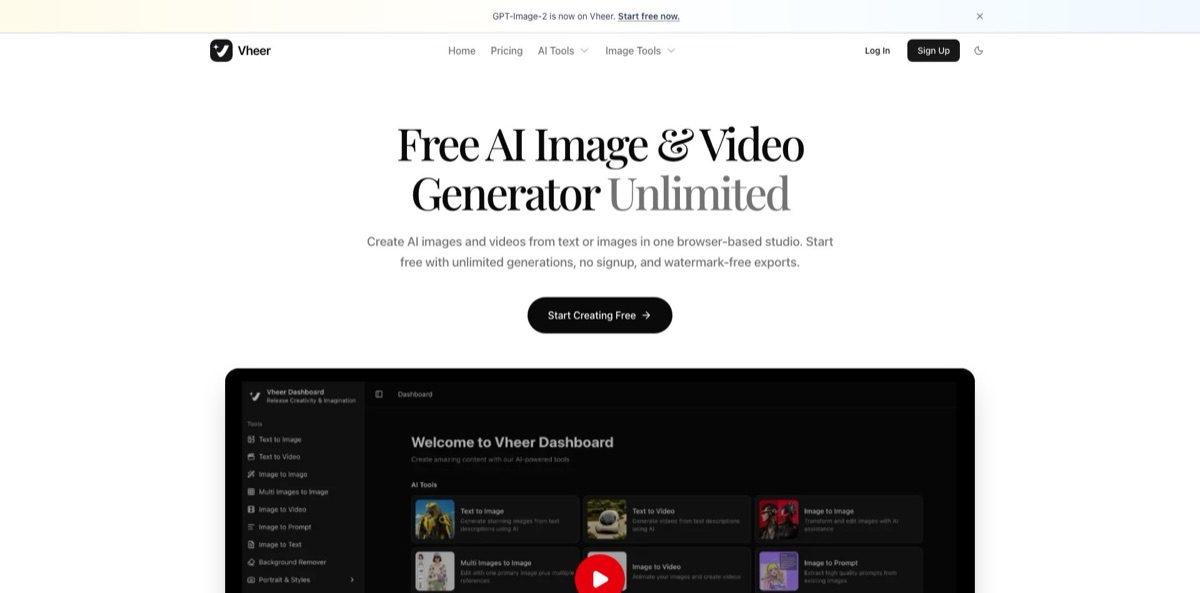
Vheer is a browser studio that puts its own free model, Vheer Quality, next to paid third-party engines such as Nano Banana Pro, GPT Image 2, SeeDream, Sora 2, Veo 3.1 and Hailuo, all drawing on one credit wallet. You type a prompt or upload a photo, pick a model, and get images or short clips back without installing anything or, for the free workflows, even creating an account. Around the generators sit dozens of style presets (anime portraits, pixel art, tattoos, headshots, logos) and plain utilities like a resizer, face blur and file compressors. The weak spot is consistency: Trustpilot reviewers regularly mention ignored prompts, edits that drift from the uploaded photo, strict content filters and slow queues on the free tier. Pick Vheer if you want watermark-free drafts at zero cost and occasional access to premium models without paying for several separate subscriptions.
How to start using Vheer?
Open vheer.com and click Start Creating Free, which drops you into the tools dashboard. No sign-up is needed for the core free tools, such as Text to Image on the Vheer Quality model and the non-AI utilities. Create an account, with email or Google login, only when you want premium models, saved history or credits. A free account receives 50 credits a month; the billing rules say that if your balance falls below 50, it is topped back up to 50, and free credits never accumulate beyond that.
For a first test, open Text to Image, leave Vheer Quality selected and write a concrete prompt covering subject, setting, lighting and camera angle. Prompts can run up to 5,000 characters. Choose an aspect ratio (the free model offers 13 of them, from 1:1 to 21:9 and 9:21) and ask for one to four images per run. If your prompt feels thin, switch on Think mode: an agent rewrites your idea into a more detailed brief before generating, and the app charges 1 credit for that step.
The model dropdown is where the real decisions happen. Vheer shows the credit cost before you run a paid task, and the spread is wide. At the base rates the app lists, Flux Klein costs 4 credits per image, the SeeDream models 6, Nano Banana 2 costs 16 and Nano Banana Pro costs 30, while video models such as SeeDance V1 Pro Fast (36), LTX Video 2.3 Fast (48), Veo 3.1 Fast (150) and Sora 2 (160) sit in a different league. For edits, Image to Image and Multi Images to Image let you upload a primary picture plus extra references and describe the change in plain language.
Before you use a result, check it against what you asked for. Users often report that edits wander away from the uploaded photo, so compare faces, products and any text closely, then regenerate or switch to a stronger model when details slip. Download finished files right away, because Vheer’s terms say uploaded and generated files are deleted from its servers every 6 hours. If the image is going into an ad or client work, confirm your plan covers commercial use first: free-plan output from the Quality text-to-image model is limited to personal use.
Who is it for?
Social Media Creators
You need a fresh visual for every post and cannot justify another monthly bill. Vheer’s free model produces watermark-free images with no account, and the image-to-video tool turns a still into a short clip for Reels or TikTok. Your posting schedule stops depending on a design budget.
Students and Hobbyists
You want to experiment with AI art without handing over an email address or a card. The no-signup free workflows and dozens of themed generators, from pixel art to fantasy maps, cover most casual projects. Expect queues at busy times, which reviewers flag as the price of free.
Small E-commerce Sellers
Product photos need clean backgrounds, quick variations and the odd promo clip. The batch Background Remover, Image to Image editing and Multi Images to Image references handle that in one tab. Vheer’s terms clear image-to-image and background-removal output for commercial use on any plan, while free text-to-image renders stay personal-only.
Marketers Comparing Models
You want to see whether Nano Banana Pro, SeeDream or GPT Image 2 suits a campaign before committing to any single vendor. Vheer bundles them under one credit balance, so you can run the same prompt across engines and compare. One bill replaces several trial subscriptions.
Bloggers and Presenters
Header images, slide visuals and explainer clips eat time you would rather spend writing. Text to Image with Think mode turns a rough idea into a usable illustration, and the compressors shrink files before upload. Your posts and decks look finished without a stock-photo subscription.
Designers Gathering References
Mood boards and early concepts need volume more than polish. Image to Prompt extracts a reusable prompt from a reference picture, and the free model lets you iterate without counting credits. Final production work still belongs in a tool with finer control.
Vheer pricing
Vheer runs on a freemium credit model. The free workflows on its own Vheer Quality model cost nothing and carry no fixed daily limit, while premium models and paid workflows spend credits that come from a monthly subscription or one-time top-ups. Every paid plan can be billed monthly or yearly, and yearly billing saves the equivalent of two months. Checkout runs through PayPro, and activation is instant.
Unlimited use of the free workflows, plus 50 credits a month for premium models once you sign in. Basic image generation, all free tools, email support and no watermark. Quality-model images are for personal use only, and the paid tiers advertise “No Ads”, so expect ads here.
1,000 credits a month, commercial use, all premium models, all free tools, priority support, and no watermarks or ads. At the listed base rates, that covers roughly 33 Nano Banana Pro images or six Sora 2 clips.
2,000 credits a month, commercial use, all premium models, priority support and bonus credits on top-up packages. Business and Ultra subscribers can buy extra credits at the same unit price as their plan.
5,000 credits a month, commercial use, all premium models, priority support and the largest bonus on credit packages, aimed at power users and teams.
Higher plans receive extra credits on each pack, and top-up credits never expire.
A few rules matter before you pay. Monthly plan credits reset on each billing date and do not roll over, and yearly plans grant credits month by month under the same rule. An upgrade is scheduled for the start of your next billing cycle rather than applied immediately. Vheer offers a 7-day refund window, with used credits deducted from the amount returned. Each account can run tasks on up to two desktop web sessions and one mobile web session at once, and the FAQ points multi-user teams to a Team Plan that the pricing page does not list.
Vheer key features
Free Vheer Quality model
Text to Image runs on Vheer’s own model at zero credits, with no account, 1 to 4 images per run and 13 aspect ratios. Output downloads without a watermark. You can test dozens of prompt variations before spending anything.
Premium image models in one place
Nano Banana Pro, Nano Banana 2, GPT Image 2, SeeDream V4, V4.5 and V5 Lite, Minimax Image 01 and Flux Klein sit in the same model dropdown, and the credit cost shows before each run. You compare engines on one prompt instead of juggling separate accounts.
Image to Image and multi-reference editing
Upload a photo and describe the change, or use Multi Images to Image to combine one primary image with several references. Edit models range from the free Vheer Quality editor to SeeDream, Nano Banana and GPT Image 2 edit modes. This covers outfit swaps, scene changes and product composites without layers or masks.
Text-to-video and image-to-video
Text to Video offers models including SeeDance, Veo 3.1 Fast, LTX Video 2.3, Sora 2 and MiniMax Hailuo 2.3, with adjustable aspect ratio, duration and resolution. The image-to-video page lists 5- or 10-second clips up to 1080p in MP4 or WebP, and a legacy Vheer Quality model animates photos for free. Video is where credits disappear fastest, so preview with short clips.
Think mode and Image to Prompt
Think mode passes your idea through an agent that expands it into a structured prompt for 1 credit. Image to Prompt works in reverse, pulling a detailed prompt out of a picture you like. Together they help beginners get closer to the result they picture in fewer attempts.
Templates and browser utilities
Themed generators cover anime portraits, headshots, logos, tattoos, pixel art, pet portraits, album covers and more. Free utilities include a batch background remover, resizer, splitter, face blur, color palette extractor, OCR and compressors for video, GIF, PDF, PPT and Word files. Many tasks that would need separate sites stay in one tab.
Short file retention
Vheer’s terms and privacy policy say uploaded and generated files are deleted from its servers every 6 hours and are not used to train AI models. Your sensitive uploads do not sit around indefinitely.
Vheer Pros & Cons
Pros
Vheer gives you a working image generator with no account, no card and no watermark, which is rare at this level of output. Trustpilot reviewers repeatedly praise exactly that: genuinely free access, no spam and an interface beginners understand quickly. When you outgrow the free model, the same dashboard opens up Nano Banana Pro, GPT Image 2, Sora 2 and Veo 3.1 without separate subscriptions, and credit packs never expire. The extra utilities, from batch background removal to file compressors, save trips to other sites. Short file retention and a no-training policy are welcome for personal photos. Start with the free model for every draft and move to a premium model only for the version you plan to publish.
Cons
Prompt adherence is the most common complaint. Reviewers describe uploaded photos being ignored, edits that change the wrong details and text prompts that return a different object entirely. Content filters are strict: NSFW generation is prohibited, and one reviewer says even the Image to Prompt output gets censored. Free-tier queues can be long, and some users feel paid credit allowances run out fast, especially with video models costing up to 160 credits per clip at base rates. Upgrades only apply from the next billing cycle, and generated files vanish after 6 hours. Test the exact edit you need on a cheap model before buying a larger plan.
Use Vheer if you want…
- Generate watermark-free AI images without creating an account.
- Compare Nano Banana, SeeDream and GPT Image 2 outputs.
- Animate product photos into short 1080p video clips.
- Edit photos by describing changes in plain language.
- Combine several reference images into one finished visual.
- Turn rough ideas into detailed prompts with Think mode.
- Remove backgrounds from batches of product shots for free.
- Access Sora 2 and Veo 3.1 without separate subscriptions.
Vheer alternatives








Vheer Reviews
Easy to pick up and genuinely free to use, with no watermark and no spam emails afterwards; reviewers praise the free text-to-image and image-to-image output, though one notes the paid tier is hard to judge from the free part alone.
Image quality and the range of tools get praise, but heavy content censorship and long waits that sometimes end in a cut-off generation spoil the experience, and paid plans are said to include too few credits.
Several reviewers say the editors ignore their uploads or instructions, returning the wrong object, a stock-looking headshot or a result that barely resembles the source photo, and some felt an update made the editor worse.
Beginners like the prompt enhancement feature, which turns short ideas into better visuals than their own prompts, and find images and videos good enough for simple projects even if some clips lack sharpness.
FAQ
Is Vheer really free?
Yes. The free workflows on the Vheer Quality model have no fixed daily limit and need no account, while premium models spend credits. A free account adds 50 credits a month for trying premium models.
Do I need to sign up to use Vheer?
No. Core free tools work without registration. You need an account, via email or Google login, for premium models, saved history, credits and subscriptions.
Can I use Vheer images commercially?
It depends on the tool and plan. Vheer’s terms limit free-plan images from the Quality text-to-image model to personal use, while subscribers get commercial rights, and output from the video, Image to Image and background tools may be used commercially on any plan.
Does Vheer allow NSFW content?
No. The terms and privacy policy prohibit generating or uploading NSFW or explicit content, and accounts that break the rule can be restricted or banned.
What happens to my uploaded photos?
Vheer says all uploaded files and generated outputs are deleted from its servers every 6 hours and are not used to train AI models. Download anything you want to keep straight after generating it.
Do unused credits roll over?
Subscription credits reset every month and do not carry forward, including on yearly plans. Credits bought as one-time top-up packages never expire.
Can I cancel or get a refund?
You can cancel at any time, and subscriptions otherwise renew automatically. Vheer offers a 7-day refund window, with credits already used deducted from the refund.
Can I use Vheer on a phone or through an API?
Vheer is built for the browser and works in mobile web sessions, but its site does not advertise a public API. One account can run tasks on up to two desktop web sessions and one mobile web session at the same time.
Similar tools
 BannerbearTemplate-based API for generating on-brand images, PDFs, animations and videos at scale from your data via REST, Zapier, Airtable or AI agents.
 Generated PhotosLibrary of 2.6M+ AI-generated faces plus face and full-body human generators for model-release-free people images in design, ads and research.
 StablecogOpen-source web app for generating images with FLUX.1, Stable Diffusion 3 and Kandinsky, with a free daily allowance, upscaling and a REST