

Videotok
Video GenerationUpdated October 28, 2026
AI creative workspace that turns a topic, link, audio file or product into faceless videos, UGC-style ads and static ads with editing and auto-posting.
We may earn a commission when you sign up through our links. It does not affect our reviews.
What is Videotok?
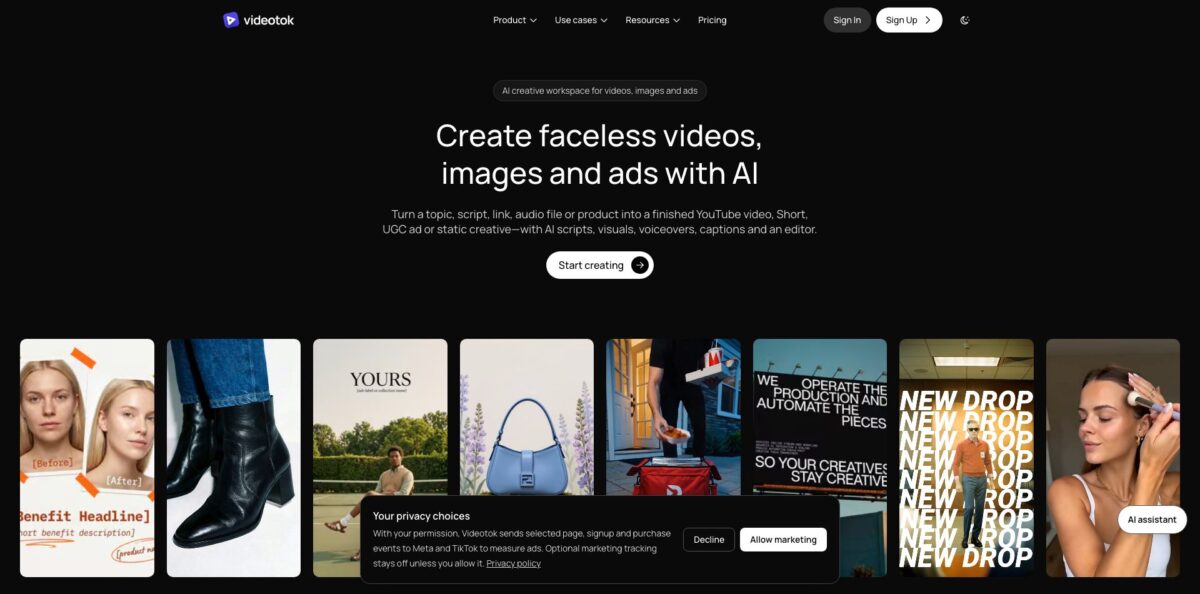
Videotok is a browser-based creative workspace from The Formula AI, a small company in Milan, that turns a topic, script, web link, audio file or product photo into a faceless YouTube video, a Short, a UGC-style ad or a static ad. One credit balance routes jobs to third-party models such as Veo 3.1, Kling Video v3 Pro, Seedance 2.5, Nano Banana Pro and ElevenLabs Music, then drops the result into a scene editor with voiceover, captions and music. AI agents can also schedule and post the finished work to six social networks. The weak spots are money and support. There is no free trial, credits expire every month, and several Trustpilot reviewers describe slow replies after paying. Pick it if you produce ad variations or faceless content at volume; skip it if you only need one test clip.
How to start using Videotok?
Go to videotok.app and click Sign Up. Before you do, know that the official FAQ is explicit: there is no free trial and no starter credits, so a working account starts with a paid plan, from $39 a month for Creator. The company’s own advice is to watch the tutorials on its YouTube channel first to see the workflow. The site also hosts free utilities, such as an ad hook generator, an ad script generator, a YouTube transcript extractor and a social safe-zone checker, which give you a feel for the scripting side without a subscription; the hook generator, for example, allows 5 free generations a day.
After checkout, set up your brand once. You add products, colors, fonts, voice, visual style, hooks and calls to action, and the agents apply those rules to every output, according to the FAQ and the lifetime deal page. Then create your first project in three steps, as the homepage lays them out: add a topic, script, link, audio file or product; choose a faceless-video, image, UGC or ad format; generate, edit and export. If you would rather not write a prompt, start from a reference in the curated inspiration library, and Videotok turns that structure into a script and scene plan for your topic.
The screen to learn is the editor. For a faceless video you can change the narration, visual prompt, duration or media of any single scene, and the voice, captions and music stay in sync as you edit. Each scene can use static images, video clips, search visuals or motion graphics. The plan table also lists caption templates, AI background removal, video extension, first and last frame generation, upscaling and face swap inside the same editor. Export goes up to 1080p on every plan.
To publish, connect your social accounts. The FAQ lists Instagram, TikTok, YouTube, LinkedIn, X and Pinterest, and you decide per brand or per platform whether agents need your approval or post on autopilot. Creator allows 3 connected accounts, Grow and Scale allow 5, Invictus is unlimited. Check the aspect ratio of each export before it goes out: one Trustpilot reviewer reported that a 9:16 setting kept producing 16:9 video. If the tool is not for you, cancel under Settings, then Subscription, and you keep access until the end of the billing period.
Who is it for?
Faceless channel creators
You run a YouTube, TikTok or Reels channel without appearing on camera and lose hours stitching scripts, stock footage, narration and captions. Videotok builds the whole package from a topic, a URL or a podcast file. You review scenes and publish instead of assembling them by hand.
Performance marketers
You need many hooks, avatars and angles to find an ad that converts, and booking creators for every test is slow and expensive. The UGC formats generate testimonial, demo, problem-solution and hook-plus-demo variations from one product brief. Creator’s credits cover up to 16 video ads or 86 static ads a month.
E-commerce brands
You have product photos and a catalog but no studio budget. Videotok turns a product image and a short brief into product photography, static ad variations and avatar videos where a presenter holds the product. Your shop gets fresh creative for every launch without a photo shoot.
Agencies with several clients
Every plan includes unlimited brand kits, so each client keeps separate colors, voices, avatars and connected accounts. Scale includes 3 user seats, and Invictus includes 5 with unlimited social connections. One subscription can serve a small client roster without mixing brand rules.
Startup social media managers
You are the whole content team and post across many networks. The agents can plan, create and schedule posts, either waiting for your approval or running on autopilot. You stay in control of what goes live while the production work runs in the background.
Developers and automation builders
You want video and ad generation inside your own app or workflow. Videotok offers a REST API, an OpenAPI schema, a remote MCP server for AI assistants and ready n8n templates. API keys need an active paid plan, and each job deducts credits before it is queued.
Videotok pricing
Videotok sells monthly credit allowances. Each plan comes with a fixed pool of credits, generations spend them at server-side rates that the app shows, and the pricing page converts each pool into an approximate number of static ads, video ads or slideshows. Higher tiers get credits about 5 to 14% cheaper than Creator. Unused credits expire at the end of every month, and there is no free plan or trial. Yearly billing takes about 20% off. Prices below are the USD figures on the official pricing page; the comparison table on the same page shows identical numbers in euros, so confirm the currency at Stripe checkout.
30,000 credits a month, enough for up to 86 static ads, 16 video ads or 29 slideshows. 1 user seat, 3 social account connections, unlimited brands and automation agents, voiceovers and captions in 30+ languages.
80,000 credits, up to 229 static ads, 43 video ads or 76 slideshows. 1 seat, 5 social connections and 1 voice clone slot in the comparison table.
125,000 credits, up to 357 static ads, 68 video ads or 119 slideshows. 3 seats, 5 social connections and 3 voice clone slots. Marked as the popular plan.
350,000 credits, up to 1,000 static ads, 189 video ads or 333 slideshows. 5 seats, unlimited social connections and 5 voice clone slots.
one-time packs of 10,000 credits for $16, 50,000 for $75, 100,000 for $140 and 250,000 for $330, for months when automations need extra capacity.
The offer is capped at 500 deals, can be withdrawn earlier, and lifetime purchases cannot be refunded.
Refunds on subscriptions are narrow: only within 14 days of your first subscription, and only for the unused share of credits. There is no custom enterprise tier listed; the highest public plan is Invictus.
Videotok key features
Any-source faceless video
You give Videotok an idea, a script, a URL, a YouTube link or an audio file, and it writes the script, splits it into timed scenes and adds narration, captions and music. Each scene can use static images, video clips, search visuals or motion graphics. You get a complete draft for YouTube, Shorts, TikTok or Reels instead of an empty timeline.
Reference inspiration library
Instead of a blank prompt you pick a curated faceless, UGC or ad reference, or save one of your own, and Videotok copies its structure and visual direction for your product or topic. It then adapts the hook, aspect ratio, language and format for each channel. Proven ad formats become your starting point rather than guesswork.
Many generation models under one balance
The homepage lists image models such as Nano Banana Pro, Seedream 5.0 Lite, Flux 2 Pro and GPT Image 2.5, and video models including Veo 3.1, Kling Video v3 Pro, Seedance 2.5, MiniMax H3 Max and LTX 2.5. Topaz video upscaling, Recraft image upscaling and ElevenLabs music and sound effects sit beside them. You test different engines without keeping separate subscriptions.
UGC ads with avatars and voice cloning
The UGC module plans the hook, product moment, proof and call to action, then renders a talking avatar, a talking avatar over video, or an avatar holding your product. You can use library avatars, build custom avatars from your own footage and clone your voice on higher plans. Testing ten creator angles no longer means booking ten creators.
Scene-level editor
Every output opens in a browser editor where you replace visuals, adjust timing, swap voices, restyle captions and change music before export. Background removal, video extension, first and last frame generation and upscaling run inside the same project.
Agent publishing and scheduling
Connected agents can pick topics, create content and post it to Instagram, TikTok, YouTube, LinkedIn, X and Pinterest on your schedule. You choose between approval before publishing and full autopilot, per brand or per platform, and one video can be cross-posted with captions adapted for each network.
API, MCP and n8n
A REST API with an OpenAPI schema covers static ads, video ads, UGC ads, slideshows, faceless videos and editor operations, while a remote MCP server lets AI assistants operate Videotok for a signed-in user. Ready n8n templates handle repeatable automations. Paid requests support idempotency keys, and a 402 error stops a job when credits run short.
Videotok Pros & Cons
Pros
Videotok covers the whole chain from idea to posted video in one tab: script, scene plan, visuals, avatar, voiceover, captions, edit and scheduling. The model lineup is broad, so you can try Veo 3.1, Kling or Seedance on the same credit balance instead of juggling several accounts. The reference library gives non-designers a proven structure to copy, and unlimited brand kits help agencies keep clients separate. Trustpilot reviewers most often praise ease of use and the time saved on short videos, and developers get a documented API, an MCP server and n8n templates. Commercial rights to outputs are included. Use the brand setup thoroughly at the start, because the agents follow those rules on every output.
Cons
You cannot try generation before paying, since there is no free trial or starter credit, and that is the most common complaint in low Trustpilot ratings. Credits expire monthly, refunds cover only unused credits within 14 days, and lifetime purchases are non-refundable. Support quality is uneven: one user praises a fix within hours, while others report unanswered emails, lag and slow processing. One user reported wrong aspect ratios on export. Pricing copy is not fully consistent either: cards say 30+ languages while the table says 50+, and USD and EUR prices sit on the same page. Keep your first month small and record every support exchange in writing.
Use Videotok if you want…
- Turn a topic or URL into a faceless video.
- Produce dozens of UGC ad variations without hiring creators.
- Convert product photos into static ads and product shots.
- Repurpose podcasts and YouTube videos into new short clips.
- Test Veo, Kling and Seedance on one credit balance.
- Localize ads with voiceovers and captions in many languages.
- Schedule and auto-post content to six social networks.
- Keep several client brands separate inside one account.
- Automate ad production through an API or n8n workflow.
Videotok alternatives

Videotok Reviews
On Trustpilot, Videotok has about 190 reviews with a score around 4.5 to 4.7, and most five-star posts praise how easy it is to make short videos and how much time it saves, although many are one-line reviews clustered within a few days in April 2025.
Support experiences split sharply: one reviewer had a technical problem fixed by email within a couple of hours despite the time difference with Italy, while several others say their emails went unanswered after payment.
Low ratings repeatedly complain that there is no trial or starter credit to test generation before subscribing, and one paying user reported that a 9:16 setting kept producing 16:9 videos.
A four-star reviewer counted it among the better AI video tools but found it expensive and wanted faster rendering, and a one-star reviewer described laggy software and slow processing even on small projects.
Independent feedback outside Trustpilot is thin: the Product Hunt page has two launches and about 655 followers but no written reviews yet.
FAQ
Does Videotok have a free plan or free trial?
No. The official FAQ says there is no free trial, and generation requires a paid plan starting at $39 a month. The company points new users to its YouTube tutorials to see the platform before buying.
Do unused credits roll over to the next month?
No. Subscription credits expire at the end of each month and cannot be accumulated. If a month runs short, you can buy one-time top-ups starting at 10,000 credits for $16.
Can I get a refund?
Only within 14 days of your first subscription, and only for the unused share of your credits, because used credits have already incurred generation costs. Lifetime deal purchases are not refundable.
Can I use Videotok videos commercially?
Yes. The FAQ states that every video, image, voiceover and asset you create is yours to use in ads, organic posts and client work. The terms add that you keep ownership of what you upload, so you must have rights to any third-party references you feed in.
Which social platforms can Videotok publish to?
Instagram, TikTok, YouTube, LinkedIn, X and Pinterest. You can require approval before each post or let the agents publish on autopilot on a schedule you set.
How many languages does Videotok support?
The homepage and plan cards promise voiceovers and captions in 30+ languages, while the plan comparison table lists 50+. The agents can adapt the script, voiceover and visuals for each target market.
Does Videotok have an API?
Yes. There is a REST API with an OpenAPI schema and a remote MCP server for AI assistants, plus n8n templates. API keys work only for workspaces with an active paid plan, and credits are deducted before each job is queued.
What is the maximum export resolution?
All four subscription plans export up to 1080p. Upscaling tools such as Topaz video upscale are available inside the editor, but the plan table does not list 4K export.
Similar tools
 AIAIAll-in-one AI studio that puts Veo, Sora, Kling, Seedance and other models behind one credit balance for video, images, music and voice.
 ToMoviee AIWondershare's AI creative studio that turns text prompts and images into short videos, pictures, music, sound effects and voiceovers.
 Morph StudioBrowser AI video studio that runs Seedance, Kling, Veo and its own style transfer model, with a storyboard canvas for multi-shot clips.