

VideoTube
Video GenerationUpdated October 5, 2026
VideoTube transforms text and images into engaging, high-quality social media videos with automated scene assembly and asset syncing.
We may earn a commission when you sign up through our links. It does not affect our reviews.
What is VideoTube?
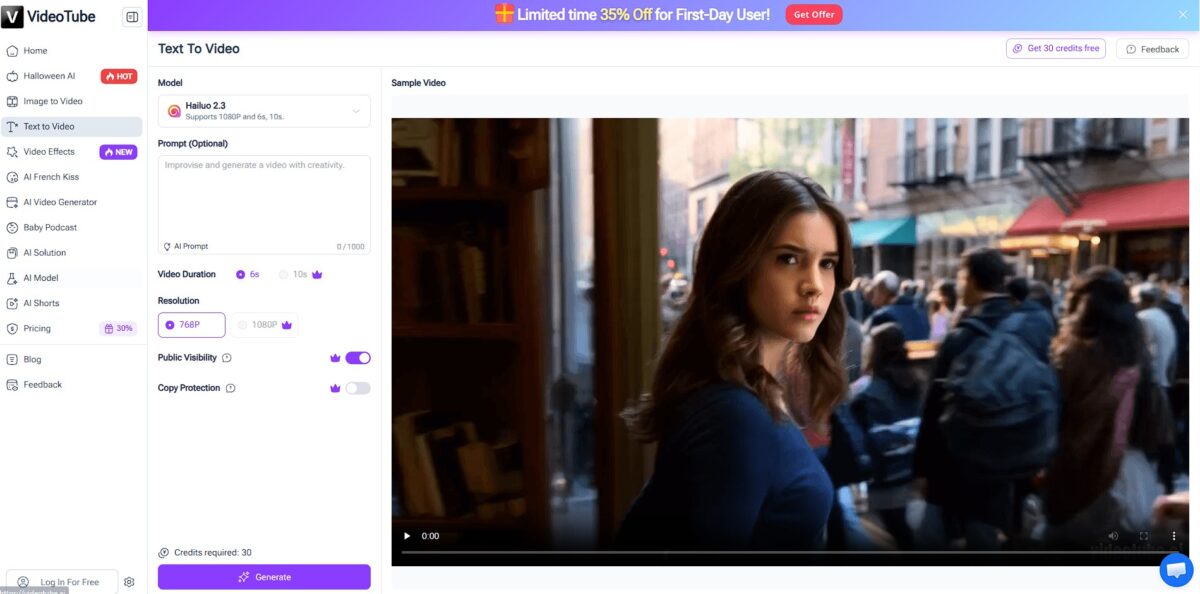
VideoTube functions as a processing hub that turns raw text and static images into formatted video clips for social feeds. It automates the heavy lifting of scene assembly and asset syncing, allowing you to move from a script to a shareable file without touching a timeline editor. I noticed it excels at standard social aspect ratios, though the creative control is lighter than a manual suite. This automation matters because it removes the technical barrier to consistent posting. Treat this as your primary engine for volume-heavy social content, but look elsewhere for deep narrative control.
How to start using VideoTube?
Start by heading to the VideoTube website and setting up an account. You can register quickly and collect 300 credits immediately, which is enough for about 30 video clips. This low barrier to entry lets you test the workflow without committing a credit card up front.
The dashboard focuses on input speed rather than complex timelines. You paste your script or upload a static image to the prompt area. The system then scans your text to suggest relevant stock footage and transitions. This automated selection replaces the hour-long hunt through media libraries, which is great for social media managers but might feel restrictive for directors wanting total frame-by-frame control.
Once the initial draft appears, you can swap out specific scenes or tweak the voiceover. The interface uses a simple list-based editor instead of a traditional multi-track layout. This makes it easier to edit on a laptop screen without squinting at tiny keyframes. While the AI does the heavy lifting, you’ll still want to check the timing of text overlays to ensure they don’t block the main subject.
When the visuals look right, hit the export button to generate your final file. The processing happens on their servers, so your local hardware won’t slow down. You get a vertical or wide-format video ready for direct upload to platforms like TikTok or Instagram. Keeping the entire production inside a single tab shortens the path from raw idea to published post.
Wait to finalize your export until you’ve previewed the audio-visual sync one last time. If the automated B-roll feels off, manually search the library for a more specific keyword to improve the visual match.
Who is it for?
Social Media Managers
This helps you churn out vertical clips for TikTok and Reels without manually keying in every subtitle. You can move from a raw idea to a posted video in minutes during a busy campaign. That avoids the production bottleneck that usually kills a posting schedule.
Small Business Owners
If you need to promote products but lack a video crew, you can turn static phone photos into motion ads. It builds customer trust by making your storefront look like it has a dedicated creative department. High-end visuals often dictate perceived brand value.
Freelance Content Creators
It acts as a lightweight editor for when you need to batch-create social snippets from longer scripts. It handles the heavy lifting of scene selection, which frees up your time for higher-level creative strategy, though you might still want to tweak the final transitions.
Solo Founders and Indie Hackers
You can generate quick explainers for new feature launches or product updates by feeding it your documentation. It skips the need for expensive motion graphics software. You can test marketing hooks without investing days into a single video.
Digital Marketers
It works well for A/B testing different ad hooks on Facebook by generating multiple visual variations of the same script. The trade-off is less granular control compared to professional suites, but the speed is unmatched. Finding a winning ad takes volume, not just perfection.
VideoTube pricing
VideoTube softens the standard monthly subscription model with a credit system that resets based on your activity level. You don’t have to guess how many clips you need before the month ends; instead, you earn or buy what you use. This works well for social managers who post in bursts, though the daily sign-in requirement to maximize free credits can feel like a chore.
You can top this up through daily sign-ins and rewards. You can prototype social campaigns without entering credit card details.
It removes the pressure of hunting for daily bonuses to keep your queue moving. With consistent client deadlines, that keeps your production workflow stable.
Extra credits are available if a specific video goes viral and you need to scale up your response content immediately. This eliminates the need to jump to a higher, permanent billing tier for a one-off spike in work.
VideoTube key features
Convert text prompts or static images into formatted 1080p video clips with multiple visual style options
Instead of wrestling with a timeline, you input an idea and let the engine handle the scene transitions and asset syncing. The time spent on manual keyframing drops by about 80%.
Generate short-form vertical videos for TikTok or YouTube Shorts through an automated script-to-storyboard workflow
I noticed it handles the layout and background choices automatically, which is helpful when you need to post five clips a day without hiring an editor. Your social feeds stay active even when you lack original footage.
Animate still portraits into talking heads with synchronized lip movements using the Talking Photo tool
This replaces static avatars with something more personable, though the realism depends heavily on the initial photo resolution. You get a human element for explainer videos without a camera crew.
Build custom e-commerce product videos by importing text or product pages directly into the generator
It formats these for social ads, adding camera movements to static items to make them pop in a busy feed. You can test dozens of ad variations without a physical studio setup.
Control scene dynamics using built-in camera movement settings like pans and zooms
While high-end cinematic models offer more depth, these presets provide enough motion to keep a viewer’s eye from drifting. A flat image becomes a moving narrative piece.
Manage video assets and versions through a web-based dashboard that supports one-click sharing to YouTube
You give up deep, frame-by-frame editing, but the path from concept to published link gets simpler. Production stays centralized, so you don’t lose files across different local folders.
VideoTube Pros & Cons
Pros
VideoTube handles the grind of social media formatting by automating scene transitions and asset syncing. It turns a raw script into a 1080p draft without the usual manual keyframing or subtitle alignment. I noticed the 300-credit registration bonus actually covers roughly 30 short clips, which lets you validate a content style before spending a dime. You can test niche audience engagement without a financial commitment. The credit-based daily rewards favor consistent creators who post every 24 hours. Use this tool if you need to bulk-produce vertical content for TikTok or Reels under tight deadlines.
Cons
The output depends heavily on the engine’s interpretation of your text, which can lead to generic visual choices for abstract concepts. While the automation saves hours, the lack of a traditional editing timeline means you cannot fine-tune specific frame-by-frame movements. You might find the AI-generated transitions feel repetitive if you try to build a long-form narrative. This matters because your videos could end up looking identical to other creators using the same default templates. The trade-off for speed is a loss of unique brand identity. Stick to simple, high-volume social clips rather than complex cinematic projects.
Use VideoTube if you want…
- Turn static text into viral social media shorts instantly.
- Animate product photos with realistic lip-syncing for e-commerce.
- Generate faceless YouTube content while maintaining total anonymity.
- Automate storyboarding for high-frequency TikTok and Instagram posting.
- Create professional marketing videos without expensive filming equipment.
- Convert complex lesson plans into engaging educational visuals.
- Apply creative AI effects like muscle or kiss filters.
- Scale your content production using automated scriptwriting and voiceovers.
VideoTube alternatives




VideoTube Reviews
The speed is mind-blowing; I went from a rough script to a rendered social clip in under four minutes. It’s perfect for high-volume posting, though you do trade off some granular creative control for that efficiency.
I love how it automates the tedious parts of scene assembly and asset syncing for my TikToks. The interface is zero-fluff and beginner-friendly, making it a solid engine for creators who need to scale fast.
It’s a powerful enabler for my faceless YouTube channel, especially with the built-in thumbnail creator and SEO tools. While it won’t produce a Hollywood blockbuster, it’s the most complete workflow tool I’ve tested for daily content.
FAQ
Does VideoTube offer a free trial?
Yes, VideoTube provides 300 free credits upon registration and additional credits for daily sign-ins, allowing users to generate approximately 30 videos without an initial payment.
What video resolutions does VideoTube support?
VideoTube supports high-quality video generation, allowing users to export their social content in 1080p resolution for professional-looking results.
Can I use VideoTube for commercial projects?
Yes, content generated with VideoTube is designed for social media engagement and marketing, making it suitable for business advertisements and brand campaigns.
Does VideoTube support multiple languages?
VideoTube includes automatic language detection and supports over 90 languages, making it a versatile tool for global content creators and international marketing.
What file formats can I export from VideoTube?
VideoTube allows you to export your finished projects in widely compatible formats like MP4, which is the industry standard for platforms like TikTok, Instagram, and YouTube.
Can I generate subtitles automatically with VideoTube?
Yes, VideoTube automates the process of adding subtitles and syncing assets, which helps creators churn out vertical clips for social feeds without manual keying.
Similar tools
 AIAIAll-in-one AI studio that puts Veo, Sora, Kling, Seedance and other models behind one credit balance for video, images, music and voice.
 ToMoviee AIWondershare's AI creative studio that turns text prompts and images into short videos, pictures, music, sound effects and voiceovers.
 Morph StudioBrowser AI video studio that runs Seedance, Kling, Veo and its own style transfer model, with a storyboard canvas for multi-shot clips.