

Vidu AI
Video GenerationUpdated October 5, 2026
Vidu AI is an advanced video generator creating cinematic 4K visuals with synchronized audio and consistent character storytelling.
We may earn a commission when you sign up through our links. It does not affect our reviews.
What is Vidu AI?
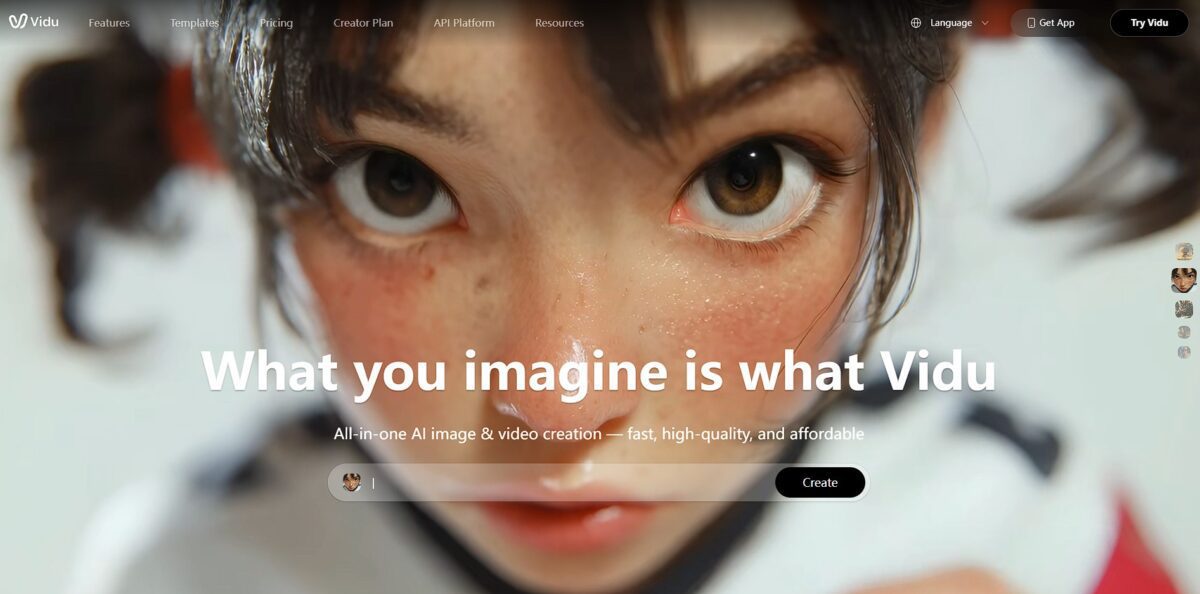
Vidu AI functions as a video generation tool that specializes in keeping characters and objects consistent across different shots. It uses a transformer-based diffusion model to produce 1080p clips up to 16 seconds long, often handling complex movements that cause other generators to warp or flicker. I noticed it excels at “Smart Cuts,” which allows a single prompt to trigger a cinematic transition from a wide shot to a macro close-up without manual editing. While it creates impressive realistic and anime scenes, the results can occasionally feel too polished or stylized for gritty, raw footage needs. This matters because it removes the “character drift” that usually forces creators to spend hours fixing faces in post-production. Use the Reference-to-Video mode with multiple character angles to maintain the most stable visual identity throughout a scene.
How to start using Vidu AI?
Start by visiting the Vidu AI website and signing in with your Google account. New users usually receive a small bundle of starting credits, which is enough to run two or three test renders before committing to a plan. The interface is clean and skips the cluttered timelines of traditional editors, focusing instead on a single prompt box and asset uploader, so you can jump straight into testing a concept without learning complex software logic.
Select the Image-to-Video mode to turn a static character or scene into a moving clip. You upload a starting frame and, if you want precise control over where the motion ends, an optional last frame. Vidu fills the gap, which solves the common problem of AI “hallucinating” a random ending. While it creates smooth physical motion for humans and animals, it can struggle with intricate machinery or text. Use a clear, high-resolution starting image to ensure the AI doesn’t blur facial features during the transition.
Switch to Text-to-Video if you prefer starting from scratch with a descriptive script. The prompt structure works best when you define the subject, then the action, and finally the environment. Adding specific camera cues like “pan left” or “slow zoom” helps anchor the output, preventing the “floating camera” look typical of basic generators. This creates a more cinematic feel for social clips or background loops without needing a camera crew.
The Reference-to-Video feature is the standout choice for maintaining character consistency. You can upload multiple angles of a character to ensure they look the same across different shots, a task that usually requires hours of manual tweaking in other tools. The trade-off is longer processing times, sometimes exceeding two minutes for a single clip. It works remarkably well for anime-style content, though hyper-realistic human skin can sometimes look a bit plastic under bright lighting.
Who is it for?
Independent Filmmakers
Vidu AI helps bridge the gap between a written script and a visual storyboard without the cost of a full camera crew. It maintains character consistency across shots, which is usually a nightmare for AI video tools. This allows you to test pacing and framing before the first day on set.
Social Media Managers
Move past static posts and generic templates by turning trending prompts into 15-second clips. While great for quick vertical content, the resolution might feel thin for large-screen ads. It keeps your brand’s visual identity steady across multiple posts.
Narrative Animators
Use the reference image feature to ground your world-building in a specific art style. It handles complex physical interactions better than basic generators, though it can still struggle with intricate finger movements. This reduces the time spent on early-stage pre-visualization.
Small Business Marketers
Create product demonstrations or lifestyle B-roll without hiring a production house. You can swap out backgrounds while keeping your product recognizable in every scene. This speeds up the content production cycle for weekly campaigns.
Concept Artists
Transform rough sketches into dynamic motion studies to show clients how a character moves or how light hits an environment. The tool works as a digital sandbox for quick ideation rather than a final render engine. Seeing movement early helps catch structural design flaws before final modeling.
Vidu AI pricing
Vidu moves away from flat generation limits, using a credit system that scales based on resolution and the specific model you trigger. While the free entry point lets you test the physics of a scene, professional workflows require moving into paid tiers to remove watermarks and unlock 1080p exports. I noticed that credit consumption isn’t uniform; a 16-second clip isn’t just double the cost of an 8-second one, as the price per second often shifts depending on whether you use the “pro” or “turbo” engines.
You get 80 credits to experiment with 720p clips capped at 8 seconds. This works for prototyping character movement but adds a visible watermark to every render. You can fail fast and learn the prompt logic without spending a dime.
This grants 500 monthly credits and bumps resolution to 1080p while extending clips to 16 seconds. It introduces a small rollover limit of 200 credits, so your budget doesn’t totally reset if you have a quiet week. That’s enough runway for social media managers to produce consistent weekly content without watermarks.
You receive 2,000 credits and the ability to generate 32-second sequences. It includes a full commercial license and priority in the generation queue, which is vital when peak-hour wait times start to climb. The extra credits leave room for the iteration needed to get complex physical interactions, like cloth simulation, exactly right.
This plan offers 8,000 credits and a “Free Off-Peak Mode” that permits up to 200 additional video submissions daily during low-traffic hours. You also get unlimited 1080p image generations and early access to experimental features. This matters because it effectively removes the “cost-per-clip” anxiety for high-volume creators.
Vidu AI key features
Lock character identity across multiple shots using Reference-to-Video
You can upload portraits of a protagonist to ensure their facial structure and clothing remain consistent throughout a narrative sequence. This solves the “morphing face” issue that plagues standard diffusion models. You can build a coherent story arc rather than a collection of random clips.
Animate static product photos into 1080p marketing teasers in roughly 30 seconds
The “Flash Mode” renders short clips quickly, which works well for high-volume social media testing but offers less complex physics than the high-tier models. The motion tends to follow a stylized, cinematic path. You can churn out five variations of an ad in the time it usually takes to open a video editor.
Generate 16-second cinematic scenes with native audio and lip-syncing in a single pass
Most competitors stop at 4 or 8 seconds, forcing you to stitch clips together manually. Vidu handles environmental sounds and basic dialogue timing within the generation itself. That means less hunting through external sound effects libraries for every small movement.
Control camera dynamics like push-pull zooms and pans using text instructions
You can guide the virtual lens to focus on specific details or create a background parallax effect without touching a timeline. Very complex, full-body motions like dancing can still glitch occasionally, but you get director-level control over the composition of the shot.
Execute multi-subject consistency by uploading up to seven different reference images
This allows you to place a specific character into a specific environment or have two consistent entities interact. It handles “hugging” or “kissing” interactions with surprising fluidity compared to tools that struggle with physical contact. Your creative scope widens from solo portraits to complex character interactions.
Build assets via the built-in image generator before converting them to motion. You can iterate on a character’s look or a background’s lighting using standard text-to-image prompts within the same dashboard. This simplifies the creative pipeline because you aren’t jumping between Midjourney and a separate video tool. Your entire pre-production workflow lives in one tab.
Vidu AI Pros & Cons
Pros
Vidu AI solves the “identity drift” headache by locking character features across different shots. You can upload a portrait of a protagonist, and the model ensures their facial structure and clothing stay the same in a 16-second clip. This removes the need for manual frame-by-frame fixes or complex compositing in Photoshop. The reference-to-video tool also handles lighting transitions better than most competitors, making shots look like they belong in the same scene. For indie filmmakers, that means storyboarding a coherent narrative without a camera crew. Stick to clear, high-quality front-facing reference images for the best results.
Cons
The free tier feels tight with only 80 credits, which disappears after a few test renders. While the character consistency is impressive, complex movements like fast running or intricate hand gestures still trigger occasional visual glitches. You might need several regenerations to get a perfect take, especially when pushing the 16-second limit. High visual fidelity also comes with a longer waiting period during peak hours for non-ultimate users, which can slow down your workflow during tight deadlines. Use the “off-peak” mode if you are on an Ultimate plan to save credits on non-urgent projects.
Use Vidu AI if you want…
- Maintain perfect character consistency across multiple cinematic shots.
- Generate synchronized audio and visuals in one go.
- Animate static character sheets into expressive digital actors.
- Execute complex camera movements like push-pull and tracking shots.
- Breathe life into 2D anime with fluid cel-style motion.
- Rapidly prototype narrative storyboards with high visual fidelity.
- Produce social-ready clips with professional-grade 48kHz sound effects.
- Control scene continuity using up to seven reference images.
Vidu AI alternatives
 Hailuo AIRead review →
 Runway Gen-3Read review →
 Kling AIRead review →
 PikaRead review →
 PixVerseRead review →
 CanvaRead review →
 HeyGenRead review →
Vidu AI Reviews
The character consistency is the best I have seen, but the rendering times can be a drag for simple projects. It is a solid choice if you need your protagonist to actually look the same in every shot.
I love how it handles the anime style and the hugging templates, but it definitely struggles with more complex text prompts. Great for fun social clips, though the daily credit limit is a bit tight for power users.
The 4K output is crisp and the motion feels natural, unlike the jittery mess you get with cheaper tools. It is pricey, but the reference-to-video feature saves me hours of post-production fixing.
FAQ
Can I use Vidu AI videos for commercial purposes?
Yes, paid subscribers on Premium and Ultimate tiers receive a commercial license for advertising, marketing, and monetized social media content, while the Free tier is for personal use only.
What is the maximum duration for a Vidu AI video?
Vidu AI can generate single clips up to 32 seconds on Premium and Ultimate tiers, while the standard generation length for the latest Q3 model is up to 16 seconds.
Does Vidu AI support audio generation?
Yes, the Vidu Q3 model features native audio-video synchronization, automatically generating sound effects, background music, and dialogue that match the visual actions.
Can I generate videos from my own photos?
Yes, Vidu AI includes image-to-video capabilities and a Reference-to-Video feature that allows you to upload up to seven images to guide character and style consistency.
What output resolutions does Vidu AI support?
Vidu AI supports high-definition exports in 540p, 720p, 1080p, and up to 4K resolution depending on the specific model and subscription plan used.
Can I control the camera movement in my videos?
Yes, Vidu AI offers smart camera controls that allow you to specify cinematic techniques such as pans, tilts, tracking shots, zooms, and orbit movements directly through your prompts.
How does Vidu AI ensure character consistency?
Vidu AI uses advanced transformer-based diffusion models and a unique reference-to-video feature to lock character features and clothing across multiple shots and scenes.
Similar tools
 AIAIAll-in-one AI studio that puts Veo, Sora, Kling, Seedance and other models behind one credit balance for video, images, music and voice.
 ToMoviee AIWondershare's AI creative studio that turns text prompts and images into short videos, pictures, music, sound effects and voiceovers.
 Morph StudioBrowser AI video studio that runs Seedance, Kling, Veo and its own style transfer model, with a storyboard canvas for multi-shot clips.