

VisionStory
Video GenerationUpdated October 21, 2026
AI video platform that turns one photo plus a script or audio file into a lip-synced talking avatar video, with voice cloning, slides-to-video and an API.
We may earn a commission when you sign up through our links. It does not affect our reviews.
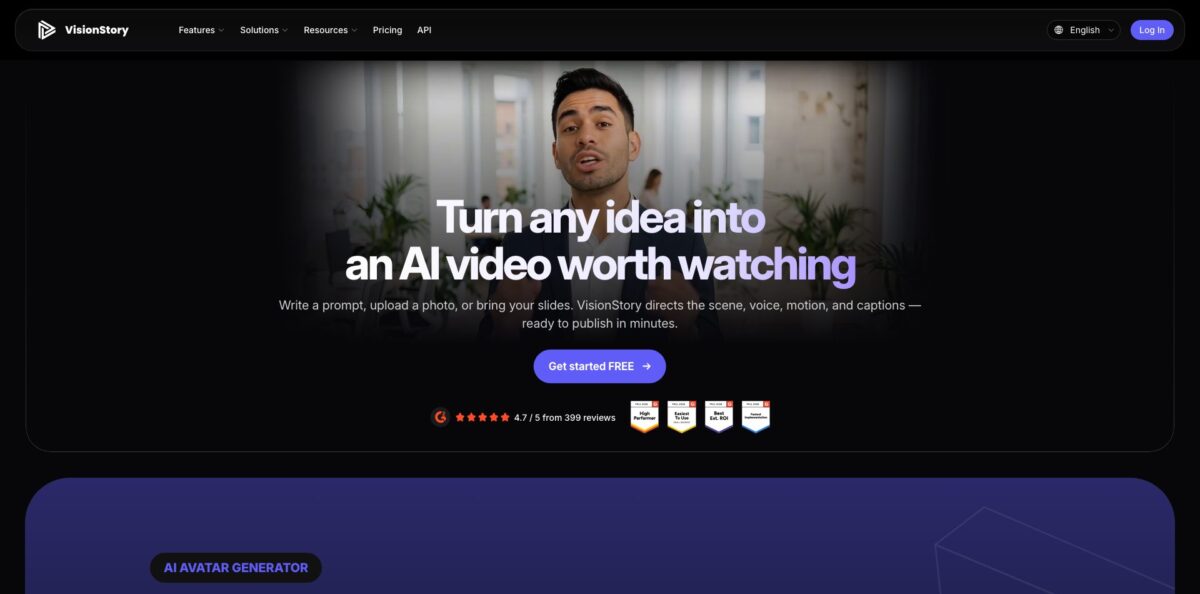
What is VisionStory?
VisionStory is a browser-based AI video platform built around its own talking-head model, V-Character 4.0. You give it a single portrait plus a typed script or a recorded audio file, and it animates the face with lip sync, head motion and expressions, then exports an MP4 at up to 2K and up to 10 minutes on the higher plans. Around that core sit an AI Video Agent that plans multi-shot videos from a prompt, URL or deck, a slides-to-video tool, a two-host podcast mode, a music video generator and paid access to outside video models such as Seedance and Kling. The appeal is price: plans start at $9.99 a month. The weak spot is the familiar one for photo avatars: results depend heavily on the source image, and the free tier caps clips at 30 seconds. Pick it if you need presenter videos without filming anyone.
How to start using VisionStory?
Open app.visionstory.ai and sign up; a Google account works, which is how several G2 reviewers describe getting in within a minute. Every new account receives 10 free credits, plus a Weekly Visit Bonus of 4 credits in each later week you return. That is enough for a short test clip at 720p, so you can judge lip sync quality on your own face before paying anything.
For your first real video, go to AI Video. Either pick one of the stock avatars or upload a clear, front-facing photo to create your own character. Then type the text the avatar should say or upload an audio file. If you type, choose a voice from the library of 1,000+ voices across 88 languages, or clone your own voice from a short sample on a paid plan. Click Generate and the clip renders in a few minutes.
The screen that deserves attention is the generation panel, because it shows the exact credit cost before you submit. A V-Character clip costs 1 credit per 4-second interval at 720p, rounded up. Switching to 1080p adds half the base cost, 2K adds two and a half times the base cost, and Green Screen adds a quarter. If you want something longer than a single talking shot, open the AI Video Agent instead, pick an avatar, describe the video or attach a URL, PDF or deck, and let it draft a script and a scene for every shot.
Before you publish, review the draft shot by shot. In the agent you can ask in plain language to shorten a shot, rewrite the hook, swap the voice or translate the script, and only the changed parts are regenerated. Choose 16:9, 9:16 or 1:1 to match YouTube, TikTok or a feed post, then download the MP4. Free videos carry a watermark and are not cleared for commercial use, so upgrade before anything goes into an ad.
Who is it for?
Solo creators and faceless channels
You want a consistent on-screen host but do not want to record yourself every week. VisionStory turns one portrait and a script into a talking video at a low per-minute cost. Weekly uploads stop depending on camera time.
Trainers and L&D teams
Your knowledge lives in PowerPoint decks that nobody watches. AI Presentation reads a PPT or PPTX, writes slide-by-slide narration and puts an avatar presenter in front of it. Onboarding and policy updates become short videos instead of attachments.
Podcasters
Audio-only shows struggle on YouTube and short-form feeds. Upload an MP3 or WAV, including a NotebookLM episode, assign host roles and the tool gives each voice a face. You get a video version without filming two people.
Small marketing teams
Product explainers and social ads need a presenter, but a shoot is expensive for a test. The AI Video Agent can start from a landing page URL and draft a multi-shot presenter video in vertical or square format. You can test several hooks for the cost of a few credits.
Musicians and music hobbyists
Releasing a track without a video limits reach on TikTok and Shorts. The music video tool takes one song and one photo, or a Suno or Udio link, and produces lip-synced performance shots. Release day no longer waits on a video budget.
Developers building media features
You need avatar videos generated from your own app or pipeline. The REST API, Python SDK, CLI and MCP server share one key and one asynchronous job flow. Personalized onboarding or outreach videos can be produced in batches.
VisionStory pricing
VisionStory sells monthly or annual subscriptions that each come with a pool of credits, and credits are what video generation actually consumes. At the base rate, 60 seconds of 720p talking video costs 15 credits, and higher resolutions, green screen, outside models, presentations, podcasts and API calls are priced separately. Subscription credits carry over while you stay subscribed, capped at twice your monthly allowance, and one-time credit packs never expire. Annual billing equals 10 monthly payments, so you get two months free. Prices below are the USD figures on the official pricing page.
10 credits on sign-up plus 4 bonus credits per weekly visit, videos up to 30 seconds, 720p, 160+ stock avatars and 2 custom avatars. Output is watermarked and has low task priority.
120 monthly credits (roughly 8 minutes of 720p video), or 1,440 credits per year on annual. Videos up to 3 minutes at 720p, no watermark, commercial use, 10 cloned voices, unlimited avatars, 4 concurrent tasks, Seedance 2.5 access and AI Presentation with up to 20 slides.
480 monthly credits (roughly 30 minutes), or 5,760 per year. Videos up to 10 minutes, 1080p and 2K export, 20 cloned voices, 6 concurrent tasks, presentations up to 50 slides and 20 weekly bonus credits.
1,920 monthly credits (roughly 120 minutes), or 23,040 per year. Everything in Advanced plus 50 cloned voices, 10 concurrent tasks, presentations up to 100 slides and 60 weekly bonus credits. A larger Ultra option lists 5,760 credits for $299/month.
VisionStory key features
V-Character 4.0 photo avatars
The native model animates one portrait with lip sync, facial expressions and some hand and body movement, keeping the same identity across clips up to 10 minutes long. You can drive it with typed text or your own recorded audio. That gives you a repeatable presenter without filming, as long as the source photo is clear.
AI Video Agent
You pick an avatar and describe the video, or hand over a URL, PDF, Word, Excel or slide file, and the agent writes a multi-shot script, generates a scene image per shot, and adds voiceover and optional captions. Edits happen by chat, and only the changed shots are regenerated. It removes the separate scripting, image and voiceover steps for explainer and promo videos.
Voices, cloning and translation
The library holds 1,000+ voices across 88 languages and regional accents, and paid plans allow 10 to 50 cloned voices. The agent can translate a script and regenerate the voiceover and captions in one request. One video can become several language versions without new recordings.
AI Presentation and Video Podcast
Upload a PPT or PPTX and the tool writes narration per slide and adds a talking presenter; 20 slides or fewer is the recommended size, and rendering requires Pro or higher. The podcast mode takes an audio file or script and assigns lines to two animated hosts. Both turn existing material into video with little extra work.
Music video and face swap tools
The music generator turns a song plus one photo into lip-synced performance shots, and it accepts uploaded audio or Suno and Udio links. Video face swap tracks a reference face across a clip and is offered free, without sign-up or watermark, with uploads deleted after processing. These are useful extras for social content, though not the main reason to subscribe.
Outside video models
Alongside V-Character, the app runs third-party models such as Seedance 2.5, Kling, MiniMax and Wan for prompt-led or image-led footage, billed per second of output. You can generate B-roll and the presenter in one account.
Developer API
A REST API, a zero-dependency Python SDK, a CLI and an MCP server or Agent Skill all share one API key sent in the X-API-Key header. You submit a text or audio script to POST /api/v1/video, poll the job and download the MP4, which stays available for seven days. That makes batch or personalized avatar videos practical inside your own product.
VisionStory Pros & Cons
Pros
The entry price is low for what you get. At $9.99 a month you receive watermark-free, commercially usable talking videos, voice cloning and unlimited custom avatars, which undercuts most avatar platforms that start well above that. Starting from your own photo instead of a stock library gives you a presenter that actually looks like you or your brand character. The feature set is unusually wide for the price, with slides-to-video, two-host podcasts, an agent that scripts whole videos and a proper API with SDK and CLI. Reviewers repeatedly describe the setup as quick and the interface as easy for non-technical users. Start with Pro for a month to see whether the avatar quality holds up on your own photos.
Cons
Output quality depends heavily on the input image, and photo-based avatars can still look slightly synthetic, especially around the eyes and in emotional delivery. The credit system takes some learning: resolution, green screen, outside models and presentations all add their own costs, and the multipliers for 1080p and 2K add up quickly. Pro is limited to 720p and 3-minute videos, so many serious users end up on Advanced. Free clips are capped at 30 seconds, which some early users felt was too short to judge the tool. Unused subscription credits disappear when you cancel. Check the cost line before every render and spend your credits before ending a subscription.
Use VisionStory if you want…
- Turn a single photo into a talking presenter.
- Convert PowerPoint decks into narrated training videos.
- Give an audio podcast two animated video hosts.
- Clone your voice for consistent avatar narration.
- Localize one video into several languages quickly.
- Draft multi-shot promo videos from a product URL.
- Make lip-synced music videos from one song and photo.
- Generate avatar videos in bulk through an API.
VisionStory alternatives
 HeyGenRead review →
 D-ID Creative RealityRead review →
 AkoolRead review →
 TavusRead review →
 InVideoRead review →
VisionStory Reviews
G2 reviewers who produce internal training and team updates say the PPT-to-video feature turns a deck into a narrated presenter video much faster than recording and editing it themselves.
A podcaster on G2 singles out the podcast mode, which takes one audio file with two people talking and assigns each section to the right character automatically, saving a lot of editing time.
Product Hunt reviewers describe smooth onboarding and characters that look close to lifelike, while a few mention hiccups with downloads or access limits.
An early community reviewer found setup quick and easy but felt the short free clip was not enough to decide whether the tool was a good fit.
Another community reviewer sees a lot of potential and likes being able to upload their own image, but calls emotion accuracy the biggest flaw and found the free-plan length cap frustrating.
FAQ
Is VisionStory free to use?
Yes, there is a free plan with 10 credits on sign-up and 4 bonus credits for each later week you visit. Free videos are limited to 30 seconds at 720p, carry a watermark and are not cleared for commercial use.
How long can VisionStory videos be?
Free accounts can generate up to 30 seconds per video, Pro up to 3 minutes, and Advanced and Ultra up to 10 minutes.
Can I use my own photo and voice?
Yes. A single clear, front-facing photo is enough to create a custom avatar, and paid plans let you clone between 10 and 50 voices from short audio samples, depending on the tier.
Which languages does VisionStory support?
The voice library covers 88 languages with 1,000+ voices, including English, Spanish, Chinese, Japanese, German, French, Portuguese and Arabic. The AI Video Agent can also translate a script and regenerate the voiceover and captions.
Can I use VisionStory videos commercially?
Commercial usage rights and watermark-free output come with the paid plans, starting at Pro. Videos made on the free plan should be treated as tests only.
Does VisionStory have an API?
Yes. There is a REST API, a Python SDK, a CLI and an MCP server or Agent Skill for coding agents, all using one API key. API usage is priced separately from the in-app credit rates, and finished video URLs are kept for seven days.
What happens to my credits if I cancel?
Your plan stays active until the end of the period you paid for, after which unused subscription credits are revoked. Bonus credits and credits from purchased packs do not expire.
What are the presentation upload limits?
AI Presentation accepts PPT and PPTX files, with 20 slides or fewer recommended. Free users can upload a deck and try the AI script, but rendering the video requires Pro or higher.
Similar tools
 AIAIAll-in-one AI studio that puts Veo, Sora, Kling, Seedance and other models behind one credit balance for video, images, music and voice.
 ToMoviee AIWondershare's AI creative studio that turns text prompts and images into short videos, pictures, music, sound effects and voiceovers.
 Morph StudioBrowser AI video studio that runs Seedance, Kling, Veo and its own style transfer model, with a storyboard canvas for multi-shot clips.