

VisualGPT
Art GenerationUpdated November 13, 2026
Credit-based AI image and video studio that runs Nano Banana, GPT Image, Seedream, Flux and Kling for product photos, photo edits and room redesigns.
We may earn a commission when you sign up through our links. It does not affect our reviews.
What is VisualGPT?
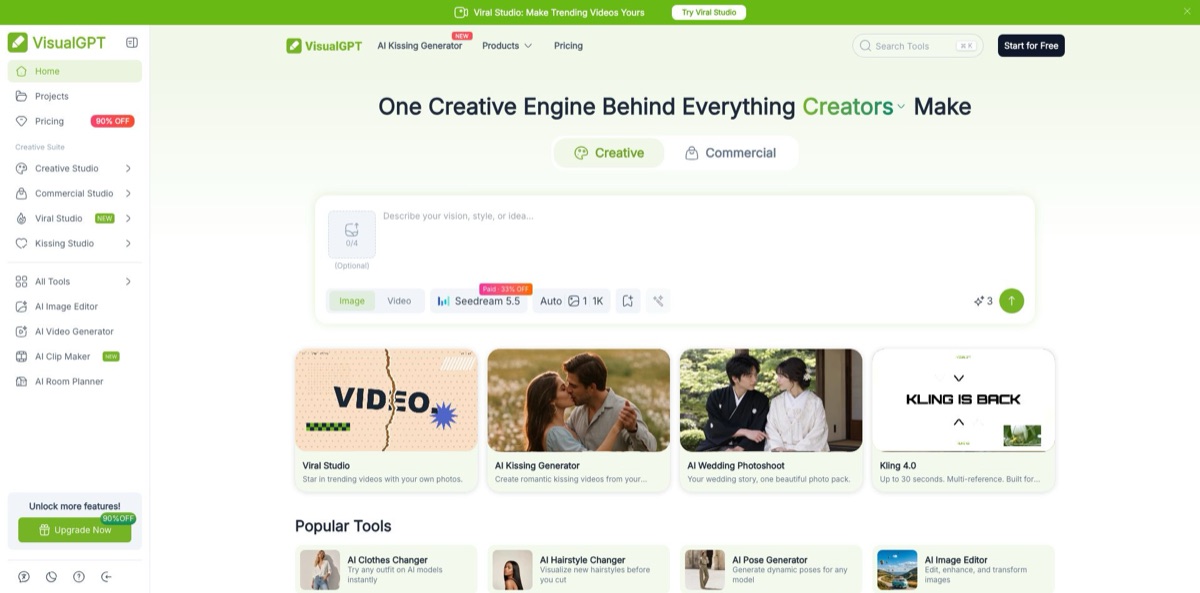
VisualGPT is a browser-based creative suite run by ZINGKODE LTD that puts dozens of third-party image and video models behind one credit balance. It does not train a generator of its own. Its model picker sends your prompt to Google’s Nano Banana family, OpenAI’s GPT Image, ByteDance’s Seedream and Seedance, Flux, Qwen, Kling and others, then wraps those models in task tools for product photos, background removal, outfit swaps, room redesigns and short videos. The problem it solves is subscription sprawl: one account and one wallet cover many models plus ready-made workflows. The weak spots are credit costs that swing widely from model to model, a 24-hour refund window and help pages that contradict the privacy policy. Pick it if you sell online or post daily and want many models without juggling many logins.
How to start using VisualGPT?
Open visualgpt.io and try a tool before you register. Many tool pages, such as the Background Remover and AI Image Editor, let you upload a JPG, PNG or WebP of up to 16MB right away. To keep results and claim free credits, click the last button in the left-hand menu, choose Sign In or Sign Up and use Google One-Click Login. Google is the only login method right now, so Outlook or Yahoo addresses will not work. Once logged in, you can claim 10 free credits a day, and they expire after 24 hours.
Pick your first real job from the left sidebar. It lists Creative Studio, Commercial Studio, Viral Studio for trend videos and Kissing Studio, while All Tools opens a catalog filtered by Image, Video, Product, Portrait, Fashion, Editing, Marketing, Design, Effects, Interior and Visual. A seller would usually start with AI Product Photography: upload a product shot, choose a style such as Studio, Lifestyle, Minimal, Luxury, Natural or Creative, and press Generate.
The model menu is the setting that matters most. On the AI Image Editor you choose a model (Seedream 5.5 is the current default), type an instruction like “remove the person in the background” and set resolution under Settings. Every model has its own price on the Credits Usage Policies page, from 1 credit for a background removal to as much as 25 credits for a Nano Banana Pro image. Check that table before you run a batch, because the same prompt can cost several times more on a premium model.
When the result is ready, an Export button appears in the top bar. Anything you did not download sits in My Projects on the left, where you can re-download or delete it. Free accounts keep history for 15 days, paid accounts without a limit. Free downloads are for personal use only, so buy a subscription or a credit pack before you publish an image in a store listing or an ad.
Who is it for?
E-commerce sellers
You need white-background shots, lifestyle scenes and model try-ons for Amazon, Shopify, Etsy or TikTok Shop, but a photoshoot per product is out of budget. VisualGPT turns one plain product photo into styled variants and listing images. Paid plans process up to 10 images per batch task, so a small catalog takes an afternoon instead of a week.
Social media creators
You post every day and need fresh headshots, outfit changes, thumbnails and short clips. The portrait tools, AI Thumbnail Maker and Viral Studio cover those formats in one place. Your content calendar stops depending on booking a photographer.
Homeowners, renters and real estate agents
You want to see a room in a new style before buying furniture or listing a property. AI Room Designer keeps the existing layout and restyles it as Modern, Scandinavian, Industrial, Bohemian, Luxury or several other themes, while sister tools handle gardens, exteriors, kitchens and paint colors. You get concept images to discuss, not architectural plans.
Performance marketers
Ad fatigue means you need many creative variations fast. AI Ad Clone and the AI Video Ad Generator rebuild a winning ad around your product, and batch generation produces versions for testing. More variants reach the test without more design hours.
Fashion brands
Clothing photos need models, flat lays and wrinkle-free fabric. The AI Clothes Changer, flat lay and wrinkle remover tools handle those steps on uploaded photos. New collections can go live with consistent imagery across every SKU.
Model-curious hobbyists
You want to compare Nano Banana, GPT Image, Seedream, Flux, Midjourney and Ideogram output without paying each vendor. One credit wallet lets you run the same prompt across them. You learn which model fits your style before committing to any single subscription.
VisualGPT pricing
VisualGPT charges in credits. Every action has a credit price that depends on the tool, model, resolution and, for video, the number of seconds. Subscriptions refill credits monthly and expire when the plan ends, while one-time credit packs never expire. The pricing page shows crossed-out “original” prices next to a Daily Deals countdown, so the figures below are the amounts actually charged as of November 12, 2026, in USD.
10 credits a day, claimed by logging in and valid for 24 hours, standard-quality downloads, 15-day history, no batch editing and no commercial use. You can also earn 5 permanent credits a day by taking part in the sharing activity.
100 credits a month, listed as up to 100 images and 12 videos, plus 10 minutes of AI clipping.
500 credits a month, up to 500 images, 65 videos and 50 minutes of clipping.
2,000 credits a month, up to 2,000 images, 250 videos and 200 minutes of clipping. This is the plan marked Most Popular.
6,000 credits a month, up to 6,000 images, 750 videos and 600 minutes of clipping.
one-time payments from $20 for 200 credits to $39 for 1,000, $59 for 2,000, $89 for 3,000, $149 for 5,000, $299 for 10,000 and $999 for 50,000. Pack credits are lifetime and stack with a subscription, and subscription credits are spent first.
Custom pricing through Talk to Sales.
All paid options add high-quality downloads, unlimited history, batch editing of 10 images per task, processing priority and commercial use. Annual plans do not auto-renew; monthly plans can be cancelled from My Subscriptions. Refunds are possible only within 24 hours of the first purchase with no credits used, and the policy excludes promotional or discounted purchases.
VisualGPT key features
A multi-model picker sits on the generator and editor pages
The credits table lists image models such as Nano Banana, Nano Banana 2 and Pro, GPT Image 1.5 to 2.6, Seedream 4.0 to 5.5, FLUX Kontext Pro, Flux 2 Pro, Flux Dev, Qwen Image, Z-Image, Midjourney and Ideogram v4. Each carries its own per-image price, from 1 to 50 credits depending on model and resolution. You can test the same prompt across vendors without separate accounts.
Background and cleanup tools handle the routine fixes
The Background Remover exports transparent PNGs for 1 credit per image, and Magic Eraser, Object Remover, Image Upscaler, Unblur and Watermark Remover cost 1 to 4 credits each. Uploads accept JPG, PNG and WebP up to 16MB.
Batch generation lets paid accounts process up to 10 images per task
It covers jobs such as background removal and product photo variations, so a set of SKUs gets the same treatment in one run. The free tier has no batch editing, which makes it a trial rather than a production option.
The AI Room suite restyles uploaded room photos while keeping walls, windows and major furniture in place
Room Designer offers styles including Modern, Scandinavian, Industrial, Bohemian, Luxury, Mediterranean and a Christmas theme, at 4 credits per image. Landscape Design, Exterior Home Design, Kitchen Planner, Room Cleaner, Paint Color Visualizer and a Floor Plan Generator round it out. The results are concept renders for discussion, not measured plans.
Commerce tools target store owners
AI Product Photography, AI Clothes Changer, virtual try-on, the AI Product Detail Page Generator and AI Ad Clone each wrap one selling task in a single upload-and-generate screen. Commercial rights apply to output from paid subscriptions or lifetime credits and remain valid after you cancel.
Video generation runs on third-party models billed per second. The credits page lists Kling 3.0, Seedance 2.0 and 2.5, Veo 3.1, Wan 3.0, MiniMax H3, Grok Imagine Video 1.5 and HappyHorse 1, and the home page promotes Kling 4.0 with clips of up to 30 seconds. Kling 3.0 at 720p costs 10 credits per second without audio and 16 with audio. AI Clip Maker cuts long uploads into short clips at 10 credits per minute of video.
AI Visual tools build mind maps, flowcharts, infographics and visual cards from text
The credits page marks all four as free. They are handy for slides and study notes, though they sit far from the product’s photo-focused core.
VisualGPT Pros & Cons
Pros
The model range is the main draw. One login gives you Nano Banana, GPT Image, Seedream, Flux, Kling and Seedance, plus task tools that already know what a product shot or a room redesign should look like. Entry pricing is low at $8 a month or $6 a month billed yearly, and background removal costs a single credit. The free tier gives daily credits without a watermark, and the AI Visual diagram tools cost nothing. Commercial rights on paid output survive cancellation, which matters for store images that stay online for years. Use the free credits to pick a favorite model, then buy the smallest plan that covers your monthly volume.
Cons
Credit costs are hard to predict, ranging from 1 to 50 per image, and video burns credits by the second. Generations blocked by the automated safety check still consume credits. Free credits vanish after 24 hours, and refunds are limited to 24 hours and exclude discounted purchases, while every subscription on the page carries a discount badge. Login is Google-only, there is no dedicated app, and no public API is documented. The help center says images are not stored and accounts cannot be deleted, while the privacy policy says the opposite on both points. The catalog also mixes work tools with novelty filters like a kissing generator. Download finished files promptly and keep copies outside the app.
Use VisualGPT if you want…
- Compare Nano Banana, GPT Image and Flux on one prompt.
- Turn plain product photos into styled listing images.
- Remove backgrounds from product shots for one credit each.
- Restyle a room photo before buying new furniture.
- Swap outfits on model photos without a reshoot.
- Batch-edit up to ten catalog images per task.
- Generate short Kling or Seedance clips from stills.
- Clone a winning ad layout around your own product.
- Build quick mind maps and flowcharts for free.
VisualGPT alternatives
 Leonardo.aiRead review →
 KreaRead review →
 OpenArtRead review →
 ImagineArtRead review →
 DzineRead review →
 PixlrRead review →
 ClipdropRead review →
 Fotor Image GeneratorRead review →
VisualGPT Reviews
A Product Hunt reviewer uses it to generate 3D room decoration layouts in many styles from a single photo and likes how simple the upload-style-generate flow is, but wants more interior tools, such as marking furniture dimensions.
Another Product Hunt user calls it free and feature-packed and says it works well, but finds the daily free credits very limited.
One early reviewer liked having image editing, room design and mind mapping in one account and found the homepage clear for beginners, but said the results were sometimes not very responsive to what was asked.
A Trustpilot reviewer complained that uploaded project files were deleted after 15 days and that credits expired when the subscription ended, which made the service a poor fit for one-off projects.
Another Trustpilot reviewer said credits disappeared from their account and that an email to support went unanswered.
FAQ
Is VisualGPT free?
Yes, with limits. Logging in lets you claim 10 credits a day that expire after 24 hours, with standard-quality downloads, 15-day history and personal, non-commercial use only.
Which AI models does VisualGPT use?
It runs third-party models rather than its own. Its pages list Nano Banana, GPT Image, Seedream, Flux, Qwen, Midjourney and Ideogram for images, and Kling, Seedance, Veo 3.1, Wan and MiniMax for video, each with a separate credit price.
Can I use VisualGPT images commercially?
Yes, if they were generated with a paid subscription or lifetime credits, subject to its terms and any model restrictions. Free-plan output is for personal use, and commercial rights on paid output stay valid after you cancel.
Does VisualGPT train AI on my uploads?
The privacy policy says uploads, generated images and prompts are not used to train models, and that its processing providers may not train on them either. You must be 18 or older to use the service.
How do I cancel or get a refund?
Cancel a monthly plan from My Subscriptions; it stays active until the period ends. Annual plans simply do not renew. Refunds are considered only within 24 hours of the first purchase with no credits used, and discounted purchases are excluded.
Is there a VisualGPT app or API?
There is no dedicated app, but the website works on mobile browsers. The site does not document a public API, so automation is limited to the web interface.
How do I sign in to VisualGPT?
Only Google sign-in is supported at the moment. Other email providers such as Outlook or Yahoo cannot be used to create an account.
What languages does VisualGPT support?
The interface is available in English, Japanese, Spanish, French, Russian, German, Arabic and Simplified Chinese. The help center says the prompt box adapts to the language you type in.
Similar tools
 CustomuseAI 3D creation platform that chains image, video and 3D models into node workflows for game-ready assets, Roblox items and scenes.
 LovartAI design agent that turns a chat brief into logos, social posts, product shots, slides and videos on one editable infinite canvas.
 PromeAIBrowser-based AI design studio that turns sketches, photos and 3D views into photorealistic renders, then edits, upscales or animates them into video.