
Vmake Labs
Video GenerationUpdated October 19, 2026
AI social video studio that turns a product image or URL into UGC-style avatar, showcase and recreated viral videos, with enhancer and watermark tools.
We may earn a commission when you sign up through our links. It does not affect our reviews.
What is Vmake Labs?
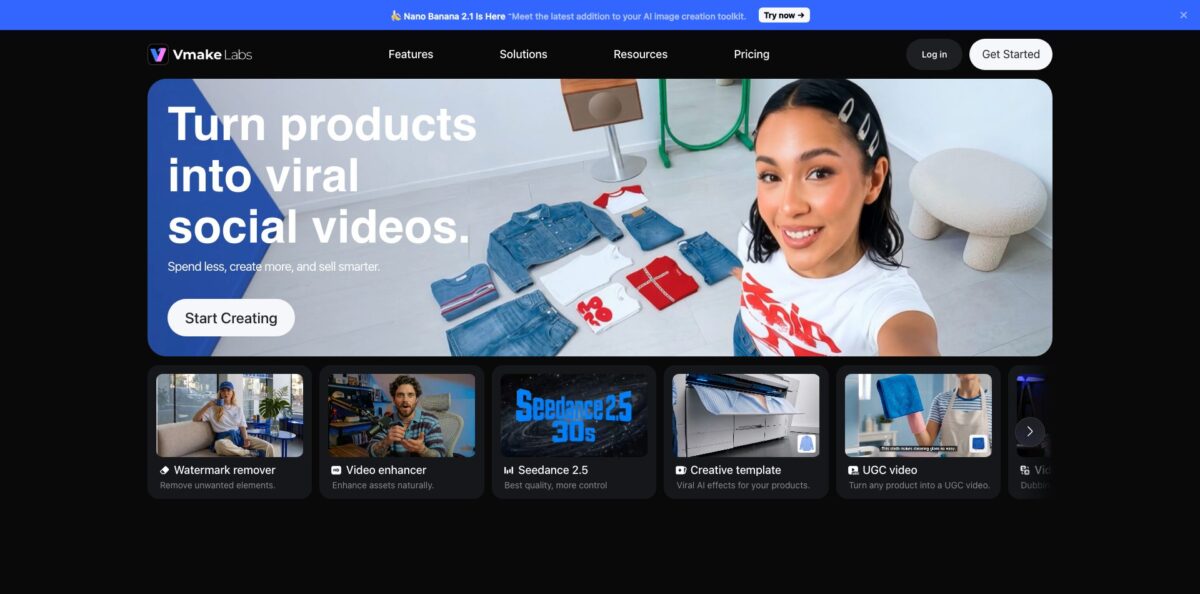
Vmake Labs, previously Vmake AI and before that the KapKap captions app, is a browser and mobile video studio built around one job: turning a product photo or product URL into short, native-looking social videos for TikTok, Reels and Shorts. Instead of a blank prompt box, you fill in a structured form, pick a workflow such as AI avatar video, product showcase or recreate video, and the agent returns a clip with visuals, a spoken script and background music already assembled. Around that core sit utility tools many people came for first: a video watermark remover, enhancer, upscaler, background remover, noise reducer and translator with lip sync. Generation runs on third-party models like Seedance, Kling, Veo 3.1 and Sora 2, paid for with credits. The weak spot is billing: Trustpilot reviewers repeatedly complain about cancellation and paywalls. It fits small sellers and affiliate creators who need many cheap product videos fast.
How to start using Vmake Labs?
Open vmake.ai and click Start Creating, which takes you into the workspace. You can sign up for free; the Free plan gives you 20 credits every day that expire after 24 hours, limited model access and watermarked output. The same account works in the Vmake Labs iOS and Android apps, so you can start on desktop and finish edits on your phone, or the other way round.
For a first real project, pick one of the three UGC workflows. AI avatar video puts a lifelike presenter next to your product, product showcase builds a clean promo from product images, and recreate video copies the pacing of a viral reference clip. In each case you upload a product image or paste a product URL, then add details such as key benefits, target audience, offer or price. No long prompt writing is needed, because the form sets up the generation for you.
The settings worth time are language, avatar and scene. On the avatar workflow you can switch the speaking language, presenter style and background to make versions for different markets, or upload a photo of the person you want to appear consistently across videos. Recreate video offers Fast Mode for quick variations and Advanced Mode, where you lock key shots, product placement and pacing before the final export.
Before publishing, preview the result and check that the product looks the same in every scene, since packaging details and colors are what buyers notice first. Run it through auto captions or the hook generator if the first second feels weak, then export at the resolution your plan allows: 720p on Free editing exports, 1080p on Plus, 2K and 4K for generated video on Pro.
Who is it for?
E-commerce sellers
You need fresh product videos for listings and ads, but every shoot means samples, models and editing time. Vmake Labs turns one product image plus a few selling points into a shoppable short video, so you can keep TikTok Shop, Reels and Shorts active through launches and seasonal sales without a production budget.
Affiliate and shoppable creators
Your income depends on testing many hooks across many offers, and rebuilding scripts for each one is slow. The recreate workflow reuses a proven structure for different products, and you can launch several generation tasks at once to compare angles, messages and calls to action.
Small local businesses
Posting consistently is hard when one person runs the shop, the till and the social accounts. Creative templates such as 360 spin, unboxing, before and after, or how-to formats give you ready-made styles, so a product photo becomes a post in minutes rather than an evening of editing.
Brands localizing into new markets
Translating a talking video usually means new voice actors and reshoots. The video translator removes old subtitles, adds translated ones, dubs audio with a cloned voice and syncs lips, while the avatar workflow switches language and presenter for each region.
Social media managers and editors
Repurposed footage often arrives blurry, watermarked or noisy. The enhancer, upscaler, watermark and text remover and noise reducer clean it up in one place, and batch processing on paid plans handles several files at once.
Developers and automation builders
If you want watermark removal or video enhancement inside your own pipeline, the Vmake Labs API and a Claude Code skill expose those tools with usage-based pricing. Reviewers warn that API billing rules have changed before, so budget with a margin.
Vmake Labs pricing
Vmake Labs combines a monthly credit allowance with daily quotas. Credits are spent in the Vmake Labs Agent on video and image generation, and the cost depends on the model, so the same balance buys far fewer Seedance 2.5 clips than Seedance 2.0 clips. Utility tools like the enhancer, watermark remover and upscaler run on a daily file limit instead. Monthly credits are valid for 30 days, and yearly billing saves up to 42%. Prices below are in USD from the official pricing page.
20 credits per day, valid for one day, limited AI models, watermark on generated output, editing exports up to 720p, up to 3 files for video and audio to text, one AI thumbnail per day.
1,000 credits per month, which the pricing page puts at up to 6 Seedance 2.5 videos, 11 Seedance 2.0 videos or 34 Nano Banana Pro images. Includes models such as Sora 2, Veo 3.1, Seedream 4.0 and GPT Image 1, enhancer and remover tools at 10 files per day, 1080p export, batch processing, 30 days of generation history and commercial use.
4,500 credits per month, listed as up to 30 Seedance 2.5 videos, 52 Seedance 2.0 videos or 45 Minimax H3 videos. Full model access including Kling 3.0, Kling O1, Wan 2.2 and Nano Banana Pro, 50 files per day on core tools, batch processing of up to 30 files, 2K and 4K export for generated video, image upscaling to 8K and 16K, and commercial use.
usage-based pricing billed separately through the developer dashboard.
Payment is by Visa, Mastercard, American Express, JCB, UnionPay or Link, and a subscription is valid across the website, iOS and Android apps.
Vmake Labs key features
UGC video agent: You choose AI avatar video, product showcase or recreate video, upload a product image or URL and fill in a short form. A single generation returns visuals, a spoken script and background music together. This removes the usual step of stitching clips, voice and music in a separate editor.
Recreate viral video: Paste an optional reference link and the tool maps its pacing and selling beats, then inserts your product’s key points into the same flow. The output is a complete 30-second video with a hook, product story and close. Model lock keeps the same character across scenes, which reduces style drift between shots.
AI avatars with localization: An upgraded talking avatar model handles lip sync, expressions and product interaction on screen. You can switch language, avatar and scene from the same form or upload a photo to build a consistent custom presenter.
Multi-model generator: The AI video generator gives access to Seedance 2.0 and 2.5, Kling 3.0, Veo 3.1, Sora 2, Minimax and Wan models, plus Nano Banana, Seedream and GPT Image for stills. Model access widens with the plan. You compare outputs from several engines without separate subscriptions.
Video translator: The translator removes original subtitles, generates new ones, translates audio, clones the original voice, syncs lips and can enhance footage up to 4K in one workflow. The feature page lists languages including Spanish, Brazilian Portuguese, French, Chinese, Japanese, Korean, Arabic, German and Italian. You can switch each step on or off per project.
Cleanup and enhancement tools: The suite includes a video watermark and text remover, video and image enhancer, upscaler to 2K or 4K, background remover, noise reducer, video and audio to text, auto captions, a hook generator and an AI thumbnail maker. These run on daily quotas rather than credits on paid plans. Repurposed or older footage can be made post-ready without another app.
Creative templates and API: A library of trending styles such as streetwear, fruit drama, 360 spin and FPV drone applies viral effects to your product. For automation, the API and VmakeSkill let tools like Claude Code call watermark removal and enhancement directly. Vmake Labs states it does not use your uploads to train public models.
Vmake Labs Pros & Cons
Pros
The form-based approach is the main strength. You do not need to know how to prompt Seedance or Kling; you give a product image, a few selling points and a target audience, and the agent returns a finished clip with script and music. Starting prices are low compared with many avatar studios, at $9.99 per month for Plus, and one subscription covers web and mobile. App Store reviewers often say the editor is easier than CapCut and that the enhancer keeps footage realistic rather than cartoonish. The bundle of watermark removal, upscaling, captions and translation means one tool covers most cleanup work. Use the free daily credits to compare the avatar and recreate workflows on your best-selling product first.
Cons
Billing is the recurring complaint. Trustpilot shows 4.2 overall, but about 11% of ratings are one star, and many recent reviews describe trouble cancelling, charges continuing after cancellation, or a paid plan not showing up on another device. Some users feel the free tier is a teaser, because processed results stay locked behind a subscription. Credit costs vary sharply by model, so the advertised video counts are a ceiling, not a guarantee. One API user reported that a billing change multiplied the credits a short video consumed. Content filters can also block harmless themes. Save your receipts, cancel through the account menu well before renewal, and confirm by email that it went through.
Use Vmake Labs if you want…
- Turn one product photo into shoppable UGC videos.
- Recreate a viral video structure for your own product.
- Generate a talking AI avatar that presents your product.
- Localize product videos with dubbing and lip sync.
- Remove watermarks, text and logos from video clips.
- Upscale and enhance blurry footage to 2K or 4K.
- Test many ad hooks without booking creators or shoots.
- Access Seedance, Kling, Veo and Sora from one account.
Vmake Labs alternatives

Vmake Labs Reviews
A Trustpilot user of about three months calls it straightforward with a good mix of AI generation and simple image and video editing at fair pricing, a solid all-rounder for social content.
Another reviewer enjoys the platform but finds it a little expensive and slow to convert, and is unsure about paying for full video downloads at the current price.
An App Store user who switched from CapCut says the enhancer gives realistic upscaling results, while asking the team not to make it look more artificial in future updates.
Several App Store reviewers like how fast and easy the editing is, but say more and more useful tools are moving behind the paywall, which frustrates younger creators on tight budgets.
A recent Trustpilot reviewer using the API for subtitle removal reports that a billing change made short videos consume 50 to 60 credits, turning a modest monthly cost into a much larger one with no legacy option offered.
FAQ
Is Vmake Labs free?
Yes. The Free plan gives you 20 credits per day, valid for one day, with limited AI models and a watermark on generated output. Paid plans remove the watermark and add commercial use.
Is Vmake Labs the same as Vmake AI and KapKap?
Yes. Vmake AI has rebranded as Vmake Labs, and the old kapkap.ai domain now redirects to vmake.ai. The iOS app, once KapKap AI Captions, is now listed on the App Store as Vmake Labs.
Can I use Vmake Labs videos commercially?
Commercial use is included on the Plus and Pro plans. Free plan output carries a watermark and is not listed with commercial rights.
Does one subscription work on web and mobile?
Yes. The pricing FAQ says a membership is valid on the website and the iOS and Android apps. Some users report sync problems, so contact support@vmake.ai if a plan does not appear on a second device.
How do I cancel a Vmake Labs subscription?
For web purchases, open the Vmake pro menu at the lower left of the workspace and click Cancel Subscription. App purchases are cancelled through Apple ID subscriptions on iOS or the Play Store subscriptions screen on Android.
Does Vmake Labs train AI models on my uploads?
Vmake Labs states that uploads are processed securely and kept private, and that your content is not used to train public models.
Does Vmake Labs have an API?
Yes. The developer portal offers API keys, a usage dashboard and a Claude Code skill for watermark removal and image or video enhancement, billed on usage separately from subscriptions.
What languages does the video translator support?
The translator page lists 10+ languages, including Spanish, Brazilian Portuguese, French, Chinese, Russian, Japanese, Korean, Arabic, German, Indonesian, Thai, Italian and Vietnamese.
Similar tools
 AIAIAll-in-one AI studio that puts Veo, Sora, Kling, Seedance and other models behind one credit balance for video, images, music and voice.
 ToMoviee AIWondershare's AI creative studio that turns text prompts and images into short videos, pictures, music, sound effects and voiceovers.
 Morph StudioBrowser AI video studio that runs Seedance, Kling, Veo and its own style transfer model, with a storyboard canvas for multi-shot clips.