

Voiceflow
Chatbot BuildersUpdated October 21, 2026
Platform for building, testing and running AI customer support agents across web chat, phone and SMS, with playbooks, workflows and tools.
We may earn a commission when you sign up through our links. It does not affect our reviews.
What is Voiceflow?
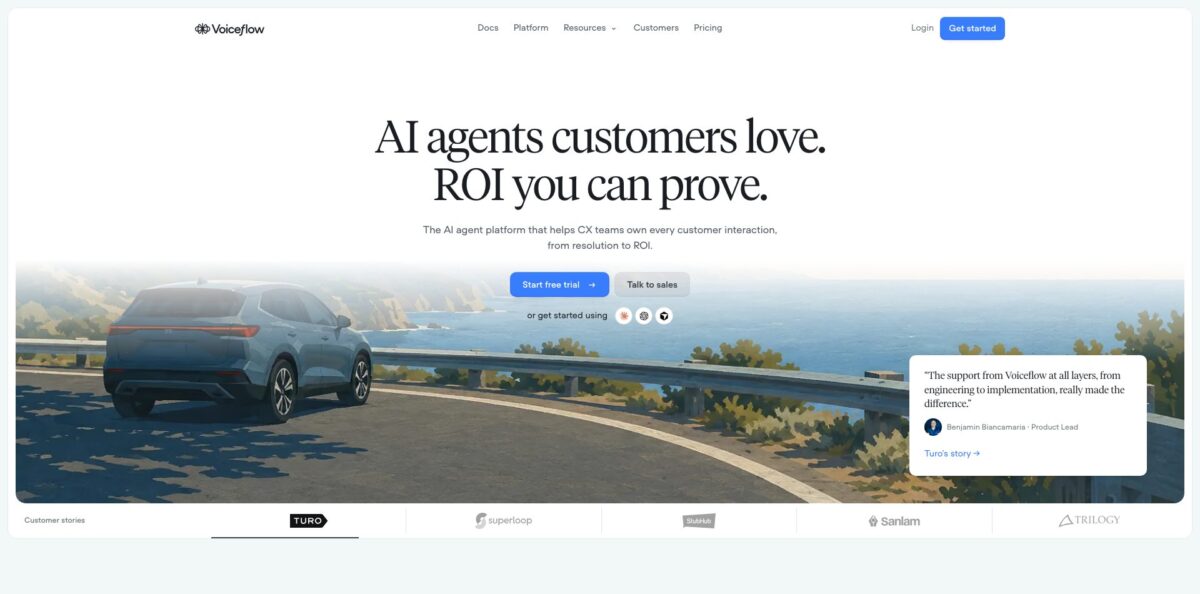
Voiceflow is a Toronto-built platform where support, CX and engineering teams design, test and run AI agents that talk to customers over web chat, phone and SMS. It started in 2018 as Storyflow, a tool for Alexa stories, and today claims more than 3,000 customers and over a billion processed messages. Each project holds one agent made of a global prompt, goal-driven playbooks, fixed step-by-step workflows, tools that call your systems, and a knowledge base built from your own docs. You pick the LLM per agent or playbook, set a fallback model for provider outages, and ship changes through separate environments with traffic splits. The weak spot is cost visibility: Voiceflow does not publish list prices, and usage runs on credits that are hard to forecast. Choose it if your team wants to own the agent’s logic instead of renting a black box.
How to start using Voiceflow?
Open the Voiceflow dashboard and go to Projects, then New project. Name the project, keep the default settings for a chat agent or set the type to Voice for a phone agent, and select Start from scratch. You will be asked to pick a framework: Agentic, where an AI router moves the customer between playbooks and workflows, or Conversation flow, where you draw every branch yourself. The docs recommend Agentic, and a project can switch to it later but never back, so decide before you build a large flow.
Next, shape the agent. In the Global agent description, click generate and describe what the agent does, who it represents and how it should sound; Voiceflow drafts a full prompt from that. For a voice project you can also tune tone, talking speed and how long the agent waits for a reply. Then click the Knowledge Base icon in the left sidebar (or press Shift + K) and add your FAQ, return policy or product catalog as PDFs, text files, CSVs, pasted text or a URL to index.
Now add real work. From the Agent tab, click + to create a playbook for an open-ended goal such as processing a return, give it a clear name and a trigger that says when to use it, and attach tools from the Tools panel: Zendesk, Shopify, Salesforce, an API call, an MCP server or a JavaScript function. Press Run (Shift + R) to chat with it and watch the logs as it calls each tool. Use a workflow instead when a process must run the same way every time, like identity checks.
When the answers hold up, click Publish in the top-right corner. Chat agents go live through the snippet in the Widget tab, which you paste into your site. For voice, click Call, enter your number and the agent rings you; for production, connect a phone number from the Phone numbers tab. Every publish saves a version, so a bad change becomes a rollback.
Who is it for?
Support operations leads
Your queue is full of order status, refund and password questions that follow the same policy every time. Voiceflow lets you write those policies as playbooks and connect them to Zendesk or Shopify so the agent can act, not just answer. Your human team keeps the cases that need judgment.
Conversation designers
You want to design and test dialogues without waiting for an engineering sprint. The visual workflow canvas, personas for testing and transcript review give you a full design-to-launch loop in one workspace. Viewers are free, so stakeholders can comment without buying seats.
AI automation agencies: You build chat and voice agents for many clients and need separate workspaces, handoff tools and white-labeling. Voiceflow’s agency track includes a free trial with no credit card and multi-client workspace management. Reviewers on G2 and Trustpilot who build for clients are among its loudest fans.
Engineers on CX teams
You need code-level control without writing the agent runtime yourself. Functions, API and MCP tools, the REST API, the vf CLI and per-environment secrets cover custom logic, while Voiceflow hosts the runtime, channels and versioning.
Contact center teams adding voice
You want an AI agent to answer calls and pass hard ones to people. Voiceflow connects numbers from Twilio, Vonage or Telnyx, forwards calls to a number or SIP address, and hands chat to Genesys, UJET, Kustomer, Dixa or Zendesk.
Regulated enterprises
Banks, insurers and public-sector teams need audits before anything ships. Voiceflow lists SOC 2 Type II, ISO/IEC 27001:2022 and GDPR compliance, supports HIPAA-compliant deployments and sells PII redaction as an add-on.
Voiceflow pricing
Voiceflow does not publish list prices on its pricing page, and its own company facts page says so directly. Your bill combines a monthly plan fee, optional add-ons and credit-based usage. Credits are consumed by AI responses, phone minutes, LLM chunking during knowledge base syncs and even automated evaluations, and the exact rate depends on the model and voice vendor you choose. Current prices for plans, add-ons and credit bundles are visible only inside the product under Plans and Billing, or through a sales quote.
A one-time credit grant that does not renew and limited features. Voiceflow positions it for trying the platform, not for production traffic.
price shown in-app. Aimed at individual builders, with access to all LLM models and a higher agent limit than Free. Includes some free editor seats and one Voiceflow phone number per workspace.
price shown in-app. Built for growing teams, adding LLM fallback models, priority support and the option to remove Voiceflow branding from the chat widget.
Custom. Unlimited product usage, single sign-on, private cloud hosting, custom credit allotments and a dedicated account manager, billed per contract.
free trial with no credit card, usage-based billing, white-labeling and client handoff tools.
extra editor seats, extra phone numbers and higher concurrent call limits. PII redaction is a separate add-on sold through sales.
Paid plans reset their credit allotment each billing cycle and credits are shared across all workspaces in your organization. You can turn on auto top-ups so agents keep answering when the balance hits zero. If you cancel, paid features stay until the end of the period and the account drops back to the free tier.
Voiceflow key features
Playbooks and workflows in one agent
Playbooks are goal-based instructions the model follows while calling tools, and workflows are fixed sequences of steps you can still sprinkle with AI reasoning. The top-level agent routes each turn to the right one. You get free-form handling for messy requests and strict control for authentication or refunds.
Tools that take action
Native tools cover Zendesk, Salesforce, HubSpot, Shopify, Twilio SMS, Airtable, Make, Gmail and Google Sheets, plus a generic API tool, MCP tool and JavaScript function tool. Each tool carries its own trigger description so the agent knows when to call it. The agent can check an order or open a ticket during the conversation instead of telling the customer to email support.
Knowledge base with sync and smart chunking
Import web pages, a whole sitemap, PDF, TXT or DOCX files up to 10 MB, CSV or XLSX tables, plain text, Zendesk articles and Shopify catalogs, then set refresh to daily, weekly or monthly. LLM chunking options such as FAQ optimization or Smart chunking improve retrieval but cost credits on each sync. Metadata filters let one agent serve different plans, brands or regions with the right content.
Voice stack you can tune
Choose text-to-speech from ElevenLabs, Cartesia, Rime, Google Chirp, Amazon or Microsoft, and speech-to-text from Deepgram, Gladia, Cartesia, AssemblyAI or Google, with Deepgram Flux recommended for end-of-turn detection. A pronunciation dictionary, keyword boosting and keypad input handle brand names and account numbers. Phone numbers come from Voiceflow in the US and Canada, or from Twilio, Vonage and Telnyx.
Model choice with outage protection
Set a default model, temperature, token limit and memory (10 to 100 turns, default 50) for the project, and override the model per playbook. Options include models from Anthropic and Google and Voiceflow Core, the company’s own model. A fallback provider takes over if your primary one goes down, so a vendor outage does not take your support line offline.
Environments, A/B tests and rollbacks
Each project supports up to 10 environments, each with its own draft, live version and history. You can send a percentage of real traffic to a new version, compare results, then merge it into Main, while protected environments limit publishing to admins and owners. Changes reach customers on purpose, not by accident.
Evaluations, tests and analytics
Every transcript can be scored automatically by LLM evaluations; the defaults rate customer satisfaction from 1 to 5, deflection, and resolution across five outcomes such as Resolved, Ticket created and Abandoned. Tests with simulated personas catch regressions before launch, and the Atlas copilot (in beta) helps investigate where customers get stuck. You can prove ROI with numbers instead of anecdotes.
Voiceflow Pros & Cons
Pros
Voiceflow gives you real control over how the agent behaves. You can mix open-ended playbooks with deterministic workflows, pick a different LLM per playbook, and inspect agent logs that show every tool call and its response. Production features that cheaper builders skip are built in: environments with traffic splits, version history, protected releases, automated evaluations, and handoff into the contact center tools you already pay for. Voice is a first-class channel with a choice of speech vendors, not an afterthought. Users on G2 and Trustpilot repeatedly praise how fast the visual builder gets a working agent and how far custom JavaScript and API calls stretch it. Start with the Agentic framework and a single playbook to see that strength quickly.
Cons
Pricing is opaque: there are no list prices on the website, and credits burn at different rates depending on the model, voice provider and features like LLM chunking or evaluations. Several G2 reviewers call the credit system confusing, and agencies note the seat limits on lower tiers. Advanced builds still push you toward APIs and custom code, and reviewers describe a steep learning curve once a project grows to dozens of branches and integrations. Phone agents need you to configure telephony and speech providers, and SSO and private hosting sit on Enterprise. Support quality also gets mixed comments. Set a budget alert on credits and document your playbooks early so the project stays maintainable.
Use Voiceflow if you want…
- Resolve support tickets with agents that act in Zendesk.
- Run one agent across web chat, phone and SMS.
- Combine AI playbooks with strict step-by-step workflows.
- Switch LLM providers without rebuilding your agent.
- A/B test agent changes on a slice of live traffic.
- Hand conversations to Genesys, Kustomer or Zendesk agents with context.
- Score every transcript for resolution and customer satisfaction automatically.
- Build white-labeled chat and voice agents for agency clients.
Voiceflow alternatives
 ChatbaseRead review →
 CognigyRead review →
 PolyAIRead review →
 Bland AIRead review →
 FinRead review →
 Kore.aiRead review →
Voiceflow Reviews
G2 reviewers rate it highly for building flows without code and for how much it can be customized, though several say advanced customization still needs external APIs or custom code.
Agency builders who ship chat and voice agents for clients say the visual builder makes flows easy to explain to customers, but the learning curve for advanced features is steep.
A recurring G2 complaint is the credit-based billing: it is hard to predict how many credits a month of traffic will use, and the lowest paid tier includes only two editor seats.
On Trustpilot, most reviewers praise the easy chat agent setup, API integrations and an active community, while a few report slow or unhelpful support when something breaks and say voice features still have room to grow.
Product Hunt users call it beginner friendly and good for combining AI conversation with classic workflow logic, with one noting the interface can feel too complicated for average users.
FAQ
Does Voiceflow have a free plan?
Yes. The Free plan comes with a one-time credit grant that does not renew and limited features, so it suits trying the platform rather than production use. Agencies also get a free trial with no credit card required.
How much does Voiceflow cost?
Voiceflow does not publish list prices. Billing combines a monthly plan fee for Free, Pro, Business or Enterprise, optional add-ons like editor seats and phone numbers, and credit-based usage; you see current prices in the Plans and Billing tab or get a quote from sales.
Can Voiceflow agents answer phone calls?
Yes. You can provision a Voiceflow number in the US or Canada, or connect numbers from Twilio, Vonage or Telnyx for inbound and outbound calls, and Twilio numbers also handle SMS.
Which AI models can I use?
You choose the model per agent or playbook from several providers, including Anthropic and Google, or use Voiceflow Core, the company’s own model. You can also configure a fallback provider for outages.
Is my data used to train AI models?
No. Voiceflow says customer data is not used for model training and model providers run with zero data retention. It is SOC 2 Type II compliant, ISO/IEC 27001:2022 certified, GDPR compliant and supports HIPAA-compliant deployments.
Can the agent hand off to a human?
Yes. The Live agent handoff step passes chat conversations to Zendesk, Genesys, UJET, Kustomer or Dixa with the transcript and chosen variables, and the Call forward step transfers phone calls to a number or SIP address.
Does Voiceflow have an API?
Yes. A REST API lets you run conversations on any custom interface and manage playbooks, tools and knowledge base documents, and the official vf CLI manages agents, environments and analytics from your terminal or CI.
How do I cancel my subscription?
Open Plans and Billing, then Billing, click Manage and choose Cancel subscription. You keep paid features until the end of the current billing period, after which the account reverts to the free tier.
Similar tools
 Expertise AIWebsite AI agent, formerly Chatsimple, that answers B2B visitors, identifies and qualifies leads, books meetings and syncs chats into HubSpot or Salesforce.
 BotnoiThai no-code builder for AI chatbots and agents that answer customers on LINE, Facebook Messenger and the web, billed per bot message
 Insighto.aiNo-code platform for building AI chat and phone agents that answer from your documents, book meetings and run across web chat, WhatsApp,