

Warp
Developer ToolsUpdated October 5, 2026
Warp is an agentic, GPU-accelerated terminal that uses AI to automate coding, debugging, and complex CLI workflows.
We may earn a commission when you sign up through our links. It does not affect our reviews.
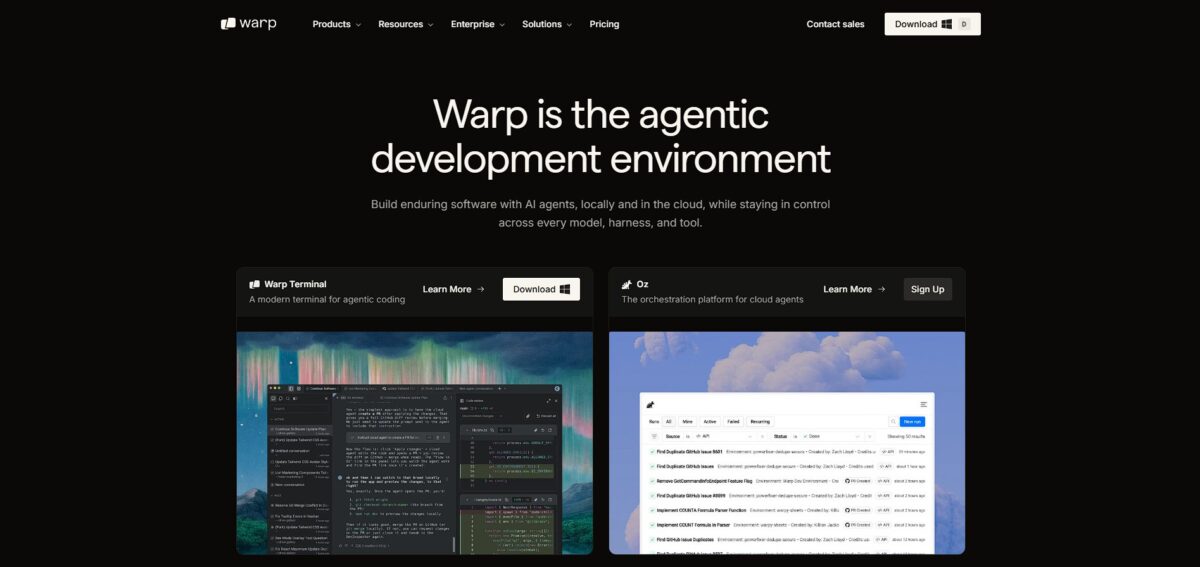
What is Warp?
Warp replaces the traditional text-grid terminal with a Rust-based environment where every command and its output lives in a discrete, manageable block. It swaps the clunky readline experience for a full IDE-style text editor, letting you click to position your cursor or use standard keyboard shortcuts to fix a typo in a complex Docker string. Instead of scrolling through miles of messy logs, you can collapse specific blocks or share a direct link to a command’s output with a teammate. This matters because it turns a solitary, 50-year-old interface into a collaborative space that understands natural language prompts. It excels at modernizing day-to-day CLI workflows, though its requirement for a login might annoy those preferring a completely offline setup. Use Warp if you want to stop wrestling with terminal buffers and start treating your shell history like a searchable codebase.
How to start using Warp?
Grab the installer from warp.dev for your OS. macOS users can just run brew install --cask warp to skip the browser download. Linux users have official .deb and .rpm packages available. Windows support is native, so you don’t need to mess with WSL configurations to get it running. This simple entry point lets you swap your crusty default terminal for a modern environment in about two minutes.
Launch the app and create a free account. Some devs dislike the mandatory login for a terminal, but it enables the cloud-based AI and block-sharing features. I noticed the onboarding flow asks about your experience level to tailor the initial command suggestions. If you are migrating from iTerm2 or Konsole, the setup wizard offers to import your existing shell configurations. This ensures your custom aliases and PATH variables carry over without manual editing.
Set Warp as your default terminal emulator. On macOS, this is a toggle in the settings; on Linux, use the update-alternatives command to prioritize warp-terminal. If you use VS Code, you can point the integrated terminal path to Warp’s executable for a consistent experience across tools. Switching between your editor and your standalone terminal then costs no extra mental effort. The trade-off is a slightly higher memory footprint than a bare-bones shell.
Open the command palette with CMD-P or CTRL-P to explore the AI features. You can type natural language questions to generate complex shell commands or use the “Warp AI” sidebar to explain why a build failed. It indexes your local workflows, so it learns your project-specific scripts over time. This turns a static CLI into a collaborative assistant that understands your codebase.
Who is it for?
The Command Line Minimalist
If your workflow relies on raw speed and you hate the lag of Electron-based apps, this Rust-built shell delivers snappy text rendering even with massive log files. It removes the stutter often seen in VS Code’s integrated terminal when running heavy builds. Your input stays fluid while the CPU is pegged. Expect a steeper learning curve than standard emulators, though.
The DevOps Script Hunter
You probably have a “notes.txt” or a messy Wiki full of one-liners for Kubernetes or Docker that you can never quite remember. Warp’s searchable workflows let you trigger those complex strings with a few keystrokes instead of hunting through browser tabs. That saves minutes of frustration when you’re under pressure to fix a production pod and reduces the risk of typos during critical deployments.
Collaborative Engineering Teams
Most terminals are solitary silos, but Warp lets you share a direct link to a specific block of command output. Instead of screenshotting a failed build, you send a link so your teammate can see the exact environment and error context. Fewer back-and-forth debugging sessions in Slack. It works well for remote teams, though privacy-focused shops might find the cloud-sync requirement a hurdle.
The AI-Curious Developer
If you are tired of jumping to a browser to ask an LLM why a shell script is failing, the integrated agent explains errors right in the terminal window. It translates natural language into bash syntax, which helps when you need to find files by size but forgot the specific find flags. I noticed it’s especially helpful for junior devs who haven’t memorized thirty years of Unix history. You stay in the flow of the terminal.
SSH and Remote Server Managers
Warp includes a feature called Warp Drive that syncs your workflows across different machines and environments. You can set up your aliases on a local machine and have them ready when you jump onto a staging server or a new laptop. No more tedious manual setup of .zshrc files on every new box. The catch: you must be comfortable with your configuration living in their cloud.
Warp pricing
Warp recently overhauled its billing to focus on how much AI you actually consume. The core terminal remains free, which is a relief for anyone who just wants a fast, modern CLI without a subscription. Paid tiers add agentic coding features and team collaboration tools.
You get the full terminal experience and 75 AI credits monthly. This works for solo devs who rarely touch AI prompts. You aren’t forced into a subscription for basic shell work.
This includes 1,500 credits and lets you bring your own API key (BYOK) from OpenAI or Anthropic. This is the sweet spot for power users who want Warp’s interface but prefer paying for their own tokens, and it means you don’t double-pay for LLM access.
You get 18,000 credits and expanded access to cloud agents. It targets developers running heavy codebase indexing and constant AI debugging. On the downside, that is a high entry price for what remains a terminal-based workflow.
Adds Single Sign-On (SSO) and team-wide zero data retention. This is for regulated industries where security audits are non-negotiable. Your proprietary scripts stay out of public model training.
Warp key features
Blocks replace the endless scroll of text
You can select, copy, or share specific command outputs without dragging your mouse across the screen. A messy log becomes a structured data set you can actually use.
The AI command search translates intent into syntax
Type a rough description of what you need, like “find files over 100MB,” and it generates the precise find command. Nobody should have to memorize obscure flag combinations for every CLI tool.
Workflows store your complex, multi-step commands in a shared library
You can run custom scripts or deployments with a few keystrokes instead of hunting through an old .txt file. Team operations stay consistent across different local setups.
Warp Drive provides a collaborative space for terminal configurations
It syncs your environment and history across machines, making it easier to switch between a laptop and a desktop. Say goodbye to “it worked on my other machine” friction.
The editor behaves like a modern IDE rather than a 1970s teletype
You get real cursor positioning, native keybindings, and predictable completions that don’t break when you backspace. You spend less mental energy fighting the terminal’s input lag.
Warp Pros & Cons
Pros
Warp fixes the annoyance of hunting through endless scrollback for a specific command output. It groups your work into blocks, so you can copy a single response or share a direct link to an error with a teammate. The Rust-based engine renders long logs instantly without the lag common in Electron terminals. You can position your cursor with a mouse click and use standard shortcuts, which makes editing long commands feel like writing in VS Code rather than a relic from the 70s. You no longer need to memorize awkward shell navigation keys. Use it if you want an interface that feels like a modern app instead of a text stream.
Cons
The requirement to create an account and log in just to use a terminal feels invasive for a local tool. While the AI features are helpful for syntax, they rely on a cloud connection and a credit system that can run dry mid-project. If you rely heavily on tmux for window management, you’ll find it currently incompatible with Warp’s block system. I noticed the memory footprint is higher than minimalist alternatives like Alacritty, which might bother you if every megabyte counts. This matters because it introduces external dependencies to your core dev environment. The trade-off is a faster workflow at the cost of some privacy and local control.
Use Warp if you want…
- Natural language command generation instead of Googling syntax.
- Collaborative terminal blocks to share context with your team.
- Agentic workflows that automate multi-step terminal tasks.
- Rust-based speed with an IDE-like editing experience.
- Reusable workflows and runbooks stored in a shared drive.
- Instant error debugging with integrated AI explanations.
- Modern terminal features like split panes and command search.
- Direct integration with your existing CLI coding agents.
Warp alternatives
Warp Reviews
The block-based UI is a game-changer for terminal navigation. I love how it handles command history and makes debugging errors significantly faster with the built-in AI.
Indispensable for complex CLI commands. I no longer have to jump to Google to remember obscure flags; I just ask the assistant right in the prompt.
Fast and beautiful default theme. The agentic workflows have saved me hours on refactoring, though I wish it played better with my old tmux setup.
The natural language command generation is scarily accurate. It feels like having a senior DevOps engineer living in my command line.
Switched from iTerm and haven’t looked back. The Git integration and workflow sharing make it the best choice for our engineering team.
FAQ
Which operating systems are currently supported by Warp?
Warp is available for macOS (Intel and Apple silicon), Linux (x86_64 and ARM64), and Windows (x86_64 and ARM64).
Does Warp support shells like Zsh, Bash, and Fish?
Yes, Warp supports Zsh, Bash, and Fish out of the box and is compatible with your existing shell configurations.
Can Warp be used offline?
After launching Warp once while online to handle initial setup, most core terminal features continue to work without an active internet connection.
How does Warp handle data privacy for my commands?
Warp does not transmit locally run commands to the cloud; AI prompts are sent for processing but are deleted after 30 days according to their privacy policy.
Is Warp open source?
The Warp client is open source under the AGPL v3 license, allowing developers to audit the code or build it from source.
What is Warp Drive?
Warp Drive is a feature that allows you to save, organize, and share reusable workflows and command templates with your team in a cloud-synced space.
Does Warp support Vim keybindings?
Yes, Warp includes an optional Vim mode for the command editor, allowing you to use familiar keyboard shortcuts for text manipulation.
Can I sync my terminal settings across different computers?
Warp includes a cloud-based Settings Sync feature that keeps your themes and configuration consistent across all devices where you are logged in.
What are blocks in the Warp terminal?
Blocks group each command with its specific output, making it easier to copy results, share snippets, or use AI to debug individual execution errors.
Can I customize the position of the command input?
Warp allows you to pin the input bar at the top, keep it at the bottom like a chat interface, or let it scroll naturally with the terminal output.
Similar tools
 Novita AIDeveloper cloud with one API for 200+ open-weight AI models, plus GPU instances, dedicated endpoints and isolated sandboxes for AI agents.
 You.comDeveloper platform of web search, content extraction, cited research and model inference APIs that feed AI agents and RAG apps real-time web
 QodoAI code review platform that runs specialized agents on every pull request, enforces team rules and checks changes against tickets and linked