

WaveSpeedAI
Art GenerationUpdated October 5, 2026
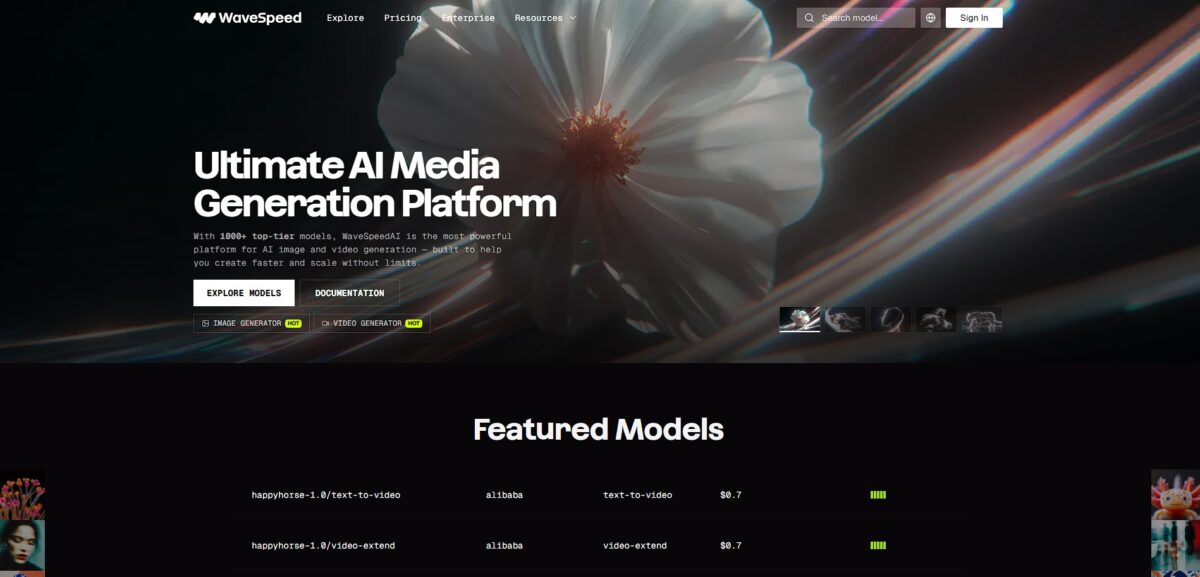
WaveSpeedAI is a high-speed inference engine aggregating over 1,000 models for professional image, video, and audio generation.
We may earn a commission when you sign up through our links. It does not affect our reviews.
What is WaveSpeedAI?
WaveSpeedAI operates as a unified inference engine that aggregates over 1,000 models, allowing you to generate images, videos, and audio through a single API or desktop app. It cuts out the friction of managing separate subscriptions for tools like Flux or Kling by centralizing them into one workspace. The platform targets developers and power users who need sub-second generation speeds for batch tasks rather than casual, one-off browsing. In practice, you can automate complex pipelines, like turning a text prompt into a scripted video with synchronized audio, without jumping between different browser tabs. While it offers deep technical control for Python and JavaScript environments, the sheer density of options might overwhelm someone looking for a simple social media filter. This setup gives you a direct line to raw compute power without the usual cold starts or hardware limitations.
How to start using WaveSpeedAI?
Head to wavespeed.ai and authenticate using your existing Google or GitHub account. You won’t find a traditional “Sign Up” form here; the platform relies entirely on third-party logins to skip the password management headache. New accounts usually start with a small trial credit, which lets you test most models without opening your wallet. That’s enough to verify whether a specific character animation or audio conversion model actually meets your needs before committing any funds.
Once inside, navigate to the models page to browse the library. The interface feels more like a repository than a simple art gallery, with clear tabs for playground testing and API documentation. You pick a model, enter your prompt or upload a file, and hit run to see results in the predictions tab. This approach works well for rapid prototyping but can feel technical if you aren’t used to seeing JSON schemas alongside your images. On the plus side, it bridges the gap between creative experimentation and production-ready code.
If you are a developer, grab your API key from the dashboard after adding a small balance. WaveSpeed uses standard Bearer token authentication, so you just need to pass your key in the authorization header of your HTTPS requests. I noticed the playground even provides ready-to-use cURL and Python snippets based on your current settings, which saves time when moving from a browser test to a local script, so repetitive upscaling or speech generation tasks run without manual clicking.
The playground includes a useful prompt enhancer tool located right next to the input field. It costs a fraction of a cent per use and rewrites basic descriptions into detailed instructions that help the AI avoid common pitfalls like blurry backgrounds or anatomical errors. You pay slightly more per generation for better initial results, but you pay for fewer failed renders because the technical logic is right the first time.
Who is it for?
API Developers
This is a playground for engineers who need to pipe audio-driven video or image upscaling directly into their own stacks. You get to skip the infrastructure headache of managing GPU clusters. Your time goes into your app’s logic rather than server maintenance.
Technical Content Creators
It works for those who need to turn a static character into a talking head for a dev log or tutorial. I noticed the lip-syncing holds up well even with complex technical jargon that usually trips up simpler models, so you don’t have to re-record your face every time you update a script.
Rapid Prototypers
If you are building a concept for a character-driven app, you can generate animated variants in minutes. The tool handles the transition from text to speech to video in one go, which is a massive time-saver for early-stage demos. Stakeholders see a “living” product instead of flat wireframes.
E-commerce Automation Specialists
You can automate the cleaning and upscaling of bulk product images via the API. It removes background noise from photos while keeping the textures of the actual product sharp, which gives you a consistent look across a catalog of thousands of items without manual editing.
AI Fiction Storytellers
It excels at maintaining character consistency when you need to animate specific scenes from a script. While it handles short clips well, fidelity drops slightly for very long sequences. Still, you can build a coherent visual narrative without your protagonist’s face morphing every three seconds.
Localization Teams
It lets you swap audio tracks to create multi-language versions of the same talking video. The engine re-syncs the lip movements to the new phonemes, which looks far more natural than a standard dub. Your content feels native to global audiences rather than translated.
WaveSpeedAI pricing
WaveSpeedAI skips the traditional subscription model in favor of a pay-as-you-go credit system. You top up your account and pay only for the exact compute used by the specific model you trigger. This setup prevents the common headache of paying for a monthly seat you only use three times.
The platform starts you with $1 in free credits, which covers roughly 500 generations using the most affordable Z Image Turbo model. Prices fluctuate based on the model’s complexity; for instance, a Seedream 4.5 image costs $0.04 while a second of high-end Kling 3.0 video runs $0.084. Language model costs follow the standard token-based approach, with Gemini 3.1 Pro priced at $0.00125 per 1K input tokens. If you need raw power, serverless GPU rentals like the RTX 4090 cost $0.49 per hour. This granularity lets you scale from a single prototype to a massive batch job without hitting a subscription ceiling. Your expenses track your project’s output volume directly.
WaveSpeedAI key features
Access 1,000+ pre-optimized AI models through a single REST API
You stop hunting for separate API keys across different hosting providers because models like Seedream 4.5 and WAN 2.6 live in one dashboard. You can prototype multimodal apps without managing five different billing accounts.
Eliminate cold starts with pre-loaded GPU instances
Inference begins in roughly 100ms, which is a massive relief compared to the 30-second spin-up times on community-driven platforms. This allows for real-time applications where users expect instant image results, without the “loading” friction that kills user retention.
Animate multiple characters in a single frame with multi-track lip sync
Unlike standard tools that struggle with overlapping dialogue, this system lets you assign separate audio tracks to 3 or 4 distinct faces. This makes it possible to create complex conversational scenes without tedious manual masking. The most time-consuming part of AI filmmaking gets automated.
Execute complex AI pipelines using a node-based visual workflow editor
You can build automation chains that scan a directory, generate a summary, and then produce a lip-synced video. It functions like a local skill server for agents, though the learning curve is steeper for non-technical users. You get custom logic without writing boilerplate Python code.
Rebuild missing visual elements with content-aware upscaling
Rather than just stretching pixels and adding blur, the engine reconstructs textures to make low-res scans appear sharp at 4K. It works best on photographs, while illustration models prevent skin from looking like plastic. Grainy mobile footage becomes usable on professional displays.
Deploy 12 browser-based creative tools that run without an API key
You get background removal, object erasing, and media conversion for free directly in the web app. It is a handy playground for quick edits, but the high-resolution video exports will eventually require paid credits. You can test the “Segment Anything” logic before committing to a full integration.
WaveSpeedAI Pros & Cons
Pros
WaveSpeedAI delivers images in under two seconds and generates ten-minute talking-head videos from a single static portrait. You stop jumping between separate web apps just to sync audio to a character or upscale a frame. I noticed the Infinite Talk engine maintains a consistent facial identity over long durations, effectively solving the drifting features problem that usually ruins immersion in shorter AI clips. This matters because you can produce complete video lessons or long-form social content in one pass instead of spending hours masking and editing disjointed shots. Try the multi-person conversation feature to automate dialogue scenes between different avatars without manually aligning separate audio tracks.
Cons
The credit-based system creates friction when you need to run high-volume experiments or batch-process 1080p renders. While the platform offers a wide selection of models like FLUX and WAN, you sacrifice the hyper-specific fine-tuning controls found on local Stable Diffusion setups. Token pricing for video generation varies significantly between Lite and Pro models, which makes it difficult to predict monthly costs for agency-scale workflows, and a series of failed test renders can drain your balance before you settle on a final prompt style. Use the initial free credit to benchmark token usage for your specific prompt complexity before topping up a larger balance.
Use WaveSpeedAI if you want…
- To convert audio into dynamic, high-fidelity talking videos
- Crystal-clear 4K upscaling for low-resolution legacy footage
- Smooth character animation driven by realistic speech patterns
- To integrate professional video generation via powerful APIs
- Rapid image editing and generative video creation workflows
- Advanced speech generation that syncs with facial movements
- To automate complex media operations and content versioning
WaveSpeedAI alternatives



WaveSpeedAI Reviews
The audio-to-video synchronization is seamless; it’s become my go-to for quick character animations.
FAQ
Is WaveSpeedAI free to use?
New users receive $1 in free trial credits to test the platform without a credit card, though some premium models may require a paid balance.
What types of models can I access?
You can access over 1,000 models covering image generation, video creation, audio synthesis, 3D asset creation, and avatar lip-sync through a single API.
Does WaveSpeedAI support commercial use?
Yes, the platform is built for production-grade workflows, and users generally retain the rights to the content they generate for commercial purposes.
How fast is the generation process?
Optimized image generation typically takes under 2 seconds, while video generation ranges from 30 to 180 seconds depending on complexity and length.
Can I use my own custom models?
Yes, WaveSpeedAI offers serverless GPU infrastructure that allows you to deploy and scale your own custom models with per-second billing.
Is there a mobile app available?
Yes, WaveSpeedAI provides a cross-platform application available for Android, Windows, macOS, and Linux that shares the same powerful inference engine.
Does it support audio-to-video generation?
Yes, you can transform audio files into cinematic music videos or talking avatar videos with frame-accurate lip sync and beat-aware editing.
What integration options are available for developers?
Developers can integrate via a unified REST API, Python and JavaScript SDKs, or through no-code tools like ComfyUI and n8n.
Similar tools
 CustomuseAI 3D creation platform that chains image, video and 3D models into node workflows for game-ready assets, Roblox items and scenes.
 VisualGPTCredit-based AI image and video studio that runs Nano Banana, GPT Image, Seedream, Flux and Kling for product photos, photo edits and
 LovartAI design agent that turns a chat brief into logos, social posts, product shots, slides and videos on one editable infinite canvas.