
WeShop AI
Image GenerationUpdated October 27, 2026
AI image and video studio for e-commerce that turns flat-lay and product photos into on-model shots, virtual try-ons, product scenes and short videos.
We may earn a commission when you sign up through our links. It does not affect our reviews.
What is WeShop AI?
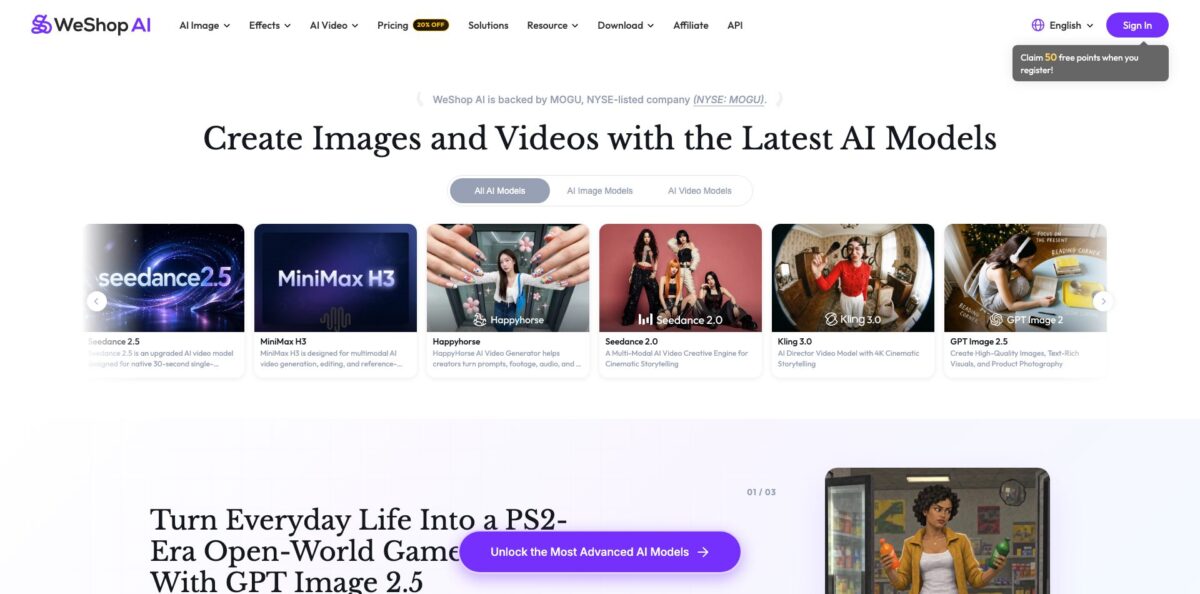
WeShop AI is a browser-based image and video studio built around one job: turning plain product photos into listing-ready visuals without booking a model or a studio. You upload a flat-lay, a mannequin shot or a packshot, and dedicated agents such as Virtual Try-On, AI Fashion Model, AI Product and Change Pose place it on a generated person or in a styled scene. Around that core sit cleanup tools (background removal, hand fixer, expander) and a menu of third-party models, from GPT Image 2.5 and Nano Banana to Kling 3.0 and Sora 2 for video. Everything runs on a shared points wallet. The weak spots are the ones merchants keep reporting: anatomy glitches, rerolls that cost points, and low ratings for the mobile apps. It fits apparel and accessory sellers who need volume more than pixel-perfect art direction.
How to start using WeShop AI?
Open weshop.ai and click Try For Free or Sign In to create an account. The Free Trial plan gives you a starter balance of points on registration (the pricing card says 200, while an older FAQ line still mentions 50 welcome points), access to selected models only and one job at a time. That is enough for a handful of test images, so plan to spend it on the product you sell most rather than on novelty filters.
For a first real run, pick Virtual Try-On or AI Fashion Model from the AI Image menu. Upload a clear garment photo with even lighting, since the tool reads fabric texture and shape from that source image. Files must stay under 10MB with an aspect ratio below 2, and GIFs are rejected. Then choose an AI model, body type or pose and press generate. Try-On offers WeShop Flash at 10 points and WeShop Pro at 20 points per image, so start on Flash while you learn what kind of input works.
The key controls sit next to the canvas. The Settings icon at the bottom right lets you generate anywhere from 1 to 16 images per run, which matters because each output is charged whether you keep it or not. For non-apparel goods, AI Product offers three composition modes: Recommended for accurate listing shots, Similar for light variation, and Creative Adaptation for ad-style scenes. A Fixed Location mode repeats the same setting across different products, which keeps a catalog visually consistent.
Before anything goes live, zoom into hands, feet, necklines and logos. If a result is close but flawed, run AI Hands & Feet Fixer, Magic Eraser or Design Repair instead of regenerating from scratch. When you are happy, hover over the preview and click the 4K icon in the lower-left corner to download the high-resolution file. Check My Points afterwards so you know what a finished image really cost you.
Run one SKU through Flash, fix it with the repair tools, and only then decide which plan your monthly volume needs.
Who is it for?
Independent fashion sellers
You have racks of clothes and only flat-lay photos, and hiring a model for every drop is out of budget. Virtual Try-On and AI Fashion Model put each garment on a generated person in a few clicks. Your product pages finally show fit and drape instead of a shirt lying on a table.
Shopify store owners
Moving images between tools and your store eats hours every week. WeShop has its own Shopify App Store app, and finished images can be shared straight into the Files section of your Shopify dashboard. Expect to check every output, because merchants report occasional extra fingers and invented details.
Accessory and jewelry studios
Small brands selling rings, bags or eyewear rarely need full fashion shoots, just believable context. AI Product drops items into lit scenes, and Fixed Location keeps every product in the same setting. The result is a consistent catalog look without a weekly photographer booking.
E-commerce content teams
Marketplaces, social ads and lookbooks all want different crops and scenes of the same item. With up to 48 concurrent jobs on the Ultra and Enterprise plans, a team can batch large catalogs instead of queueing images one by one. The bottleneck shifts from production to review.
Developers building fashion tools
You want try-on or background replacement inside your own app, not a browser tab. The WeShop Open Platform issues API keys, and the open-source weshop-cli wraps each agent in a single command with a cost estimate flag. You get WeShop’s e-commerce agents without building a pipeline from scratch.
Social video marketers
Static images are no longer enough for TikTok and Reels. Video Agent and image-to-video models such as Kling 3.0 and Seedance turn a product still into a short clip. Budget carefully, since video tasks start at 500 points or more.
WeShop AI pricing
Everything is billed in points. WeShop’s own reference is that 10 points buy roughly one generated image, while premium models cost more and video tasks run into the hundreds. Each paid plan has a slider of point tiers, annual billing cuts 20%, and points never roll over: monthly points expire at the end of the billing cycle, and annual plans grant one yearly allocation. Points are charged even when a result is unusable and refunded only after a system error. Prices below are in USD from the official pricing page; the US and non-US views showed the same figures.
A one-time starter balance of points on registration, selected models only, 1 concurrent job and a frequency limit. Kling 3.0, Nano Banana 2 and Pro, GPT Image 2 and API access are excluded.
Higher Pro tiers go up to 6,000 points for $25.99/month. You get all models and 16 concurrent jobs. The comparison table estimates a monthly Pro allowance at about 100 Midjourney images, 44 Nano Banana 2 images at 1K, or 3 five-second Kling 3.0 clips with audio.
Tiers scale to 20,000 points for $110/month. Ultra adds 48 concurrent jobs, a high-priority queue, faster generation on flagship models and the option to buy pay-as-you-go point packs, which Free and Pro users cannot do.
Tiers run up to 390,000 points for $2,099/month. Per WeShop’s FAQ, this is the tier with full API coverage, including premium skills such as Virtual Try-On, AI Model, Change Pose and Remove Background, which Ultra’s API access excludes.
Upgrades apply immediately at the full price of the new plan and reset the billing cycle, while downgrades wait until the current cycle ends. The plan cards and the FAQ do not describe API access per plan the same way, so confirm what your tier includes before you build on it.
WeShop AI key features
Virtual Try-On takes a garment, flat-lay or product shot and renders it on an AI model with folds, alignment and lighting matched to the body. You choose the model, body type and pose, and you can keep the same model and scene while swapping outfits across a collection. That replaces repeat studio sessions for every seasonal drop.
AI Fashion Model and Change Pose turn one flat-lay or mannequin photo into several on-model shots in standing, walking or seated poses while keeping the garment details. The Google Play listing advertises over 200 human models of different nationalities, ages and genders. Shoppers see fit on bodies closer to their own, which supports more inclusive product pages.
AI Product places non-apparel items into realistic scenes with three composition modes, from accurate listing shots to stylised ad visuals. Fixed Location replicates one setting across many products, and WeShop says some outputs now cost as little as 5 points. Your storefront, Instagram and paid ads can share one visual style without a reshoot.
A multi-model hub puts GPT Image 2.5, Nano Banana and Nano Banana Pro, Seedream 5.0, Midjourney v7, Qwen Image Edit, FireRed, Z-Image and Grok Imagine next to video models such as Kling 3.0, Seedance 2.5, Sora 2, Veo 3, Wan, Hailuo and Vidu Q3. All of them draw from the same points wallet. You can compare engines on one product without juggling separate subscriptions.
Repair and cleanup agents cover background removal, Magic Eraser, AI Hands & Feet Fixer, Design Repair, image expansion, relighting and a photo enhancer, mostly at 10 points per task. They exist because generated anatomy and logos are not always right on the first pass. Fixing a near-miss is usually cheaper than paying for a fresh batch.
Video Agent and image-to-video tools animate product stills into short social clips, with Seedance 2.5 handling native 30-second single-segment generation. Video tasks are priced from 500 points upward, so they eat a Pro allowance quickly.
The OpenAPI and weshop-cli expose the agents to code
You get an API key from open.weshop.ai, install the CLI from npm, and run commands such as virtual try-on or background replacement with local files, plus a flag that estimates point cost before a task runs. Developers can automate catalog processing or plug WeShop into their own storefront tools.
WeShop AI Pros & Cons
Pros
WeShop AI is built specifically around apparel and e-commerce rather than general art. Try-on, model swap, pose change and product scenes are dedicated agents with sensible defaults, so a non-designer can get usable listing images quickly. Shopify reviewers who compared several AI model apps single out the large model library, easy pose changes and good value against pricier rivals. Entry pricing is low, a monthly Pro plan costs under $10, and the same wallet also covers third-party models like Nano Banana, Midjourney and Kling. A Shopify app and an open API make it practical for growing stores. Begin with one bestselling product and compare WeShop Flash against WeShop Pro before scaling.
Cons
The points model punishes iteration. Every generation is charged, even when hands, feet or necklines come out wrong, and reviewers on Shopify and AppSumo complain about paying again to fix errors the AI made. Video is expensive relative to the allowances, with tasks starting at 500 points. The mobile apps are rated far below the web and Shopify versions, and Google Play reviewers describe failed generations and trouble cancelling subscriptions. Points expire every cycle, and the plan cards, FAQ and API terms do not always match each other. The menu also mixes serious commerce tools with novelty filters, which clutters navigation. Keep batch sizes small until you know your typical failure rate.
Use WeShop AI if you want…
- Turn flat-lay clothing photos into on-model product images.
- Try garments on diverse AI models without photoshoots.
- Place accessories and home goods into styled product scenes.
- Keep one consistent scene across an entire product catalog.
- Generate multiple poses of the same outfit quickly.
- Compare Midjourney, Nano Banana and GPT Image in one place.
- Animate product stills into short clips for social ads.
- Automate try-on and background replacement through an API.
WeShop AI alternatives
WeShop AI Reviews
Shopify merchants who tested several AI model apps say WeShop offers the widest choice of models and easy pose changes, and one switched over from Botika and OnModel for the better quality-to-price balance; the shared complaint is paying credits to redo mistakes the app made.
Small store owners on the Shopify App Store describe the photos as natural enough to replace basic shoots, but mention extra fingers, toes and invented background elements, especially when generating several poses that should match.
AppSumo lifetime-deal buyers liked Virtual Try-On, FaceForge and access to Kling 3.0, but called a 10-second video at 600 credits too costly and were frustrated that the Shopify integration was not included with their codes.
Mobile users on the App Store and Google Play are far less positive: they report requests being ignored, the same photo coming back unchanged, and difficulty cancelling a subscription without contacting support.
FAQ
Is there a free version of WeShop AI?
Yes. The Free Trial plan costs $0 and adds a starter points balance on registration, with access to selected models and one concurrent job. Premium models such as Kling 3.0, Nano Banana Pro and GPT Image 2 require a paid plan.
How many images can I make with my points?
WeShop’s reference rate is about 10 points per generated image, though premium models and higher-quality modes cost more. Video tasks start at around 500 points, so a 1,000-point Pro month covers roughly 100 basic images but only a few clips.
Do unused points roll over?
No. Monthly points expire at the end of each billing cycle, and annual plans grant one yearly allocation that must be used within the subscription period. Pay-as-you-go packs, available only on Ultra and Enterprise, last for the current subscription period.
Can I use WeShop AI images commercially?
WeShop’s product pages state that try-on and AI Product outputs are meant for e-commerce listings, ads and social campaigns. Read the Terms of Service for the exact licence conditions before using images at scale.
Does WeShop AI integrate with Shopify?
Yes. There is an official WeShop AI app in the Shopify App Store, rated 4.5 from 43 reviews, and finished images can be shared directly to the Files section of your Shopify dashboard. AppSumo codes did not include this integration.
Does WeShop AI have an API?
Yes. Developers get API keys through the WeShop Open Platform at open.weshop.ai, and an open-source command-line tool, weshop-cli, wraps the agents. API access is tied to paid plans, and premium e-commerce skills are listed as Enterprise-only in the FAQ.
How do I cancel my subscription?
Cancel from your account billing settings. The plan stays active until the end of the current cycle, then it stops renewing and any remaining points expire.
Are my generated images private?
According to WeShop’s FAQ, generated images are accessible only through your own account and are not shared with third parties. Safety filters also block overly explicit prompts, since WeShop is not a dedicated NSFW platform.
Similar tools
 BannerbearTemplate-based API for generating on-brand images, PDFs, animations and videos at scale from your data via REST, Zapier, Airtable or AI agents.
 Generated PhotosLibrary of 2.6M+ AI-generated faces plus face and full-body human generators for model-release-free people images in design, ads and research.
 VheerBrowser-based AI studio for text-to-image, photo editing and image-to-video, with a free no-signup model plus credit access to Nano Banana, Sora 2