

Word.Studio
Content CreationUpdated November 10, 2026
Library of 150+ form-based AI tools for writing, editing, wordplay and images that swap prompt writing for short guided fields.
We may earn a commission when you sign up through our links. It does not affect our reviews.
What is Word.Studio?
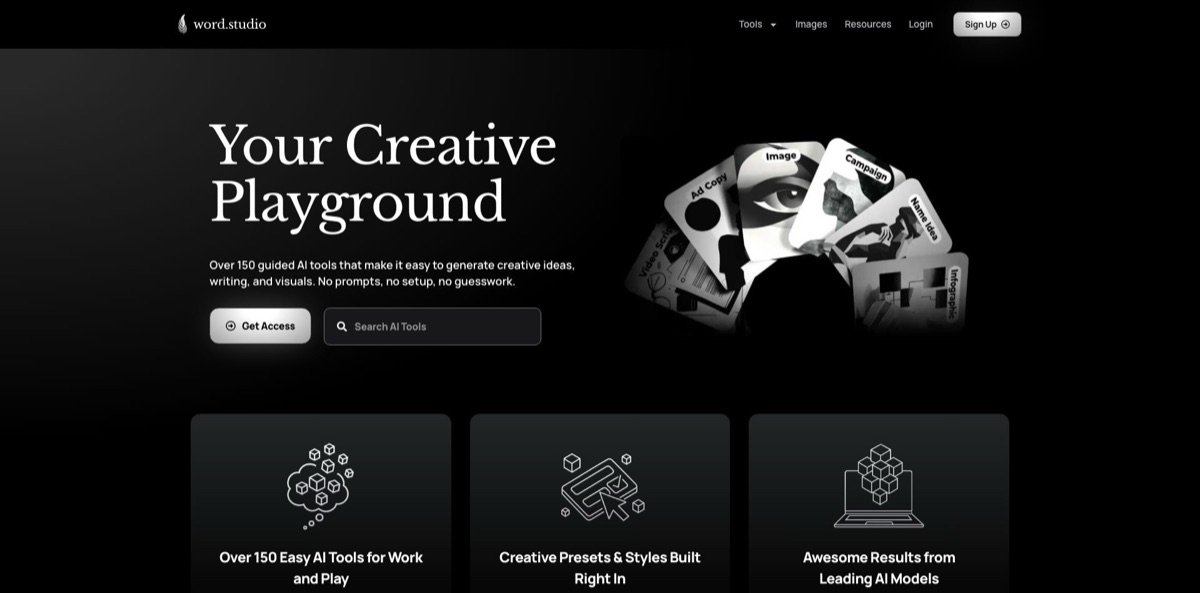
Word.Studio is a web library of more than 150 single-purpose AI tools, each wrapped in a short form instead of a blank chat box. You pick a tool such as Article Writer, Cover Letter Writer, Humanizer or Logo Designer, fill in fields like topic, audience, tone and length, and the platform sends your answers through a prompt the company has already written and tuned, routed to whichever model it chose for that job. The problem it removes is prompt writing: you get a usable first draft without learning how to brief an AI. The weak spot is depth. Nothing is saved between sessions, there is no project workspace, no listed API and no team plan, and each tool is a one-shot generator rather than a long-form editor. Take it if you write many short, varied pieces and want cheap, quick drafts; skip it if you need collaboration or long documents.
How to start using Word.Studio?
You can try it before paying anything. Guests who are not logged in can run any Starter-level tool three times per day, so open the homepage, scroll the tool grid or use the search box, and filter by the toolbox menus: Writing, Editing, Analysis, Education, Business, Career, Wordplay and Images. When the free runs are used up, the Sign Up button leads to a “Select Your Studio” page with two plans, Starter and Pro. Checkout asks for your name and billing address and starts a monthly subscription with no contract.
For a first real job, open Article Writer. The form asks for a subject, the intended audience, a tone of voice from a dropdown and a target length. The tool page spells out the workflow in three steps: fill in the fields with as little or as much detail as you like, submit and wait a few seconds for the text to appear above the form, then copy it wherever you need it. The built-in guide recommends being specific, for example naming the reader (“homeowners with solar panels”) instead of writing “everyone”.
The screen you will use most is the form itself, plus the usage meter in your dashboard. Many tools come with style presets, such as music genres for the Lyrics Generator or handwriting and paper styles for the Handwritten Letter Generator, so you select rather than describe. Every run starts from a clean slate with no conversation history, which means you can change one field, regenerate and compare versions without earlier attempts bleeding into the result. Pro members also get chat-style writing assistants for open-ended requests.
Before you publish anything, move the output out of Word.Studio. The service keeps no history in your account, deletes queries from its database after 15 days and stores your form entries only in your browser cache. Paste drafts into your own document, then proofread: the tool pages themselves remind you to check facts and edit the text to make it your own. You can chain the editing tools, for example Grammar Checker, then Cliché Finder, then Em Dash Eliminator, and use the feedback form on any tool page if something misbehaves.
Who is it for?
Job Seekers
Writing a fresh cover letter for every application is slow, and generic chatbot letters sound the same. Word.Studio bundles a Cover Letter Writer, Resume Editor, Interview Question Prepper, Letter of Interest Generator and Career Path Explorer behind simple forms. The cheaper Starter plan covers all of them.
Freelance Copywriters and Marketers
You juggle ad lines, hooks, landing pages and product descriptions for different clients and tones. Tools like Classic Ad Copywriter, Hook Writer, Landing Page Writer and Brand Voice Analyzer give you a first pass in seconds, and the analyzer returns a reusable prompt that describes a client’s voice. You spend your time editing instead of staring at a blank page.
Songwriters and Creative Hobbyists
The product started as a song generator for friends, and it shows. Lyrics Generator, Parody Songwriter, Country Lyrics Generator, Novel Outliner and Beat Sheet Builder turn a few details into structured drafts. Personalised birthday songs or a screenplay outline take minutes rather than an evening.
Teachers and Students
Lesson Planner, Quiz Generator, Glossary Generator and Thesis Statement Generator produce outlines for any subject and grade level. They help with structure and brainstorming. Treat the facts as a draft and check them before anything reaches a classroom or a grade.
AI Image, Video and Music Creators
Writing good prompts for other generators is its own skill. Midjourney Prompt Crafter, Luma Prompt Creator (which also targets Runway and Sora), Music Style Prompt Generator for Suno and Udio, and Audio Tag Infuser for voiceover scripts ask you a few questions and return a detailed prompt you paste into the other tool.
Small Business Owners
Business Plan Builder, Business Idea Validator, Competition Analyzer, Review Responder and Job Description Writer cover the documents a founder writes once a quarter but never wants to start from zero. The output is a solid skeleton, not a finished investor deck.
Word.Studio pricing
There are two flat monthly subscriptions with daily output caps, not credits or seats. Caps reset every 24 hours and count only the final words a tool produces. Image generations are converted into word equivalents: roughly 1,000 words for images with graphics or lettering and roughly 500 words for photorealistic and illustration tools. The official plan page shows monthly billing only, with no contract and cancellation “in 2 clicks”; there is no annual discount and no team tier.
No account needed. Any Starter-level tool can be used three times per day. Image generators and certain advanced tools stay locked.
Access to the 150+ writing, editing and brainstorming tools, up to 15,000 output words refreshed daily, and the privacy promise that your data is not used for AI training. Image generators are not included.
Everything in Starter plus the Pro text and visual tools, up to 35,000 words refreshed daily, up to 20 images or visuals per day, and chat-style writing assistants. This is the only way to reach Logo Designer, Infographic Generator, Collage Creator and the other image tools.
Custom terms are not offered on the pricing page. The FAQ says that if you hit your limit you can email support and they will often raise it for that day, and that consistently extreme volume users will be pointed to a different platform.
Word.Studio key features
Form-driven tools with hidden prompts
Each tool asks for exactly the inputs its task needs, such as topic, audience, tone, length, key points and things to leave out, and feeds them into a detailed system prompt the company maintains. You never see or edit that prompt, which keeps things simple but also limits fine control. You get consistent drafts without prompt-engineering knowledge.
Per-tool model routing
Word.Studio describes itself as model-agnostic and pairs each tool with the model it considers strongest for that job, updating as new models launch. The Image Generator page names Black Forest Labs Flux.1 as its engine; most text tools do not name their model publicly. You benefit from model choices without managing several AI subscriptions yourself.
Editing and analysis toolkit
Beyond generators, there are Grammar Checker, Paraphraser, Tone Transformer, Humanizer, Active Voice Converter, Adverb Overload Detector, Cliché Finder, Jargon Buster, Fallacy Finder and Word Counter Plus with readability and keyword density.
Image and visual generators on Pro
Logo Designer, Book Cover Designer, Movie Poster Maker, Podcast Cover Designer, Neon Sign Generator, Handwritten Letter Generator, Coloring Page Maker and Infographic Generator produce graphics from a short description plus a style preset. Pro allows up to 20 images or visuals per day. These are concept-level assets, so plan on finishing logos or covers in a design tool.
Prompt builders for other AI apps
Midjourney Prompt Crafter, Luma Prompt Creator, Music Style Prompt Generator, Prompt Optimizer and Reverse Prompt Engineer turn your rough idea into a structured prompt for another generator. A separate Prompt Templates library sorts ready-made prompts into categories such as Marketing, Legal, Podcasting, Sales and Human Resources. That makes Word.Studio useful even if your main AI tool lives elsewhere.
Wordplay and fun tools
Anagram Alchemist, Pun Pal, Rhyme Finder, Riddle Generator, Roastmaster, Insult Generator and Morse Code Converter are lightweight but distinctive. They are the reason the site calls itself a “creative playground”, and they make it handy for party invitations, toasts and social posts.
Sketchpad-style privacy and ownership
Inputs are not used for model training, queries are deleted from the database after 15 days, and there is no stored history. You own everything you generate and may use it commercially; the FAQ suggests adding your own human edits if you want a stronger copyright claim.
Word.Studio Pros & Cons
Pros
The form approach removes the hardest part of using AI for casual writers: knowing what to ask. Because each tool requests the right details and wraps them in a prepared prompt, outputs tend to be on-task from the first run, and the clean-slate design makes it easy to tweak one field and compare variations. The catalogue is wide, from cover letters and grant proposals to lyrics, coloring pages and Midjourney prompts, and pricing is low and predictable at $7 or $16 a month with clear daily word caps. Privacy terms are refreshingly plain: no training on your data and automatic deletion after 15 days. Use the free guest runs to find the three or four tools you will actually return to.
Cons
Breadth comes at the cost of depth. There is no document editor, no saved history, no folders, no team accounts, no listed API and no integrations with Google Docs, WordPress or other apps, so every result has to be copied out by hand. You cannot see or adjust the hidden prompts, which limits control when a tool’s default framing is wrong for you. Image generation is capped at 20 per day on Pro, and the service automatically blocks very explicit adult or violent terms. Independent user reviews are almost nonexistent, so you are relying on the vendor’s word. Treat it as a quick-draft companion next to a full writing tool, not a replacement for one.
Use Word.Studio if you want…
- Draft cover letters and resumes without writing any prompts.
- Generate song lyrics and parodies from genre presets.
- Turn a rough topic into a first-draft article.
- Clean up AI text with humanizer and cliché tools.
- Create logo, book cover and neon sign concepts.
- Build detailed prompts for Midjourney, Suno or Runway.
- Plan lessons, quizzes and glossaries for any grade.
- Keep AI writing costs flat and predictable each month.
- Keep your inputs out of AI model training.
Word.Studio alternatives
 Easy-Peasy.AIRead review →ToolbazRead review →
 1min.AIRead review →
 Jasper AIRead review →
 Hypotenuse AIRead review →
 SimplifiedRead review →
 ChatGPTRead review →
Word.Studio Reviews
Independent feedback is very thin: the two users who rated it on TopAI.tools both recommend it and both credited quality results and good value for the price, but two votes without written comments say little about long-term use.
On There’s An AI For That it holds a single five-star rating with no text, while Product Hunt and Capterra list no user reviews at all, so there is no real record of praise or complaints from paying customers yet.
Most of the positive picture comes from the vendor itself: the founder’s About page says more than 2,000 creators visit every day and that the company is bootstrapped, which is a company claim rather than an independent review.
FAQ
Is there a free version of Word.Studio?
Yes. Guests can use any Starter-level tool three times per day without creating an account. Image generators and some advanced tools require the Pro plan.
How much does Word.Studio cost?
Starter costs $7 per month and Pro costs $16 per month, both billed monthly with no contract. Starter allows up to 15,000 output words per day; Pro allows up to 35,000 words or 20 images per day and adds chat assistants.
Does Word.Studio save my inputs or use them to train AI?
No. The company says it never uses your data for model training and automatically deletes every query from its database after 15 days. Form entries are kept only in your browser cache so you do not lose them on refresh.
Can I use Word.Studio content commercially?
Yes. You own everything you generate and may use it for personal or commercial work, including client projects. The FAQ recommends adding your own edits if you want a stronger copyright position.
Which AI models does Word.Studio use?
The platform picks the model it considers best for each tool and does not disclose most choices. The Image Generator page states it runs on Black Forest Labs Flux.1.
What happens when I reach my daily word limit?
Usage resets every 24 hours, and you can track it in the dashboard meter. If you hit the cap, the FAQ says you can email support and they will often raise your limit for that day.
Does Word.Studio have an API or integrations?
No API or third-party integrations are listed on the site. You work in the browser and copy results into your own documents.
How do I cancel my Word.Studio subscription?
Plans are monthly with no contract, and the pricing page says you can cancel anytime in two clicks from your account.
Similar tools
 RunableGeneral AI agent that turns one prompt into websites, slide decks, social carousels, videos and apps, with plugins and scheduled tasks.
 AISEOAI writing suite with a text humanizer, article and Outrank generators, AI detector and plagiarism checker, plus AI search visibility tools.
 Octopus.doVisual sitemap builder that drafts page structure, block copy and SEO tags with AI, crawls existing sites and connects to ChatGPT, Claude