

Writefull
Content CreationUpdated November 21, 2026
Academic writing AI for Word, Overleaf and the browser, with journal-trained language edits, an Academizer, a paraphraser and title and abstract generators.
We may earn a commission when you sign up through our links. It does not affect our reviews.
What is Writefull?
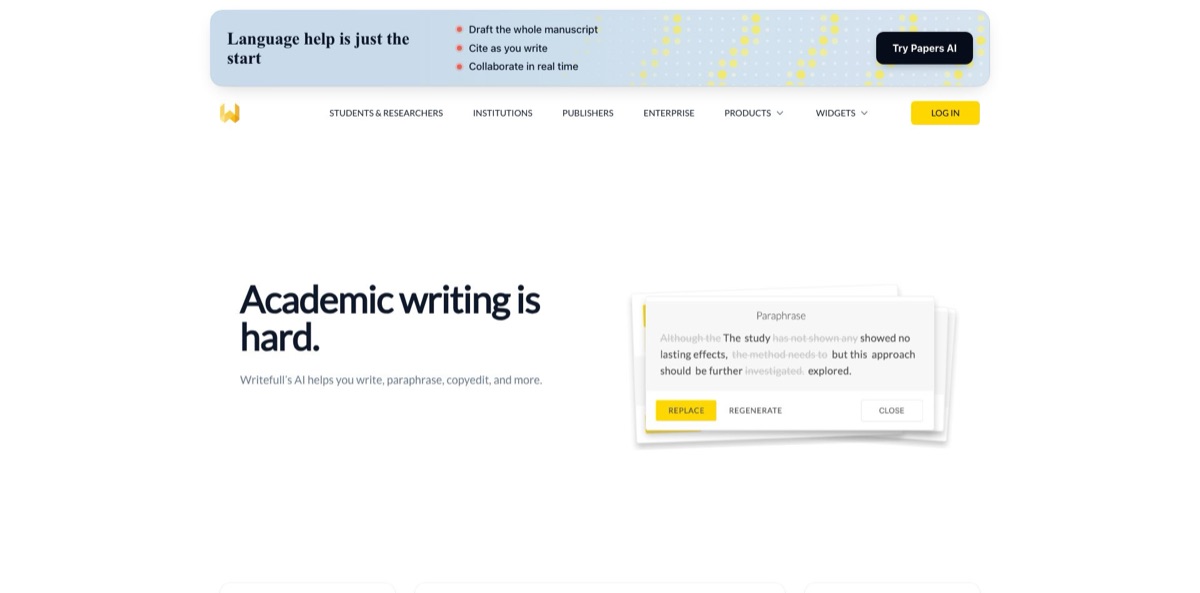
Writefull is an academic writing assistant that checks and rewrites English research text using language models trained on millions of published journal articles. It runs as an add-in for Microsoft Word, inside the Overleaf LaTeX editor, and as a set of free browser widgets called Writefull X, where the Academizer turns informal sentences into academic prose and the Paraphraser, Title Generator and Abstract Generator handle the other drafting chores. Digital Science, which also owns Overleaf, held a stake in the Dutch startup from 2018 and acquired it outright in November 2023. The strength is edits calibrated to journal style rather than business email. The weak spots are a narrow footprint with no Google Docs support, proprietary models that only cover English, and several rewrite features that rely on OpenAI or Anthropic. Pick it if you write papers or a thesis in Word or LaTeX, especially in a second language.
How to start using Writefull?
Create a free account at my.writefull.com, or install one of the tools and sign up from inside it; either route puts you on the Free plan by default. In Word, open the Home tab, click Add-ins (on older builds it sits under Insert), search for “Writefull” and click Add. On Windows you need Office 2016 or newer, while Mac and Word Online need Microsoft 365 or Office 2016 and later. A legacy installer remains available for older versions of Office.
Overleaf users skip the installation. The old Chrome extension has been switched off because Writefull is now built into Overleaf, so you enable it from your Overleaf Account Settings, where it now sits among Overleaf’s AI features. Your Overleaf login is used, and you can keep the suggestion model set to the Writefull model under the Spelling and language settings. Inside Overleaf, the daily allowance for these tools follows your Overleaf plan.
For a first real run, open a chapter you are already revising and let the language check work through it. Suggestions cover grammar, word choice, punctuation and style, and suggestions you never want to see again can be blocked from your account page. Then select a paragraph and try the context options: Paraphrase, Make scientific, Make concise, Split, Join or Synonyms in Context. In Word, Ask AI answers questions about a selected passage, such as whether your statistics are reported clearly.
When you only need a quick fix, Writefull X runs in the browser with no install. Paste up to 2,000 characters of casual text into the Academizer, or drop a sentence into the Paraphraser and pick one of three rewrite levels, with High being the most creative. The Abstract Generator expects your paper from Introduction to Conclusion, without the existing abstract and references, and clicking Generate again gives you another version. Read every output against your data before it goes into the manuscript, because these models polish wording and cannot verify your claims.
Run the language check on one finished section before upgrading, since the free daily quota is enough to judge whether the edits fit your field.
Who is it for?
PhD students writing a thesis
You are producing a long document in English, perhaps your second language, and feedback from a supervisor arrives slowly. Writefull flags grammar and word-choice issues with edits modelled on published papers, and the Premium quota is set high enough to process an average PhD thesis a day. Expect to reject some suggestions that clash with your department’s style guide.
LaTeX-first researchers
Your paper lives in Overleaf, where most grammar checkers trip over commands and maths. Writefull reads the source and gives LaTeX-aware feedback, while TeXGPT and the Table and Equation Generators write code from a prompt or even an image of a table. You stay in one editor from first draft to submission.
Non-native English authors before submission
A desk rejection over language quality can cost you months. Writefull began as a project to help researchers from non-English-speaking backgrounds, and its edits target the phrasing journal reviewers expect. Pair it with a colleague’s read of the discussion section, where nuance matters most.
Students turning notes into academic prose
You know what you want to say, but it comes out sounding like a chat message. The free Academizer rewrites informal sentences in an academic register, and the Paraphraser offers alternatives at three strengths. Treat the output as a draft, and keep citing sources, because Writefull itself warns against rephrasing other people’s work to pass a plagiarism check.
University libraries and writing centres
You want one licence that covers every student instead of individual subscriptions. An institutional licence adds Writefull Revise and Writefull Cite to the Word, Overleaf and browser tools, and administrators can switch off individual AI features to match the university’s AI policy.
Publishers and editing services
Manuscript triage and copyediting at volume need consistent metrics. The Writefull language API returns corrections and quality scores in JSON or as Track Changes, and Digital Science lists the American Chemical Society, Sage and the Royal Society of Chemistry among the publishers using Writefull in their workflows.
Writefull pricing
Writefull sells a single personal subscription, Premium, on top of a Free plan, and the billing period only changes the discount. Free accounts get a daily quota for language suggestions and AI writing features that resets automatically, while Premium removes the quota under a fair-use policy. Prices below are in USD from the official plans page as of 20 November 2026. If you write in Overleaf, check your Overleaf plan too, because Overleaf’s documentation ties daily AI allowances, Writefull suggestions included, to the Overleaf tier.
Limited Writefull language edits, limited GPT edits for other languages, limited use of the rewriting tools (Paraphraser, Change Style, Explain, Summarize, Split/Join, Synonyms in Context, Title and Abstract Generators) and limited Writefull X. Prompt-based GPT edits and Supercomplete in Overleaf are not included.
Unlimited language edits and rewriting features across Word, Overleaf and Writefull X, plus custom GPT edits with your own prompt, TeXGPT, Ask AI, the LaTeX Table and Equation Generators, Error Assist and Supercomplete. Renews automatically each month.
Same features, and a reasonable fit for one paper’s revision cycle.
Same features at the lowest rate, the obvious choice for a thesis year.
Members get Premium in Word, Overleaf and Writefull X, but not Revise or Cite.
Custom. Quotes are based on the number of students and researchers expected to use Writefull, with bundle discounts for institutions that already hold an Overleaf licence. This is the only route to Writefull Revise and Writefull Cite.
Writefull also offers a 15% student discount when you introduce it to a staff member at your university and copy institutions@writefull.com. Payments run through Stripe or Gumroad, and you can cancel from the billing portal of whichever one you used.
Writefull key features
Research-trained language edits are the core of the product
Writefull’s own models learned from millions of published articles across all research fields, so suggestions on grammar, word choice, punctuation and style follow journal conventions and recognise discipline-specific terms. These models run on Writefull’s servers in the Netherlands, and the company says your text is neither stored nor used for training.
The Academizer and the other Writefull X widgets work in any browser without a download
The Academizer converts informal sentences into academic register with a model trained on academic language and accepts up to 2,000 characters at a time. The Paraphraser rewrites academic sentences at three levels, the Title Generator was trained on title and abstract pairs, and the Abstract Generator drafts an abstract from the body of your paper. The older GPT Detector widget has been discontinued.
Context options in Word and Overleaf rewrite whatever you select: Paraphrase, Make scientific, Make punchy, Make concise, Split, Join and Synonyms in Context, with Explain and Summarize also offered in Word. These particular features call OpenAI’s GPT or, in some cases, Anthropic’s Claude, and Writefull asks for your consent before text is sent the first time. Edits land in place, so there is no copying back and forth between a chatbot and your manuscript.
LaTeX tools in Overleaf target the parts of a paper that eat time
TeXGPT writes LaTeX on request for formatting, figures and custom commands, while the Table and Equation Generators take a prompt or an uploaded image and return code. Error Assist helps with compile errors, and Supercomplete, a paid feature, suggests sentence endings as you type.
Ask AI is an assistant inside Word that answers questions from a researcher’s perspective
You can ask freely or select a passage, for example your conclusion, and ask how to make it more convincing. It keeps you inside the document instead of switching to a browser tab, although the answers come from a third-party model.
Writefull Revise and Writefull Cite cover the final check before submission, but only for institutions (and publishers, in the case of Revise). Revise takes a .doc, .docx or .tex file and returns a copy with language corrections in Track Changes. Cite scans a text for sentences that present non-general knowledge without a reference and lets you set a confidence threshold for how many flags you see.
Writefull Pros & Cons
Pros
The edits come from models trained on published research, so they follow journal conventions instead of nudging everything toward plain business English, which is the advantage users point to when comparing Writefull with Grammarly. It lives where academics already write: Word, and Overleaf without any extension now that the two Digital Science products are integrated. The browser widgets, the Academizer included, are free under fair use, and Premium is inexpensive for the category at $12.50/month on annual billing. The privacy policy is clear too, with no storage or training on your text by Writefull’s own models and a consent step before any third-party feature. Run the free tier on a real chapter before you pay.
Cons
Coverage is narrow: there is no Google Docs or Obsidian integration, the browser option is limited to the Writefull X site, and the proprietary models only handle English. Many rewrite features send text to OpenAI or Anthropic, which may hold it temporarily, and that matters if your institution or publisher restricts third-party AI. The free quota runs out fast on long documents, widget inputs stop at around 2,000 characters, and at least one user reports rules that clash with British style, such as an enforced serial comma. Revise and Cite require an institutional licence, and inside Overleaf the allowance now depends on your Overleaf plan. Check whether your university already pays for a licence before subscribing yourself.
Use Writefull if you want…
- Polish thesis chapters with edits trained on journals.
- Turn informal draft sentences into academic English.
- Check LaTeX papers for language errors inside Overleaf.
- Generate a working title from your abstract.
- Draft an abstract from your paper’s main text.
- Paraphrase academic sentences at three rewrite levels.
- Generate LaTeX tables and equations from prompts or images.
- Keep your manuscripts out of AI training data.
Writefull alternatives
Writefull Reviews
PhD students on Reddit say the suggestions suit academic writing a little better than Grammarly and, with a discount, cost a fraction of its price, but they miss Google Docs support and rate the extra widgets below free alternatives.
A scientist and translator on Reddit found that many of the roughly 250 issues flagged in a paper came from an enforced serial comma that British English does not require, and went back to Grammarly.
Capterra reviewers say Writefull makes their papers cleaner and easier to read and that the Title Generator is the widget they use most, though the 2,000-character limit gets in the way with longer selections.
Other Capterra users note that suggestions do not always match the tone a document needs, and one flagged a suggestion to replace “she” with “he” as a bias concern.
Reviewers of the former Overleaf browser extension praised language feedback that actually understands LaTeX, while a few questioned whether the subscription is worth it next to Grammarly.
FAQ
Is Writefull free?
Yes. The Free plan includes the language check and AI writing features with a daily quota, and the Writefull X widgets such as the Academizer and Paraphraser are free under a fair-use policy. Premium removes the daily limits.
How much does Writefull Premium cost?
Premium costs $21 per month, $51 per quarter or $150 per year in USD, and renews automatically. Groups of 2 to 100 people get volume discounts, and institutions receive a custom quote.
Does Writefull store my text or train on it?
Writefull says it never stores your text or uses it for training, because its models learn from published papers, and its servers are in the Netherlands. Features powered by OpenAI or Anthropic ask for consent first; those providers may keep text temporarily, typically up to 30 days, but do not train on it.
Does Writefull work for languages other than English?
Writefull’s own models only check English. In Overleaf you can switch the language check to GPT to revise text in other languages, and Writefull’s FAQ says this option is still being rolled out in Word.
How do I use Writefull in Overleaf without the Chrome extension?
Writefull is now built into Overleaf, so you enable it from your Overleaf Account Settings instead of installing anything. Your Overleaf login is used, and the daily AI allowance depends on your Overleaf plan.
Which versions of Word does Writefull support?
On Windows you need Office 2016 or newer. On Mac and Word Online it works with Microsoft 365 or Office 2016 and later, and older Office versions need the legacy add-in from Writefull’s website.
Is there a student discount?
Writefull gives a 15% discount when you recommend it to a staff member at your institution and copy institutions@writefull.com on the email. Many universities already hold licences, so check with your library first.
Can I buy Writefull Revise or Writefull Cite on my own?
No. Both are sold only through institutional licences, with Revise also available to publishers, while personal and group plans cover Word, Overleaf and Writefull X.
Similar tools
 TypefaceEnterprise marketing AI platform that turns brand guidelines into AI agents for on-brand emails, ads, web pages and campaign variants at scale.
 Storyboarder.aiAI pre-production platform that turns scripts or ideas into shot lists, consistent storyboard frames, animatics and pitch decks for film and ad
 Repurpose.ioAutomation service that takes videos, images, Stories and podcasts from one channel and republishes them to TikTok, Reels, Shorts and other platforms.