

Writer
Content CreationUpdated October 5, 2026
Writer is an enterprise AI platform ensuring brand consistency, governance, and secure content workflows for professional teams.
We may earn a commission when you sign up through our links. It does not affect our reviews.
What is Writer?
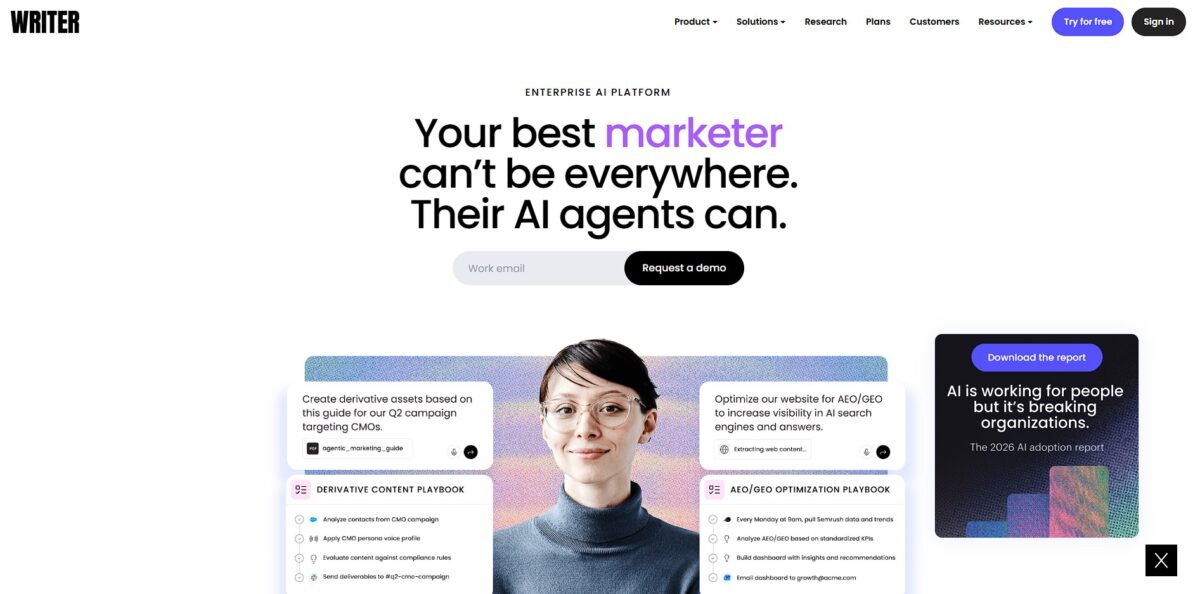
Writer functions as a specialized governance layer for companies that need their AI to sound human and stay accurate. It replaces generic prompting with a system of Voice profiles and Knowledge Graphs that sync directly with your brand guidelines and live product data. I noticed it flags off-brand terminology in real-time within Google Docs or Slack, which saves editors from manually correcting “AI-speak” every time a team member generates a draft. This setup allows marketing teams to scale content without the usual drift into robotic, repetitive language that ruins brand trust. It is excellent for maintaining a tight editorial standard across a global workforce, though it is likely excessive for a solo creator who doesn’t need complex enterprise security or multi-team style guides. This matters because it shifts AI from a creative toy to a predictable, governed business asset. Use Writer if you want your AI outputs to be publish-ready on the first try rather than a mess for your editors to clean up.
How to start using Writer?
You start by defining your brand’s “ground truth” in the Knowledge Graph. This isn’t just a bio; you upload style guides, past successful campaigns, and specific terminology that your legal team has already blessed. While generic bots guess your tone, Writer anchors its generations to these existing documents. This keeps banned phrases and off-brand metaphors out of your first draft, so you skip the back-and-forth editing cycles where you strip “AI-isms” from every paragraph.
Rule of thumb: upload your most recent 10-K or brand book first to set the baseline.Next, you move into the workspace to build your first “Snippet.” These are reusable blocks of text, like a standard product description or a recurring disclaimer, that the AI can pull into any new content. Setting these up early prevents the model from hallucinating technical specs that changed six months ago. It works well for maintaining factual consistency across a large team, though it requires a bit of upfront manual entry. With snippets in place, five different writers won’t describe the same feature in five different ways.
Takeaway: begin with your most frequently used product blurbs to see immediate time savings.Once your knowledge base is populated, you can switch to the “Ask” interface or use the direct extensions in Google Docs and Microsoft Word. Instead of jumping between tabs, you trigger the AI within your actual document to rewrite sentences or expand on a bulleted list. It feels less like a chat bot and more like a specialized editor that already knows your company’s internal jargon. On the downside, it can feel restrictive if you are trying to write something outside of your pre-defined brand voice. Keeping the AI in your document editor also stops the context-switching that usually kills a writer’s flow.
Actionable tip: install the browser extension immediately to bring your brand guidelines into every web-based text box.Finally, you set up the “Check” rules to automate your style guide enforcement. This acts as a real-time grammar and tone monitor that flags deviations as your team types. It identifies when someone uses a casual tone in a formal white paper or misses a required trademark symbol. In testing, it caught small formatting errors that human eyes often skip after a long day of editing, which means senior editors no longer have to act as “brand police” for minor mistakes. Choice rule: use the “Push to all users” setting to ensure every new hire is following the same rules from day one.
Who is it for?
Content Operations Leads
Centralize brand guidelines so every AI-generated draft matches your specific tone and terminology. That stops the constant back-and-forth of correcting “on-brand” nuances across hundreds of files and gives the entire company a single source of truth for its voice.
Enterprise Legal and Compliance Teams
Filter AI outputs through a built-in governance layer to catch regulatory slip-ups before they go live. It works well for highly regulated industries where a single wrong claim is a liability, though it may feel restrictive for purely creative teams. Risk management moves directly into the drafting phase.
Technical Documentation Writers
Build custom apps that pull from internal wikis to help explain complex APIs or legacy systems. The platform indexes your specific documentation rather than relying on general web data, which reduces the risk of the AI hallucinating non-existent features and keeps things technically accurate for your developers.
Marketing Agencies at Scale
Manage multiple client workspaces with distinct personas and restricted access for external contractors. This setup allows you to pivot between varied brand voices without accidentally mixing up client data. Client confidentiality stays protected while the first-draft process speeds up.
Product Managers
Draft consistent release notes and internal memos by feeding the tool your product requirement documents. It translates dense specs into readable updates, saving you from staring at a blank page every Friday afternoon. Stakeholders stay informed without the updates eating up your deep-work hours.
Writer pricing
Writer keeps its pricing behind a gate for anything beyond departmental use. It focuses on the enterprise market, so you will find two main paths depending on your team size and technical needs. You pay a high per-seat cost in exchange for strict brand governance.
Starter: $29/user per month (billed annually) or $39/user monthly. This plan supports up to 5 users. It includes access to the Writer Agent and limited Knowledge Graph connectors. The per-seat model becomes a budgeting headache for scaling teams, since it forces you to choose who actually needs AI access rather than deploying it company-wide.
Enterprise: Custom pricing. You must contact sales for a quote. This adds unlimited users, full API access, and the ability to train the AI on your specific helpdesk tickets or internal wikis. It offers expert onboarding and advanced security controls. Regulated industries get the legal and technical safeguards they require.
API: Pay-as-you-go. Pricing depends on the specific Palmyra model used. For example, Palmyra X5 costs $0.60 per 1M input tokens and $6.00 per 1M output tokens. This lets developers build custom applications directly on Writer’s LLMs. If you only need the raw model without the full platform interface, you get granular cost control.
Use the Starter plan to test brand alignment with a small team, but prepare for a sales call the moment you need to integrate proprietary data at scale.
Writer key features
Proprietary LLM Training
Writer builds its own models rather than just wrapping OpenAI APIs. This setup helps large teams avoid the generic “AI voice” that plagues basic chatbots. Your enterprise data also stays within a controlled environment.
Automated Style Guide Enforcement
The editor flags non-compliant terminology and tone shifts as you type. I noticed it catches specific brand jargon that generic tools miss. Editors are spared the manual chore of correcting the same branding errors across fifty different drafts.
Knowledge Graph Integration
Connect your internal wikis and databases so the AI pulls from your actual product facts. It stops the bot from hallucinating features that don’t exist in your current software version. Technical writers no longer have to fact-check every single sentence against a source document.
Zero-Data Retention Policy
Writer guarantees that your sensitive inputs won’t be used to train their public models. Unlike free tools, your secret roadmap remains private even if you use the AI to summarize it. Executives can use the tool for confidential strategy work without risk.
Multi-User Collaboration Workflows
Teams can build “Apps” or templates that standardize how every person in the department generates a report. The interface handles permissions well, keeping the creative team away from the dev-focused API keys, and output stays predictable regardless of who hits the “Generate” button.
Writer Pros & Cons
Pros
Writer enforces your specific brand voice and terminology across every department automatically. It scans drafts for style guide violations and restricted jargon before content goes live. The platform uses your own internal data to train its models, which prevents generic, AI-sounding fluff. This matters because it ensures a junior copywriter and a senior developer both produce text that sounds like it came from the same brand.
Cons
The enterprise focus makes it overkill for solo creators who just need a quick blog post. You might find the setup phase tedious if your brand documentation is currently scattered or unwritten. The interface prioritizes governance over creative experimentation, which sometimes feels restrictive during brainstorming. The API also requires significant technical oversight to integrate into custom CMS workflows, so expect to involve a developer instead of just plugging and playing.
Use Writer if you want…
- Maintain strict brand voice consistency across all departments.
- Automate complex multi-step workflows with shareable AI playbooks.
- Connect AI agents directly to enterprise tools like Slack, Asana, and Salesforce.
- Ensure enterprise-grade security and compliance with HIPAA and SOC 2 standards.
- Scale content production without sacrificing quality or governance.
- Audit AI usage through detailed system-level activity logs.
- Generate data-driven deliverables like branded decks and research reports in minutes.
Writer alternatives
 JasperRead review →
 Hypotenuse AIRead review →
 ClaudeRead review →
 ChatGPTRead review →
 eesel AIRead review →
 Adobe FireflyRead review →
Writer Reviews
I love that it ensures everything I create reflects the company’s brand voice and tone; it saves me hours of manual editing time by generating drafts that are accurate and consistent on the first read.
The drag-and-drop canvas for building custom AI agents is incredibly slick, allowing our marketing team to automate complex workflows without waiting for IT bottlenecks.
Finally, an enterprise tool that prioritizes brand governance; the real-time suggestions and integrated style guides make our team’s writing appear cohesive and professional across all channels.
FAQ
Does Writer offer a free trial?
Yes, Writer provides a free trial period for new users to test the platform’s enterprise features before committing to a paid plan.
What is the starting price for the Writer Starter plan?
The Starter plan starts at $29 per user per month when billed annually, supporting up to five users with core features like the Palmyra AI editor and style guide enforcement.
Does Writer offer an Enterprise plan?
Yes, Writer offers an Enterprise plan with custom pricing designed for large organizations, including unlimited users, advanced security, and full API access.
What are the key security features for enterprise users?
Writer provides enterprise-grade security including SSO and SCIM support, role-based access controls, and a 99.9% uptime commitment for Enterprise customers.
Can Writer enforce brand voice and style guides?
Yes, the platform allows you to codify your brand’s DNA, including style configuration and terminology management, to ensure all AI-generated content remains on-brand.
Does Writer support custom AI agents?
Yes, users can build custom AI agents and playbooks to automate specific workflows, such as generating content briefs, webinar outlines, or SEO refreshes.
How does the Writer Knowledge Graph work?
The Knowledge Graph allows you to connect your own data sources and URLs, enabling retrieval-augmented generation (RAG) so the AI can answer questions based on your specific business context.
Similar tools
 RunableGeneral AI agent that turns one prompt into websites, slide decks, social carousels, videos and apps, with plugins and scheduled tasks.
 AISEOAI writing suite with a text humanizer, article and Outrank generators, AI detector and plagiarism checker, plus AI search visibility tools.
 Octopus.doVisual sitemap builder that drafts page structure, block copy and SEO tags with AI, crawls existing sites and connects to ChatGPT, Claude