
Y2Doc
Data AnalysisUpdated November 24, 2026
Web tool that turns public YouTube videos into structured notes, timestamped transcripts and PDF, Markdown or Docx files, plus MP3 downloads.
We may earn a commission when you sign up through our links. It does not affect our reviews.
What is Y2Doc?
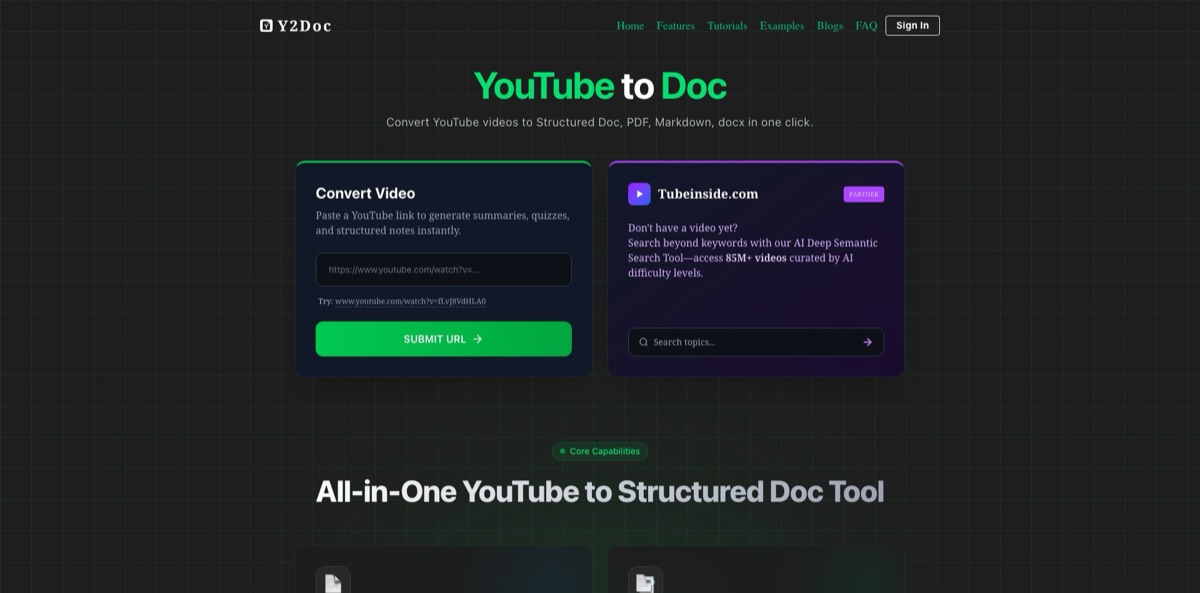
Y2Doc is a browser-based converter that takes a public YouTube link and returns a structured document: headings, section summaries, key takeaways and timestamps that point back to the video, exportable as PDF, Markdown or Docx. It can also pull the full timestamped transcript and save the video or its audio as MP3. The problem it removes is familiar to anyone who studies from YouTube: pausing a long lecture every few minutes to type notes, then hunting for one point you half remember. Basic conversions need no account, and the FAQ caps free users at videos up to 60 minutes with a daily limit. The weak spots are real, though. Output quality tracks the video’s captions, English is the main supported language, paid prices are not published, and the terms limit generated content to non-commercial use. Pick it if you learn from long videos and want clean, skimmable notes.
How to start using Y2Doc?
Go to y2doc.com, paste a YouTube link into the Convert Video box and press Submit URL. Basic conversions run without registration, so you can judge the output before handing over an email address. If you plan to use it more than occasionally, sign in with a Google, Apple or email account: the FAQ says signing in raises your daily quota, and sharing a document by link also requires a login. Only public videos work. Private and unlisted videos are refused, and region-locked ones can fail.
For a first real job, pick a lecture or tech talk under 60 minutes, since that is the ceiling on the free tier. According to the FAQ, most videos up to 30 minutes finish in under 30 seconds, while longer ones take one to two minutes depending on content and server load. The default result is a Structured Doc: the video broken into sections with headings, bullet points and short summaries instead of one long block of subtitle text. If you want the raw words, choose the Transcript option on the result page to get the full timestamped transcript.
The result page is where most of the work happens. Y2Doc maps each section to its original timestamp, so you can jump to the exact moment in the video when a summary feels thin. The About page describes detailed and concise views, plus plain-English summaries, key takeaways and definitions of technical terms for major sections. For lectures full of formulas, code or slides, the tutorials describe still frames embedded next to the matching explanation. A built-in Markdown editor with a preview lets you fix headings or wording before you export anything.
Before you rely on the document, spot-check it against the video. The FAQ is candid that quality depends on captions: videos with manually created captions convert best, and poor auto-captions can carry errors into the summary. Check names, numbers and jargon at two or three timestamps, then use Download to export PDF, Markdown (.md) or Docx. Signed-in users can share a link by email, Facebook, X, WhatsApp or LinkedIn, or publish the document to the public Community gallery, and unpublish it later if needed.
Run your first conversion on a video with human-made captions, so you judge Y2Doc’s structuring rather than YouTube’s speech recognition.
Who is it for?
Students
You have a 50-minute lecture to review before an exam and no time to rewatch it. Y2Doc turns it into sectioned notes with timestamps, so you reread what you missed and open the video only for the tricky derivation. The free tier’s 60-minute cap covers most single lectures.
Researchers
Recorded seminars and conference talks are hard to cite because you cannot skim them. A timestamped transcript plus a structured summary gives you searchable text and the exact moment to quote. Verify technical terms against the audio, since the FAQ ties accuracy to caption quality.
Personal knowledge management fans
If your notes live in Obsidian, Notion or a GitHub wiki, the Markdown export drops a video into your vault as headings and bullet lists instead of a pasted wall of text. Video sources become as linkable and searchable as articles.
Busy professionals
Hour-long podcasts and tech talks pile up in Watch Later. Converting them to a PDF lets you read the key points in a few minutes and decide which ones deserve a full watch. Nothing needs installing, so it also works from a phone browser.
Teachers and tutors
You can turn a public explainer video into an outline or handout for a class, with timestamps students can follow back to the source. Keep it within the personal and educational use the FAQ describes, and review the output before you share it.
Y2Doc pricing
Y2Doc runs a freemium model but does not publish a pricing page: y2doc.com/pricing returns a 404, and the homepage only promises free basic conversions with no registration. Paid tiers live in an in-app upgrade dialog that appears when you run out of credits. The site’s own interface text shows that the dialog bills in USD, offers monthly or annual payment, and meters usage in credits, with each minute of converted video costing 1 credit. Dollar amounts for the paid tiers are not shown on any public page, so no figures are quoted here.
Basic conversions without an account. The FAQ limits free users to videos up to 60 minutes and a limited number of conversions per day, and signing in raises that daily quota. PDF, Markdown and Docx export are part of the free flow.
price not published. A paid plan billed monthly or annually with a monthly credit allowance. The upgrade screen advertises conversion of videos up to 4 hours long and full, detailed documents rather than highlights.
price not published. The upper tier, also billed monthly or annually in USD. Its exact credit allowance appears only inside the upgrade dialog.
Subscriptions renew automatically until you cancel, and the terms say payments are non-refundable unless you are charged twice or cannot use the service for more than 10 consecutive days because of Y2Doc’s technical problems. You can cancel from your account at any time.
Y2Doc key features
Structured Doc conversion uses what Y2Doc calls multimodal AI to read the transcript and visual context, then splits the video into sections with headings, bullet points and short summaries. You can switch between detailed and concise views depending on how deeply you want to study. Instead of a raw caption dump, you get a document you can scan in a couple of minutes.
Transcript extraction and chapter detection pull the full timestamped transcript from auto-generated or manual captions and mark chapters automatically. Every section stays mapped to its timestamp, so the document works as an index into the video. This is useful when you need a precise quote rather than a paraphrase.
Export to PDF, Markdown and Docx covers the main places notes end up
The PDF suits printing and offline reading, the .md file goes straight into Obsidian, Notion or a GitHub wiki, and Docx opens in Word or Google Docs. The features page also lists plain TXT among the document formats.
Visual context capture embeds still frames for formulas, code snippets and slides next to the explanation that refers to them, according to Y2Doc’s tutorials. For STEM lectures this matters more than polished prose, because the meaning often sits on the screen rather than in the speech. Check a few frames on dense videos before trusting the full set.
Video and audio download saves YouTube videos in several resolutions and extracts audio as MP3, with WAV also listed on the features page. Having the media and the notes on one site saves a second tool. Keep YouTube’s own Terms of Service in mind, which Y2Doc’s FAQ also points to.
Sharing and the Community gallery let signed-in users copy a link, send it by email or post to Facebook, X, WhatsApp or LinkedIn. You can also publish a document to a public gallery of user-shared conversions and unpublish it later.
Y2Doc Pros & Cons
Pros
Y2Doc removes friction at the start: paste a link and get a sectioned document, with no account and no browser extension. The output is built for reading, with headings, summaries and timestamps that point back to the source, which beats copying text out of YouTube’s transcript panel. Export options cover the formats people actually use, from PDF for printing to Markdown for Obsidian or Notion and Docx for Word and Google Docs. Length limits are generous on paper, with 60 minutes free and up to 4 hours on paid plans, and video and MP3 downloads sit on the same site. Use it for lectures and talks you want to skim first, rewatching only the parts that matter.
Cons
Pricing is opaque: there is no public pricing page, and the FAQ’s promise of unlimited paid conversions does not match the credit meter shown at upgrade. Output depends on captions, so videos with weak auto-captions produce weak documents, and videos without captions can fail outright. Non-English support is limited for now. The terms restrict generated content to non-commercial use, which clashes with the homepage pitch to content creators, and video downloads sit awkwardly with YouTube’s own rules. Independent feedback is scarce, and there is no public API or native integration beyond file export. Test it on the exact kind of video you plan to convert before paying.
Use Y2Doc if you want…
- Turn long YouTube lectures into structured study notes.
- Export video summaries as PDF, Markdown or Docx.
- Get timestamped transcripts without installing a browser extension.
- Add YouTube talks to your Obsidian or Notion vault.
- Skim hour-long podcasts before deciding to watch them.
- Keep formulas and slides next to their explanations.
- Save a lecture’s audio as MP3 for offline listening.
- Share a readable video summary with classmates by link.
Y2Doc alternatives



Y2Doc Reviews
Two five-star comments on AlternativeTo praise it for turning long YouTube videos into notes, one saying it handled a full one-hour lecture; both come from new, low-activity accounts that the site does not count toward the rating.
On TopAI.tools, four user votes recommend against Y2Doc: all four cite missing features, two point to the lack of integrations, and single votes call it hard to use or not worth the price.
Commenters on the Fazier launch call it useful for condensing long lectures into structured summaries and like the PDF and Markdown export, though one asked whether on-screen diagrams and slides are captured or only the speech, and the thread shows no answer.
Overall feedback is thin: the Product Hunt launch drew three upvotes and a single comment, which came from the founder, so early praise should be weighed against how few independent users have reported back.
FAQ
Is Y2Doc free?
Yes, basic conversions are free and need no registration. Free users can convert videos up to 60 minutes with a daily cap, while paid Plus and Pro plans exist but their prices are not published on a public page.
Do I need an account to use Y2Doc?
No, you can paste a link and convert without signing up. Signing in with Google, Apple or email raises your daily quota and is required for sharing documents by link.
What export formats does Y2Doc support?
You can export a Structured Doc as PDF, Markdown (.md) or Docx and pull the full timestamped transcript. Video downloads come in several resolutions, and audio can be saved as MP3.
How long can a video be?
The FAQ limits free users to videos up to 60 minutes, and the upgrade screen advertises up to 4 hours on paid plans. Most videos up to 30 minutes convert in under 30 seconds.
Does Y2Doc work with non-English videos?
Y2Doc primarily supports English. Other languages depend on the captions available on the source video, and the FAQ says multilingual support is being expanded.
Can I use Y2Doc output for commercial projects?
The terms allow reasonable reading, saving and sharing of generated content for non-commercial purposes and bar commercial reprinting, publishing or sales without authorization. The FAQ frames the service as intended for personal, educational and research use.
Does Y2Doc store my documents or the videos?
The homepage says Y2Doc does not store generated documents or share personal data with third parties, and the FAQ says it keeps no permanent copies of YouTube videos. The privacy policy of the operator, Future Y2Doc Pte. Ltd. in Singapore, still allows collecting usage data and sharing it with service providers and affiliates.
Is there a Y2Doc API or browser extension?
No public API is documented, and Y2Doc deliberately has no Chrome extension: it runs as a web app in desktop and mobile browsers. To connect it with other tools, export Markdown or Docx files.
Similar tools
 InnovatianaFrench managed data labeling service with in-house annotators for computer vision, NLP, RLHF and evaluation datasets, plus a self-serve Dataset Finder.
 InfinityCall tracking and AI call analytics platform that ties phone calls to campaigns and keywords and sends call outcomes into Google, Meta
 Simple AnalyticsCookieless, EU-hosted web analytics with an AI chat and an MCP server, so you can ask about your traffic in plain English