
YesChat AI
AI ChatUpdated November 10, 2026
Browser-based AI chat and agent that puts GPT, Claude, Gemini, Grok and DeepSeek plus image, video and music models on one credit pool.
We may earn a commission when you sign up through our links. It does not affect our reviews.
What is YesChat AI?
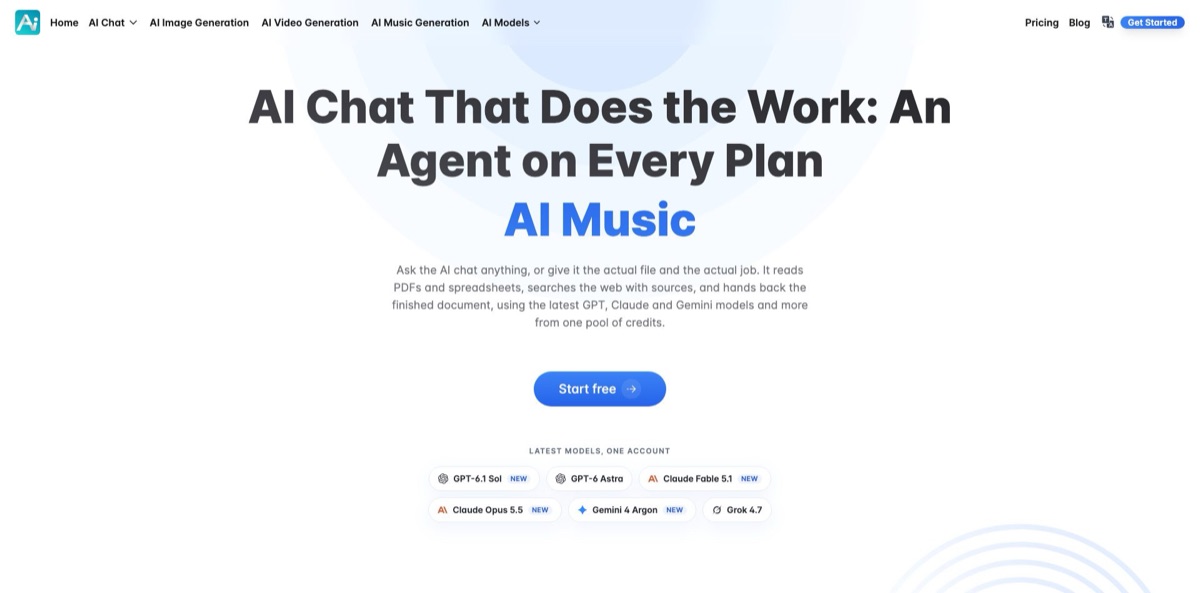
One browser tab, one login and one pool of credits for models that normally need separate subscriptions: that is the pitch behind yeschat.ai. You pick GPT-6, Claude Sonnet or Opus, Gemini 3.1 Pro, Grok or DeepSeek for each conversation, and an agent mode reads PDFs, Word files and spreadsheets, searches the web with sources and hands back an edited file. The same credits also pay for image, video and music generation. That removes the cost and friction of running several AI subscriptions for everyday writing, analysis and content jobs. The weak spots are predictability and trust: usage is metered in weighted tokens, long Claude and GPT jobs moved to uncapped API-cost billing on November 6, 2026, and public reviews complain about errors and slow support. Take it for cheap, broad model access if a reseller in the middle does not bother you.
How to start using YesChat AI?
Open yeschat.ai and click Start free or Get Started. You can sign in with Google or Microsoft, or continue with email and receive a login code or a sign-in link, and a short human-verification check may appear before the account is created. No card is needed for the Free plan, which gives you 15 messages a day with GPT-6 Luna, resets daily, and adds 60 one-time credits for images, video and music that never expire. There is nothing to install, since the service runs in the browser on a computer or a phone.
Your first real task belongs in Chat. Start a New chat and look at the starter cards: Summarize a PDF, Clean up a spreadsheet, Outline a 10-slide deck, Research with sources, Read a screenshot or scan, and Draft a report or table. Attach a file you actually need processed, such as a contract, and ask for every deadline and penalty in a table with the page each one is on. Agent mode is switched on for every plan and every model, so even the Free tier can work through a task in steps.
Two parts of the screen matter most. The model picker decides both quality and cost: on paid plans standard models such as Claude Sonnet 5.5, Gemini 3.1 Pro or GPT-6.1 Terra count at 1×, flagship models such as GPT-6.1 Sol, GPT-6 Astra and Claude Opus count at 2×, and Claude Fable 5.1 counts at 2.5×. Under every reply sits a receipt with the weighted tokens, the files read, the steps taken and the credits charged; tap it to see input, cached, output and thinking tokens separately. The left menu also holds Video, Image and Music, which draw from the same balance, and the assistants catalog lists ready-made GPTs under the GPTs, My Own and TOP15 tabs.
Check the work before you rely on it. Open the cited links from a research answer, open the downloaded Word or Excel file before you send it on, and compare the receipt with what you expected to pay. The pricing FAQ itself recommends watching receipts for a week to learn your own rate. If you decide to pay, use the Monthly or Annual toggle on the pricing page and then Get Pro, Get Ultra or Get Max.
Who is it for?
Students and casual users
You want to try a current GPT model for homework, emails or quick explanations without paying anything. The Free plan’s 15 daily messages with GPT-6 Luna, including agent mode, cover light daily use. You lose access to Claude and Gemini, so treat it as a trial rather than a full toolkit.
Freelance writers and marketers
You draft posts, rewrite client documents and translate copy across languages. Uploading a Word file and getting it back rewritten for tone or length saves the copy-paste loop, and paid plans include a commercial license for what you create.
Operations and finance staff
Your week starts with messy CSV exports and duplicate rows. The agent fixes formats, removes duplicates, adds formulas and builds a pivot table or chart, then returns the file. It replaces manual cleanup with a request like merging two sheets by email and flagging mismatches.
Social media creators
You need a product shot, a short clip and a background track for the same post. Images, video and music share one credit balance, with models like Nano Banana Pro, Kling 3.0, Veo 3.1 and Seedance 2.0 in the same account. Video is the expensive part, so budget credits per clip before a campaign.
Heavy daily chat users
You talk to an assistant all day and hate counting messages. On Ultra and Max, chat with GPT-6.1 Terra is unlimited under a fair-use limit and never touches your credits. Other models still bill per credit.
Developers who compare models
You paste an error and the surrounding code and want a second opinion from a different model family. Switching between Claude and GPT in the same chat is quicker than keeping two subscriptions. There is no documented public API, so this is a chat workspace, not a backend for your own app.
YesChat AI pricing
Billing runs on Advanced Credits shared by chat, images, video and music. One credit equals 8,000 weighted tokens: output tokens count 5, new input tokens 1.25 and context already read in the chat 0.1, so follow-ups are cheaper than fresh questions. A quick question is about 1 credit and an agent task usually 3 to 5, flagship models count double, and the token-based count is capped at 10 credits per message. From November 6, 2026, if a Claude or GPT message’s official API cost is higher than that count, the message is charged at the API cost converted to credits, with no cap. Prices are in USD, and annual billing is 20% cheaper than monthly.
15 messages a day with GPT-6 Luna in full agent mode, plus 60 welcome credits for images, video and music. No Claude, Gemini or other models, no commercial license, 1 device.
1,000 Advanced Credits a month, which the page equates to roughly 1,000 quick questions, about 200 agent tasks, 250 images or 26 videos. Includes GPT-6 Luna, GPT-6.1 Terra, Claude Sonnet 5.5, Haiku 5.5 and Sonnet 5, Gemini 3.1 Pro, Grok 4.7 and DeepSeek at 1×, a commercial license and 1 device at a time.
3,000 Advanced Credits, unlimited GPT-6.1 Terra chat, GPT-6.1 Sol and Claude Opus 5.5 and Opus 5 at 2×, priority at peak hours and 2 devices at a time.
10,000 Advanced Credits, everything in Ultra plus GPT-6 Astra at 2× and Claude Fable 5.1 at 2.5×, Music v5 Studio and the highest priority at peak hours, with 2 devices at a time.
purchased credit packs never expire and are spent only after plan credits run out; their prices are not listed on the public pricing page. Plan credits reset every billing cycle and do not roll over.
Media costs vary widely. An image costs from 1 credit with Z-Image to between 7 and 30 with Flux 2. Video starts at 12 credits and runs into the hundreds: Kling 3.0 costs 90 to 340 credits per clip and Veo 3.1 costs 282. A music track costs 20 to 50 credits. The terms allow a refund within 3 days of purchase only if no more than 20% of Advanced Credits have been used, and credit packs are non-refundable.
YesChat AI key features
Multi-model chat puts OpenAI, Anthropic, Google, xAI and DeepSeek models in one conversation list
You choose the model per chat and can switch to compare answers on the same prompt.
Agent mode works on every plan and every model
It reads PDFs and answers with page references, cleans and charts Excel or CSV files, writes slide decks as editable .pptx files, rewrites Word documents and reads text from screenshots and scans. You get a finished file back instead of text you have to paste somewhere else.
Web research with sources kicks in when an answer needs current data
The agent searches, compares what it finds and links to where each number came from. That makes a market check verifiable, as long as you open the links.
Per-reply credit receipts show the weighted tokens, files read, steps and credits for every answer
A failed or errored request is charged 0, and the receipt says so. This transparency is the main defense against surprise spending, especially after the November 2026 switch to API-cost billing for long Claude and GPT messages.
Image and video generation live in the same workspace. Images come from Nano Banana Pro, GPT Image 2, Seedream and FLUX.1 Kontext, and video from Kling 3.0, Veo 3.1, Seedance 2.0, Wan 2.6, PixVerse and Grok Imagine. You can animate a product photo or turn a text scene into a clip without another account.
AI music turns a description or your own lyrics into a full song with vocals or an instrumental
On paid plans the tracks come with a commercial license, so you can use them in videos, ads and games. Max adds the Music v5 Studio model.
A catalog of ready-made GPTs covers math, coding, writing, translation and other narrow tasks
Each message to a GPT costs a flat 1 credit, and on Free it counts toward the 15 daily messages.
YesChat AI Pros & Cons
Pros
The model lineup is broad for the price: $10 a month on Pro reaches Claude Sonnet 5.5, Gemini 3.1 Pro, Grok 4.7, DeepSeek and the GPT-6 family, and $20 on Ultra adds Claude Opus 5.5 and GPT-6.1 Sol plus unlimited Terra chat. Agent mode is not locked behind a top tier, so even the free plan can summarize a contract or clean a spreadsheet and return the file. Every reply shows what it cost, failed requests are free, and one credit pool covers chat, images, video and music, which keeps the bill in one place. Use it as your everyday multi-model workspace, and keep a direct subscription only for the single model you rely on most.
Cons
Credit math is hard to predict. Weighted tokens, 2× and 2.5× multipliers and, since November 6, 2026, uncapped API-cost billing for long Claude and GPT messages mean a big job can take dozens of credits. The refund window is only 3 days and closes once you use more than 20% of your credits. Trustpilot reviewers report internal errors, lost work and slow email support, the privacy policy dates from January 2024 and says nothing about how prompts or uploaded files are handled, and there is no app or public API. Keep confidential files out of it and test reliability before buying an annual plan.
Use YesChat AI if you want…
- Access GPT, Claude, Gemini and Grok with one subscription.
- Turn long contracts into one-page briefs with page references.
- Clean, merge and chart spreadsheets without writing formulas.
- Draft editable slide decks straight from your notes.
- Research current prices and facts with linked sources.
- Generate images, short videos and songs from one credit pool.
- See the exact credit cost of every AI reply.
- Chat with GPT-6.1 Terra all day without counting messages.
YesChat AI alternatives
 MonicaRead review →
 Overchat AIRead review →
 ChatGOTRead review →
 ChatHubRead review →
 OpenRouterRead review →
YesChat AI Reviews
One of the few positive reviews calls it good value for the price and says support did respond and tried to fix Excel and photo errors, even if the fixes took time.
The most common complaint is reliability: reviewers describe internal errors and server failures, sometimes lasting days, that wiped work in progress, with no credit given for the downtime.
Long-time users say the service has narrowed over time, with features that once worked freely now asking for a login first and some old tool pages returning errors.
Billing and support draw the harshest reviews, including an annual plan charged in full after an early cancellation and emails to support that went unanswered.
Opinions on media generation are mixed: one reviewer liked the sprite sheets from the free image tools but found paid output unusable, and another felt the short video clips did not justify a yearly plan.
FAQ
Is YesChat AI free?
Yes. The Free plan gives you 15 messages a day with GPT-6 Luna, including agent mode, resets daily and needs no credit card. New accounts also get 60 one-time credits for images, video and music.
Which AI models can I use on YesChat AI?
Chat models include GPT-6 Luna, GPT-6.1 Terra, GPT-6.1 Sol, GPT-6 Astra, Claude Haiku 5.5, Sonnet 5.5, Sonnet 5, Opus 5.5, Opus 5 and Fable 5.1, Gemini 3.1 Pro, Grok 4.7 and DeepSeek. Which ones you get depends on the plan, and the pricing page lists them tier by tier.
Do unused credits roll over?
No. Plan credits reset each billing cycle. Credits you buy separately never expire and are used only after your monthly plan credits run out.
Can I use YesChat AI content commercially?
Only with an active paid subscription. Content made on the Free plan cannot be used commercially, while paid plans include a commercial license for text, images, video and music.
Is there a YesChat AI mobile app?
No. There is no separate app; YesChat AI runs in the browser on computers and phones, including Android and iPhone, and the interface is available in nine languages.
How do I cancel or get a refund?
You can cancel any time from your account page, and the plan stays active until the end of the paid period. Refunds are possible within 3 days of purchase only if you have used no more than 20% of your Advanced Credits, and credit packs are non-refundable.
Who operates YesChat AI and how is my data handled?
The terms of use name NEXUSAI SERVICES LLC in Denver, Colorado, and apply Colorado law. The privacy policy, last updated January 10, 2024, covers account and usage data but does not say how prompts or uploaded files are shared with model providers, so avoid uploading confidential documents.
Does YesChat AI offer an API?
No public API is documented. YesChat AI is a chat and generation workspace for individual users, so developers who need programmatic access to several models should look at an API aggregator instead.
Similar tools
 Chat 4O AIAll-in-one AI workspace with GPT, Claude, Gemini and Grok chat plus image and video models like Veo, Kling and Nano Banana, paid
 LiveChatAIAI customer support agent trained on your website, docs and Q&As, with human live chat handoff, AI Actions, and WhatsApp, Slack and
 Kore.aiEnterprise agentic AI platform for building, governing and improving voice and chat AI agents for customer service, HR, IT and business processes.