
Zawa
Image EditingUpdated November 12, 2026
AI branding agent and image editor, formerly X-Design, that builds brand kits, logos, posters, product photos and short videos for small businesses.
We may earn a commission when you sign up through our links. It does not affect our reviews.
What is Zawa?
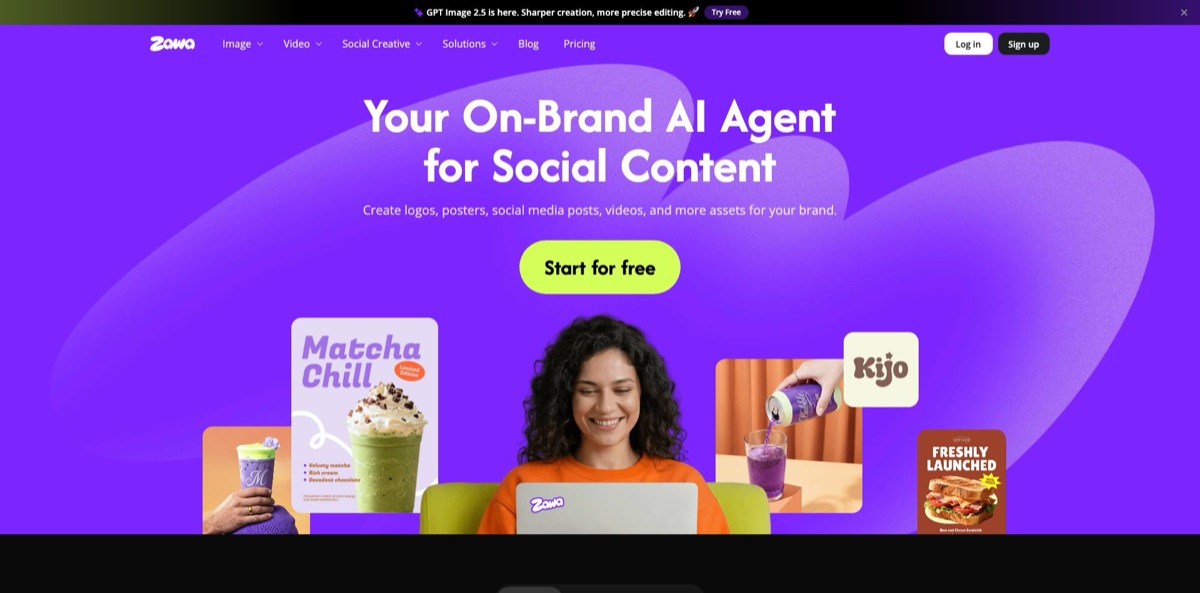
Until March 2026 this product was called X-Design. Sydney-based Starii Tech Pty Ltd renamed it Zawa and repositioned it as a creative AI agent for branding aimed at local shops, cafés and small online sellers. Technically it is a web, iOS and Android workspace where a chat-style agent sends your prompt to third-party image and video models such as Nano Banana Pro, Midjourney, GPT Image, Seedream, Kling and Veo, next to classic editing tools: background removal, object removal, upscaling and AI product backgrounds. The selling point is consistency: you build a brand kit once, and the agent applies the same logo, colors and fonts to menus, posters and social posts. Weak spots are unpredictable credit costs, billing complaints in app-store reviews and a service agreement that still mentions non-commercial use. Pick it if you need steady on-brand visuals without hiring a designer.
How to start using Zawa?
Open zawa.ai and click Start for free, which takes you straight into the workspace; the homepage states that no card is needed. The Free plan currently includes 60 credits a day as a limited-time offer, up to 20 image generations a day, one 5-second video a day and two brand sets. The same account works in the iOS and Android apps, and old x-design.com links now redirect to zawa.ai.
Your first real job should be the brand kit, because everything else draws on it. Open the Agent tab and enter your business name, a one-line description or tagline, and a preferred style or mood. The agent returns several logo directions, color palettes, typography pairings and layout examples, plus real-world mockups on menus, posters and packaging. Pick one direction and refine it with follow-up prompts, or open the logo editor to change the name, font, layout, color, size and resolution.
The key screen afterwards is Brand Memory. Your kit is stored once and applied whenever you ask for a poster, flyer, menu or Instagram post, so new designs start in your colors and fonts. Results arrive as editable designs: you can move elements, rewrite text or split parts instead of regenerating the whole image. Watch the model picker, though. Zawa’s own image generation costs 5 credits per image, Midjourney 13, and Nano Banana Pro or GPT Image 2.0 cost 30, so the same request can be six times more expensive depending on the engine.
Before anything goes public, export logos as JPG, PNG or SVG and download the HTML style guide with color codes, typography rules and spacing guidelines for your printer or staff. Proofread every line of generated text. Treat storefront and packaging mockups as previews; an independent review points out that real signage still needs production files and a print vendor. Run the upscaler first (2x on the free tier, 4x and 8x on paid plans) if an image is headed for print.
Who is it for?
Café and restaurant owners
Menus, seasonal posters and food photos usually come from different freelancers and never quite match. Zawa has dedicated coffee shop and restaurant flows, a menu maker and AI food photography that cleans up phone shots. One brand kit keeps cups, menus and window posters in the same palette.
Etsy and Shopify sellers
A studio shoot for every new product is out of budget. The background generator drops a plain product photo into one of more than 600 preset scenes or a prompted setting, and batch upload handles a whole catalog. AI fashion model, mannequin and flat-lay tools cover apparel listings.
First-time founders
You need a logo, colors and fonts before the website exists, and an agency quote is out of reach. One prompt with your business name and tagline returns logo options, palettes, type pairings and an HTML style guide. Your web developer and printer then work from the same reference.
Social media managers for local businesses
Daily posts for several small clients eat up the week. The social media post generator turns product photos into posts with captions, and the mobile app builds carousels from a single prompt and short videos from a product photo. Brand Memory applies the stored kit to every new post.
Short-form video marketers
Product clips for Reels, TikTok and Shorts normally mean filming and editing. The product video generator and image-to-video tools run on Zawa’s own video model plus Kling 3.0, Sora 2, Veo 3.1 and Seedance. Pro and Max add a viral video clone that rebuilds a referenced clip around your product.
Freelance designers
A client wants three logo directions by tomorrow morning. Zawa produces concepts, layout ideas and mockups quickly for moodboards and first drafts. Final production files are still worth finishing in your usual design software.
Zawa pricing
Every plan runs on credits, Zawa’s in-platform currency, combined with monthly caps per tool. Each model has its own price: Zawa’s image editing model costs 3 credits per image, its image generation model 5, Midjourney 13 and Nano Banana Pro 30, while video ranges from 70 credits per 5 seconds on Zawa’s video model to 300 on Veo 3.1. Basic tools such as background removal, enhancement and upscaling are described as practically unlimited on paid plans, and generative tools have monthly soft limits that reset on the first of each calendar month. Yearly billing is advertised as 40% off, and the web pricing page lists prices in USD.
60 credits a day (marked limited-time), up to 20 image generations a day, one 5-second video a day and 2 brand set generations. The background generator, AI model images and recolor are limited, and upscaling stops at 2x.
800 credits a month, up to 160 image generations and 11 five-second videos, unlimited AI removal, upscaling and enhancement, 50 AI e-commerce and 50 AI model images, plus 10 video watermark removals and 10 video enhancements a day. Both billing options open with a $0 trial.
3,500 credits a month, up to 700 images and 100 five-second videos, 175 e-commerce and 175 model images, 30 video enhancements a day and up to 5 viral video clones a month. Limited-time perks include half-price video generation in the Agent and unlimited 2K Nano Banana Pro images.
8,000 credits a month, up to 1,600 images and 230 five-second videos, 400 e-commerce and 400 model images, 11 viral video clones and 160 private model uses a month.
Custom. A tailored API with image and video tools, dedicated capacity and private models, arranged through Contact Sales.
Extra credit packs are sold to members only. In the iOS app, Zawa VIP subscriptions and credit packs are priced separately, from $9.99 to $99.99 on the US App Store, and refunds for app-store purchases go through Apple or Google. Payments on the web run through Stripe with major cards and Google Pay, and nonprofits can request a discount from support.
Zawa key features
Zawa Agent: Describe a logo, poster or product visual in plain language, and the agent builds an editable design rather than a flat picture. You can move elements, rewrite text or split parts, then refine the overall look with new prompts. Behind it sit models such as Nano Banana, Midjourney, Flux Kontext, GPT Image, Seedream, SeedEdit and Seedance, so one subscription covers several engines.
Brand kit and Brand Memory: One prompt with your business name, tagline and style returns logo options, color palettes, typography pairings and an HTML style guide with color codes and spacing rules. The kit is stored once and applied to later projects, so a new flyer starts in your colors and fonts. This is the main difference from a generic image generator.
Logo maker: Enter the name and industry, choose a style such as minimalist, 3D or abstract, then adjust font, layout, color and size. Exports come as JPG, PNG or SVG without watermarks, and the free tier allows up to 10 logos a day. SVG output matters when a sign maker or embroiderer asks for vector files.
AI product photography: The background generator detects the product outline and places it in one of more than 600 HD presets, a prompted scene or a background cloned from a reference photo, with shadows and reflections handled automatically. Batch upload processes several images at once, and AI model, mannequin and flat-lay tools turn apparel shots into catalog images. Plan for a few regenerations, since reviewers mention inconsistent results between similar prompts.
Editing toolkit: Background remover, object and text remover, image enhancer up to UHD, upscaler at 2x, 4x and 8x, image extender and recolor cover routine retouching. On paid plans the basic tools are practically unlimited, and bulk versions exist for whole catalogs.
Video tools: Image-to-video, text-to-video and a product video generator use Zawa’s own video model alongside Kling 3.0, Sora 2, Veo 3.1 and Seedance. A video enhancer, background remover and upscaler handle clean-up, and Pro and Max add a viral video clone that rebuilds a pasted TikTok, Instagram or YouTube link around your product. Video is by far the most credit-hungry part of the platform.
Web and mobile in one account: The same subscription and credits work in the browser and in the iOS and Android apps, although available features vary by platform. The iOS app supports English and 12 other languages.
Zawa Pros & Cons
Pros
Zawa covers the whole visual routine of a small business in one place. Logo, palette, menus, posters, product photos and short videos all come from the same brand kit, so the output looks like one company rather than five freelancers. The agent returns editable layers, which beats regenerating a flat image for every typo. Access to Nano Banana Pro, Midjourney, Kling and Veo under one credit balance saves separate subscriptions, and the free tier is generous enough to build a real brand set before paying. Plus costs $10 a month, or $6 on yearly billing, a fraction of an agency retainer. Build your brand kit and one test poster on the free tier before committing to a yearly plan.
Cons
Credit costs are hard to predict: a Nano Banana Pro image costs ten times a basic edit, and a 5-second Veo 3.1 clip costs 300 credits. App Store reviewers on prepaid plans report monthly credits arriving late or not at all, and the stated email response time is 3 to 10 business days. Some users say they were charged after trying to cancel a trial. Output quality varies between similar prompts, and storefront mockups are previews rather than production files. The service agreement still limits use to personal, non-commercial purposes unless otherwise stipulated, which clashes with the commercial claims on the marketing pages. Pay monthly first, note your renewal date and ask support in writing about commercial rights.
Use Zawa if you want…
- Build a complete brand kit from one prompt.
- Keep menus, posters and posts in matching colors.
- Turn phone product photos into lifestyle scenes.
- Generate editable logos with SVG export for printing.
- Create social media posts and captions from product images.
- Make short product videos without filming anything.
- Access Nano Banana, Midjourney and Veo under one subscription.
- Remove backgrounds and objects from images in bulk.
Zawa alternatives
 LovartRead review →
 CanvaRead review →
 PixelcutRead review →
 PixeliedRead review →
 RecraftRead review →
 DzineRead review →
Zawa Reviews
An App Store reviewer called it the best branding tool they had tried: a business name and a short story produced a full kit of logo, fonts and colors, and posters, menus and social posts stayed consistent with it.
Small sellers on Product Hunt like how the background generator turns plain shots, such as a mug, into warm lifestyle scenes for Etsy-style listings, though one reviewer scored output quality lower because similar prompts gave inconsistent results and high resolutions showed artifacts.
Two App Store reviewers on prepaid plans say their monthly credit allotment did not arrive for weeks or months; one got no help after several support emails, the other adds that the agent produced botched images that burned through credits.
Trial complaints come up on Product Hunt and the App Store: users say they were billed after trying to cancel a 7-day free trial, and the company replied on Product Hunt with an apology and an offer to check the cancellation and refund.
Trustpilot reviewers give it an average of about 3.9 from roughly 54 reviews, praising ease of use and background creation, while one found the credit allowance too small.
FAQ
Is Zawa the same product as X-Design?
Yes. X-Design was renamed Zawa in March 2026, x-design.com now redirects to zawa.ai, and the mobile apps were updated in place with release notes that welcome users to Zawa, formerly X-Design.
Does Zawa have a free plan?
Yes. The Free plan costs $0 and currently gives 60 credits a day as a limited-time offer, covering up to 20 image generations, one 5-second video and 2 brand sets. The logo maker page also promises up to 10 free logos a day.
Can I use Zawa designs commercially?
The logo pages advertise commercial use, but the service agreement dated March 11, 2026 limits use to personal and non-commercial purposes unless otherwise stipulated. If a logo will represent your business or become a trademark, get written confirmation from support first.
What happens to my credits if I cancel?
Your plan stays active until the end of the billing cycle, and the included credits are frozen until you resubscribe. Cancel under Manage Subscriptions at least 24 hours before renewal; an unused Pro or Max plan can be refunded within 7 days.
Which AI models does Zawa include?
The pricing page lists Zawa’s own image and video models plus Nano Banana Pro, Nano Banana 2, Midjourney, Seedream 4.5, GPT Image 2.0, Kling 3.0, Sora 2, Veo 3.1 and Seedance 2.0, each with its own credit cost.
Does Zawa offer an API?
Yes, through the Enterprise plan: a custom API with tailored image and video tools, dedicated capacity and private models, priced through sales. Credits bought for API use are separate from subscription credits.
Is there a Zawa mobile app?
Yes, for iOS and Android, and your subscription and credits carry across web and mobile. Features differ by platform, and purchases made through Apple or Google must be refunded through those stores.
What does Zawa do with my uploaded images?
The terms give Starii a perpetual, royalty-free license to use your content to operate the service and to optimize and improve Zawa, and the App Store privacy label says identifiers may be used for tracking. Avoid uploading confidential designs before a launch.
Similar tools
 HamaFree browser-based AI eraser that removes people, objects, text and blemishes from photos with a brush, plus an inpainting API for developers.
 BgEraserBrowser-based AI background remover that turns up to 20 photos per batch into transparent PNGs without an account, plus offline apps for
 ImgkitsBrowser-based set of AI photo tools for background removal, object cleanup, upscaling, old photo restoration, image generation and image-to-video.